Malware Analysis Report: XWorm RAT — Static & Dynamic Analysis of an Obfuscated .NET Remote Access Trojan
Platform: CyberDefenders
Challenge: XWorm
Category: Malware Analysis
Difficulty: Medium
Tools: Detect It Easy, CFF Explorer, PEStudio, dnSpy, ProcMon, RegShot, Python3, exiftool, ilspycmd, ANY.RUN
Achievement: Proof of Completion
1. Executive Summary
Incident Type: Remote Access Trojan (RAT) / Keylogger / USB Worm
Malware Family: XWorm
An employee accidentally downloaded a suspicious file from a phishing email. The file executed silently, triggering unusual system behavior — including unexpected scheduled tasks, Windows Defender exclusion modifications, and outbound network connections to foreign infrastructure. As a malware analyst, the objective was to conduct a full static and dynamic analysis of the provided sample to uncover its behavior, persistence mechanisms, Command and Control (C2) infrastructure, lateral movement capabilities, and data exfiltration methods.
Through reverse-engineering a packed .NET binary and correlating sandbox telemetry from ANY.RUN, we successfully identified this sample as a highly obfuscated variant of the XWorm Remote Access Trojan (RAT) — a modular threat capable of keylogging, USB propagation, sandbox evasion, and critical process protection.
Indicators of Compromise (IOCs)
| Type | Indicator | Description |
|---|---|---|
| SHA-256 | ced525930c76834184b4e194077c8c4e7342b3323544365b714943519a0f92af | XWorm packed binary |
| IPv4 | 185.117.250.169 | C2 Server (Germany, ONE-NETWORK) |
| IPv4 | 66.175.239.149 | C2 Server (US, IONOS-AS) |
| IPv4 | 185.117.249.43 | C2 Server (Germany, ONE-NETWORK) |
| Port | 7000 | C2 communication port (TCP) |
| File Path | C:\Users\*\AppData\Roaming\WmiPrvSE.exe | Dropped persistence binary |
| Scheduled Task | WmiPrvSE | Scheduled task for re-execution every minute |
| AES Key | 8xTJ0EKPuiQsJVaT | Hardcoded encryption seed |
| Company Spoof | Adobe Inc. | Impersonated company in file metadata |
| DLL Check | SbieDll.dll | Sandbox detection target (Sandboxie) |
MITRE ATT&CK Mapping Overview
| Tactic | Technique | ID |
|---|---|---|
| Defense Evasion | Masquerading: Match Legitimate Name or Location | T1036.005 |
| Defense Evasion | Virtualization/Sandbox Evasion | T1497 |
| Defense Evasion | Impair Defenses: Disable or Modify Tools | T1562.001 |
| Defense Evasion | Hide Artifacts: Hidden Files and Directories | T1564.001 |
| Persistence | Scheduled Task/Job: Scheduled Task | T1053.005 |
| Privilege Escalation | Scheduled Task/Job: Scheduled Task | T1053.005 |
| Command and Control | Non-Standard Port | T1571 |
| Collection | Input Capture: Keylogging | T1056.001 |
| Lateral Movement | Replication Through Removable Media | T1091 |
| Execution | Native API | T1106 |
2. Phase 1: Initial Triage & Static Reconnaissance (Q1 & Q2)
Objective: Extract metadata from the malicious binary to establish a baseline understanding of the sample before executing it.
Static analysis is always the first step in any malware investigation. Before detonating anything in a sandbox, we want to know what we’re dealing with — when it was compiled, who it claims to be, and whether there are any immediate red flags in the file headers. The exiftool utility parses PE headers and embedded metadata fields, giving us a quick snapshot of the binary’s identity.
Q1: What is the compile timestamp (UTC) of the sample?
Command Executed:
1
exiftool XWorm.malware | grep -i "Time Stamp"
Findings:

The Time Stamp field returned 2024:02:25 17:53:40-05:00. The -05:00 suffix indicates Eastern Standard Time (EST), which is 5 hours behind Coordinated Universal Time (UTC). Adding 5 hours converts the timestamp to UTC.
Analyst Note:
Compile timestamps can be trivially forged by malware authors using tools liketimestompor by modifying the PE header directly. However, when the timestamp appears legitimate and consistent with the malware family’s known activity timeline, it provides useful intelligence for correlating with threat intel feeds and campaign tracking.
Answer:
2024-02-25 22:53
Q2: Which legitimate company does the malware impersonate?
Malware authors routinely spoof file metadata — company names, icons, file descriptions, and copyright strings — to bypass basic endpoint security heuristics and trick users into trusting the executable. A file that claims to be from Adobe, Microsoft, or Google is far less likely to raise suspicion than one with blank or random metadata.
Findings:
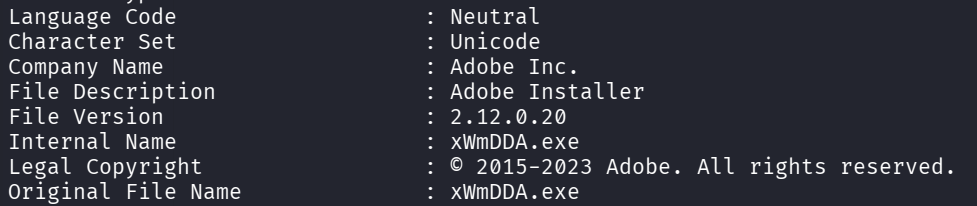
From the exiftool output, multiple fields converge to paint a consistent but fraudulent picture:
- Company Name:
Adobe Inc. - File Description:
Adobe Installer - Legal Copyright:
© 2015-2023 Adobe. All rights reserved. - Internal Name:
xWmDDA.exe
The copyright range (2015-2023) is a nice touch — it adds an air of legitimacy that a quick glance won’t catch. However, the Internal Name field (xWmDDA.exe) breaks the illusion. Legitimate Adobe binaries follow strict naming conventions (AcroRd32.exe, Creative Cloud.exe), and a randomized string like xWmDDA is an immediate red flag for any analyst who looks past the surface.
MITRE ATT&CK Reference:
This maps to T1036.005 — Masquerading: Match Legitimate Name or Location. The malware authors crafted the file metadata to mimic a trusted software vendor, aiming to bypass both user suspicion and automated heuristics that check company names against whitelists.
Answer:
Adobe Inc.
3. Phase 2: Dynamic Analysis — Sandbox Detonation (Q3, Q4 & Q5)
Objective: Detonate the sample in a controlled sandbox environment to observe its runtime behavior, anti-analysis techniques, and persistence mechanisms.
With our static baseline established — we know the sample is a .NET binary masquerading as an Adobe product — the next step is to observe what it actually does when it runs. We submitted the sample to ANY.RUN, an interactive cloud sandbox that provides real-time process monitoring, network capture, and behavioral classification.
Q3: How many anti-analysis checks does the malware perform?
Modern malware doesn’t just blindly execute. Sophisticated samples like XWorm first probe the environment to determine if they’re running inside a sandbox, virtual machine, or under a debugger’s watchful eye. If any checks return positive, the malware may alter its behavior (sleep indefinitely, exit cleanly, or execute benign code) to avoid detection and analysis.
Findings:
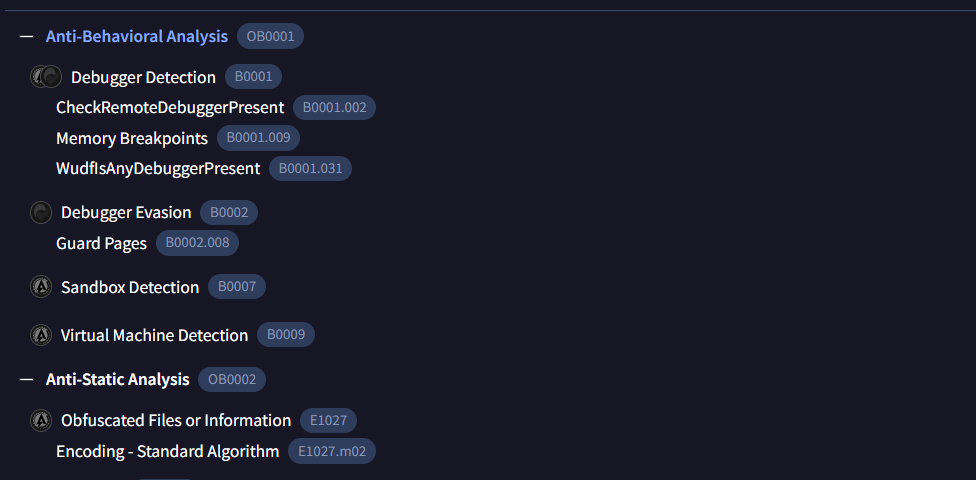
The ANY.RUN behavioral engine flagged six distinct anti-analysis techniques embedded in the XWorm binary:
| # | Technique | MBC ID | Purpose |
|---|---|---|---|
| 1 | CheckRemoteDebuggerPresent | B0001.002 | Detects if a debugger (like x64dbg or OllyDbg) is attached to the process remotely |
| 2 | Memory Breakpoints | B0001.009 | Scans for software breakpoints set by analysts in memory — a classic anti-debugging trick |
| 3 | WudfIsAnyDebuggerPresent | B0001.031 | Uses the Windows User-Mode Driver Framework API to check for any debugger presence |
| 4 | Guard Pages | B0002.008 | Sets memory guard pages and monitors for access violations triggered by debugging tools |
| 5 | Sandbox Detection | B0007 | Checks for sandbox-specific artifacts (registry keys, processes, timing anomalies) |
| 6 | Virtual Machine Detection | B0009 | Probes for VM indicators (VMware Tools, VirtualBox guest additions, specific MAC address prefixes) |
Analyst Note:
Six anti-analysis checks is a significant investment in evasion. This tells us the malware authors expect their samples to be analyzed by security teams and have taken deliberate steps to frustrate automated sandbox analysis. For a SOC analyst, this means any sample that “does nothing” in a sandbox should not be automatically dismissed — it may simply be evading detection.
MITRE ATT&CK Reference:
This maps to T1497 — Virtualization/Sandbox Evasion. The malware employs multiple runtime checks to detect analysis environments and modify its execution path accordingly.
Answer:
6
Q4 & Q5: Persistence via Scheduled Task and Dropped Binary
Objective: Identify the scheduled task and the persistence binary the malware drops to survive system reboots.
To survive reboots and maintain persistent access, malware needs a mechanism to re-execute itself automatically. By reviewing the ANY.RUN shell command logs, we can observe every command the malware spawns — providing direct visibility into its persistence strategy.
Findings (Shell Commands — Defense Exclusions):
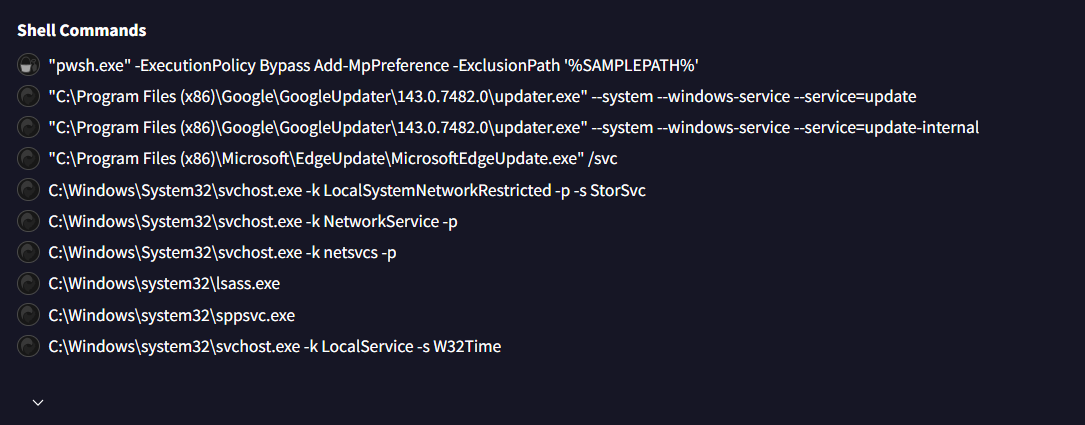
Before establishing persistence, XWorm first disables its primary nemesis — Windows Defender. The shell command log shows a cascade of powershell.exe commands, all using -ExecutionPolicy Bypass to circumvent PowerShell execution policies:
1
2
3
4
5
6
7
# Exclude the malware's staging directories from Defender scanning
powershell.exe -ExecutionPolicy Bypass Add-MpPreference -ExclusionPath 'C:\Users\user\AppData\Local\Temp\4c9d58c52d7385...'
powershell.exe -ExecutionPolicy Bypass Add-MpPreference -ExclusionPath 'C:\Users\user\AppData\Roaming\WmiPrvSE.exe'

# Exclude the malware processes by name
powershell.exe -ExecutionPolicy Bypass Add-MpPreference -ExclusionProcess '4c9d58c52d73854dfddb3835d603ad64.malware'
powershell.exe -ExecutionPolicy Bypass Add-MpPreference -ExclusionProcess 'WmiPrvSE.exe'
This is a textbook example of T1562.001 — Impair Defenses: Disable or Modify Tools. By adding both path and process exclusions, the malware ensures Defender will never scan its files or terminate its running process — even if a full system scan is triggered.
Findings (Scheduled Task Creation):

The final command in the sequence reveals the persistence mechanism:
schtasks.exe /create /f /RL HIGHEST /sc minute /mo 1 /tn "WmiPrvSE" /tr "C:\Users\user\AppData\Roaming\WmiPrvSE.exe"
Let’s break down each flag — because every one of them is significant:
| Flag | Value | Purpose |
|---|---|---|
/create | — | Creates a new scheduled task |
/f | — | Force-create, overwriting any existing task with the same name silently |
/RL HIGHEST | — | Run with the highest available privileges — attempting privilege escalation |
/sc minute | — | Schedule type: every minute |
/mo 1 | — | Modifier: execute every 1 minute |
/tn "WmiPrvSE" | — | Task name disguised as Windows Management Instrumentation Provider Service |
/tr "...\WmiPrvSE.exe" | — | Target binary in AppData\Roaming |
This is an aggressive persistence strategy. The /sc minute /mo 1 combination means the malware re-executes every 60 seconds. Even if an analyst or antivirus kills the process, it comes back within a minute. The /RL HIGHEST flag attempts to run with elevated privileges, and the task name WmiPrvSE mimics the legitimate WmiPrvSE.exe (Windows Management Instrumentation Provider Service Host) to blend in with normal Windows scheduled tasks.
Process Details Confirmation:
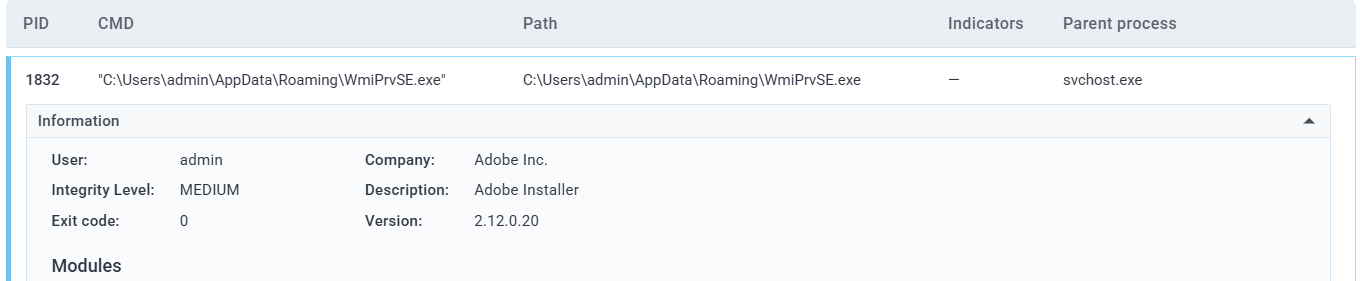
The ANY.RUN process inspection for the dropped binary confirms it carries the same spoofed Adobe metadata (Company: Adobe Inc., Description: Adobe Installer) as the original sample — the malware simply copies itself to the persistence location while retaining its disguise.
Answer (Q4 — Task Name):
WmiPrvSE
Answer (Q5 — Dropped File):
WmiPrvSE.exe
MITRE ATT&CK Reference:
This maps to T1053.005 — Scheduled Task/Job: Scheduled Task. The attacker created a high-privilege scheduled task executing every minute to ensure persistent, resilient access to the compromised host.
4. Phase 3: Cryptography & Configuration Extraction (Q6 & Q7)
Objective: Decompile the .NET binary and analyze the encryption routines used to protect the malware’s configuration data.
Automated sandboxes like ANY.RUN excel at behavioral analysis, but they couldn’t extract the XWorm configuration due to heavy obfuscation. To understand what the malware is encrypting and how, we need to go deeper — directly into the source code. Since XWorm is a .NET binary, we can decompile it back to near-original C# using ilspycmd on Kali Linux.
1
ilspycmd -p -o ./DecodedSourceCode XWorm.malware
This produces a complete C# project structure we can analyze statically.
Q6: Which cryptographic algorithm does the malware use?
To find the encryption implementation, we searched the decompiled source for the standard .NET cryptography initialization function CreateDecryptor:
Command Executed:
1
grep -rni "CreateDecryptor" ./DecodedSourceCode
Findings:

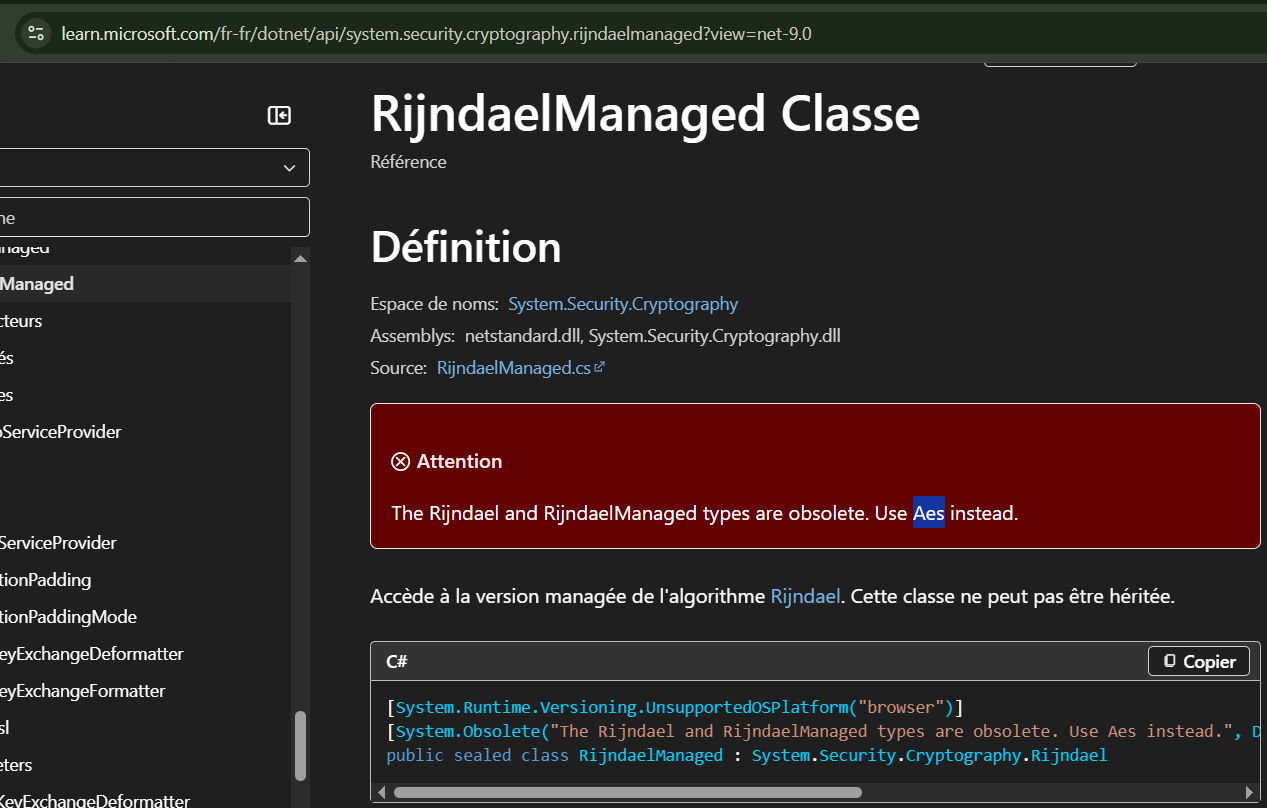
Two hits — both referencing a rijndaelManaged object. Rijndael is the underlying block cipher that was standardized by NIST as the Advanced Encryption Standard (AES) in 2001. The .NET RijndaelManaged class is functionally identical to AES when used with 128-bit blocks (which is the default).
To confirm this mapping, the Microsoft documentation page for RijndaelManaged explicitly states that Rijndael is obsolete and that Aes should be used instead — reinforcing that they are the same algorithm:
Answer:
Aes
Q7: What is the value of the hardcoded string used for encryption parameters?
AES requires a symmetric key to encrypt and decrypt data. By examining the surrounding context of the CreateDecryptor call, we can trace the key generation routine and find the master seed string.
Command Executed:
1
grep -rnC 10 "CreateDecryptor" ./DecodedSourceCode/Stub/yEA8oSg5e02FNWc6DpGE.cs
Findings:
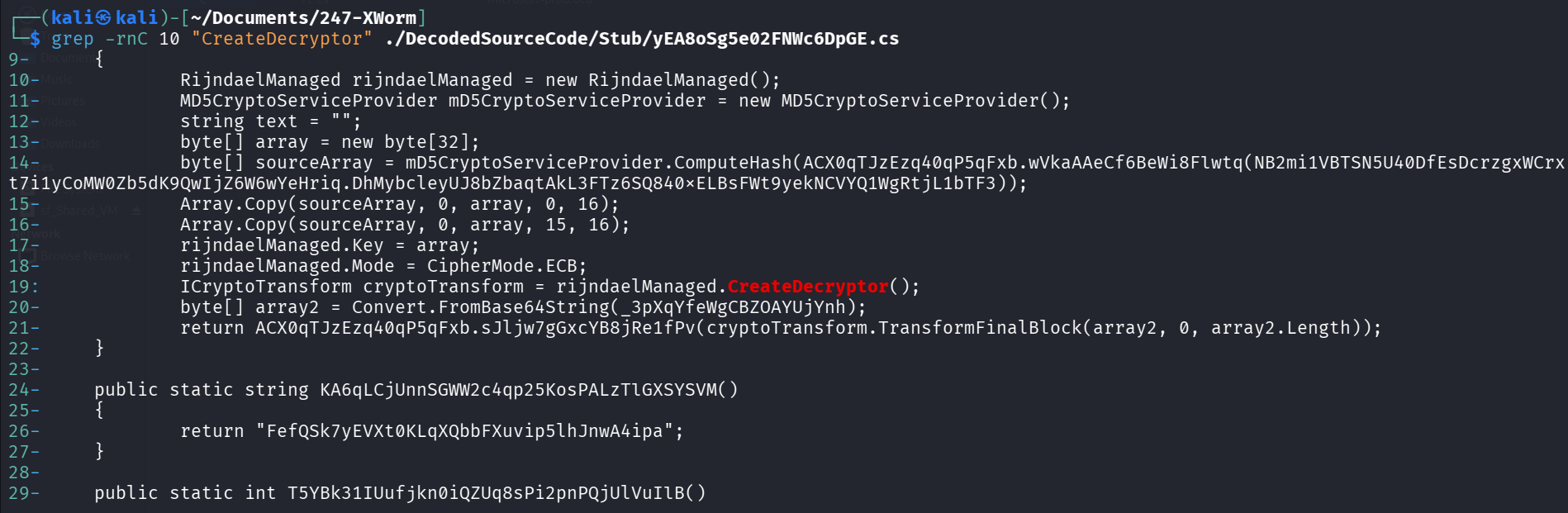
The decompiled code reveals the full decryption routine:
1
2
3
4
5
6
7
8
9
RijndaelManaged rijndaelManaged = new RijndaelManaged();
MD5CryptoServiceProvider md5 = new MD5CryptoServiceProvider();
byte[] array = new byte[32];
byte[] sourceArray = md5.ComputeHash(Encoding.UTF8.GetBytes(seedString));
Array.Copy(sourceArray, 0, array, 0, 16);
Array.Copy(sourceArray, 0, array, 15, 16);  // <-- 1-byte overlap at index 15!
rijndaelManaged.Key = array;
rijndaelManaged.Mode = CipherMode.ECB;
ICryptoTransform cryptoTransform = rijndaelManaged.CreateDecryptor();
To find the actual seed value, we traced the obfuscated variable name back through the codebase:
1
grep -rn "DhMybcleyUJ8bZbaqtAkL3FTz6SQ840×ELBsFWt9yekNCVYQ1WgRtjL1bTF3" ./DecodedSourceCode

The grep reveals the seed resolves to: public static string ... = "8xTJ0EKPuiQsJVaT";
Analyst Note — The Cryptographic Quirk:
Notice lines 15-16 in the decompiled code:Array.Copy(sourceArray, 0, array, 0, 16)followed byArray.Copy(sourceArray, 0, array, 15, 16). The second copy starts writing at index 15, not 16. This creates a deliberate 1-byte overlap in the 32-byte key array. This is not a bug — it’s an intentional quirk that makes standard CyberChef AES decryption fail. Any analyst trying to decrypt XWorm’s configuration with a generic AES tool will get garbage output unless they replicate this exact key derivation, including the overlap.
Answer:
8xTJ0EKPuiQsJVaT
5. Phase 4: Command & Control Infrastructure (Q8 & Q9)
Objective: Identify the C2 servers the malware communicates with and the port it uses for callbacks.
Once the malware decrypts its configuration in memory, it attempts to “phone home” to the attacker’s infrastructure. The ANY.RUN sandbox captures all network activity, making C2 discovery straightforward.
Q8 & Q9: C2 IP Addresses and Port
By examining the Connections tab in the ANY.RUN advanced process details for PID 7804 (XWorm.malware.exe), we can see every outbound connection the malware attempted:
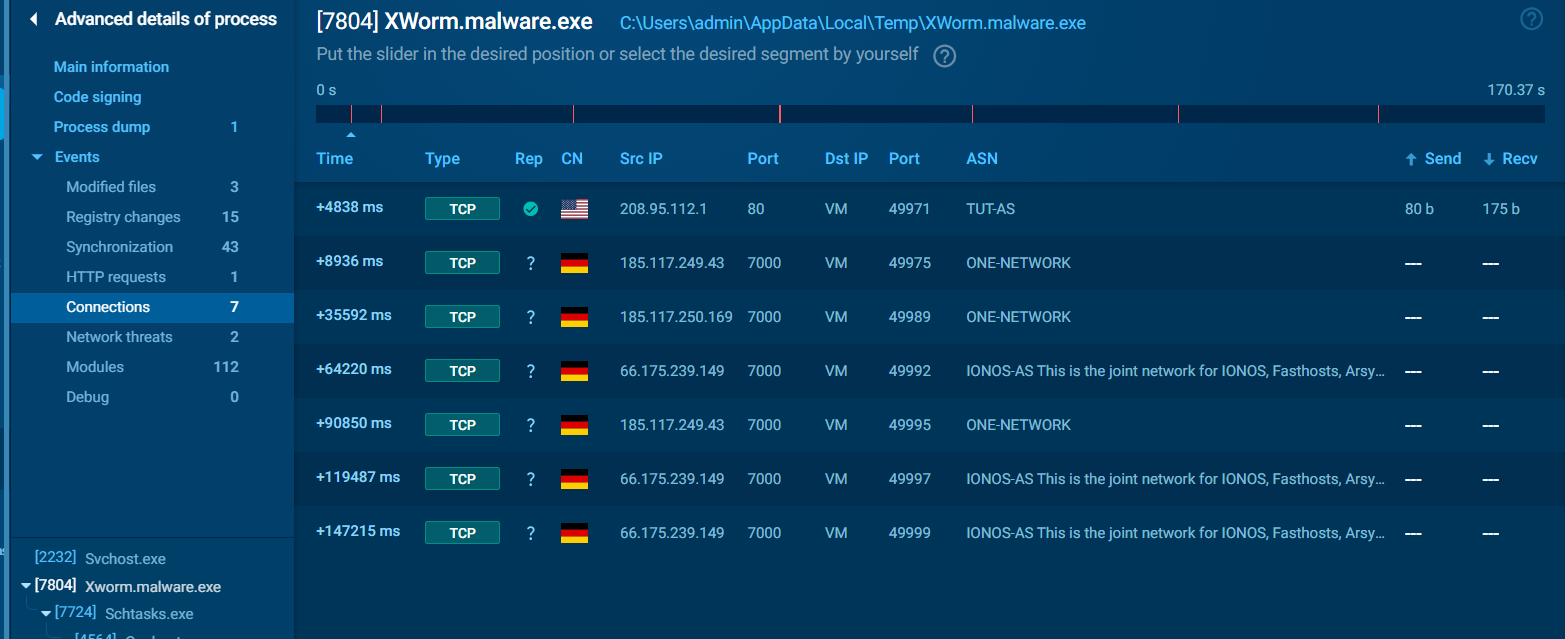
The connection log reveals a clear pattern:
| Time | Destination IP | Port | ASN | Country |
|---|---|---|---|---|
| +4838 ms | 208.95.112.1 | 80 | TUT-AS | US |
| +8936 ms | 185.117.249.43 | 7000 | ONE-NETWORK | DE |
| +35592 ms | 185.117.250.169 | 7000 | ONE-NETWORK | DE |
| +64220 ms | 66.175.239.149 | 7000 | IONOS-AS | DE/US |
| +90850 ms | 185.117.249.43 | 7000 | ONE-NETWORK | DE |
| +119487 ms | 66.175.239.149 | 7000 | ONE-NETWORK | DE/US |
| +147215 ms | 66.175.239.149 | 7000 | IONOS-AS | DE/US |
Analysis:
- Initial Check-In (
208.95.112.1:80): The first connection to port 80 is likely a connectivity check or IP geolocation lookup — a common behavior where the malware verifies internet access before attempting C2 communication. - C2 Rotation (Port 7000): The remaining six connections cycle through three distinct IPs, all on port
7000. This is a C2 failover mechanism — advanced RATs maintain multiple C2 addresses so that if one server is seized or goes offline, the malware can fail over to an alternative node without losing command capabilities. - Non-Standard Port: Port 7000 is not a commonly monitored port. By avoiding well-known ports like 80, 443, or 8080, the malware reduces the chance of its traffic being inspected by web proxies or application-layer firewalls.
- Geographic Distribution: The C2 infrastructure spans Germany (ONE-NETWORK ASN) and the US (IONOS-AS), providing geographic redundancy and making takedown operations more complex since they require coordination across multiple jurisdictions.
MITRE ATT&CK Reference:
This maps to T1571 — Non-Standard Port. The malware uses TCP port 7000 for C2 communication, deliberately avoiding commonly monitored ports to evade network security controls.
Answer (Q8 — C2 IPs):
185.117.250.169, 66.175.239.149, 185.117.249.43
Answer (Q9 — C2 Port):
7000
6. Phase 5: Lateral Movement & USB Propagation (Q10 & Q11)
Objective: Analyze the malware’s ability to spread to other systems via removable media.
XWorm doesn’t just sit on the infected host — it actively tries to jump to new machines by infecting connected USB drives. This capability transforms a single phishing compromise into a potential network-wide infection, especially in environments where USB sharing is common (manufacturing floors, shared workstations, air-gapped networks).
Q10: What is the name of the copy created on each infected removable device?
We identified the USB propagation module by searching the decompiled source for removable drive enumeration:

The code iterates over all connected drives, filtering for DriveType.Removable. When a USB drive is found, the malware:
- Runs
attrib -h -sto manipulate file visibility on the drive - Copies itself to the drive with an encrypted filename
- Creates shortcut (
.lnk) files mimicking legitimate folder names
The dropper filename is stored as an encrypted Base64 string in the source code. To recover it, we needed to replicate the exact AES key derivation — including the 1-byte overlap bug discovered in Phase 3.
Findings (Encrypted Filename References):
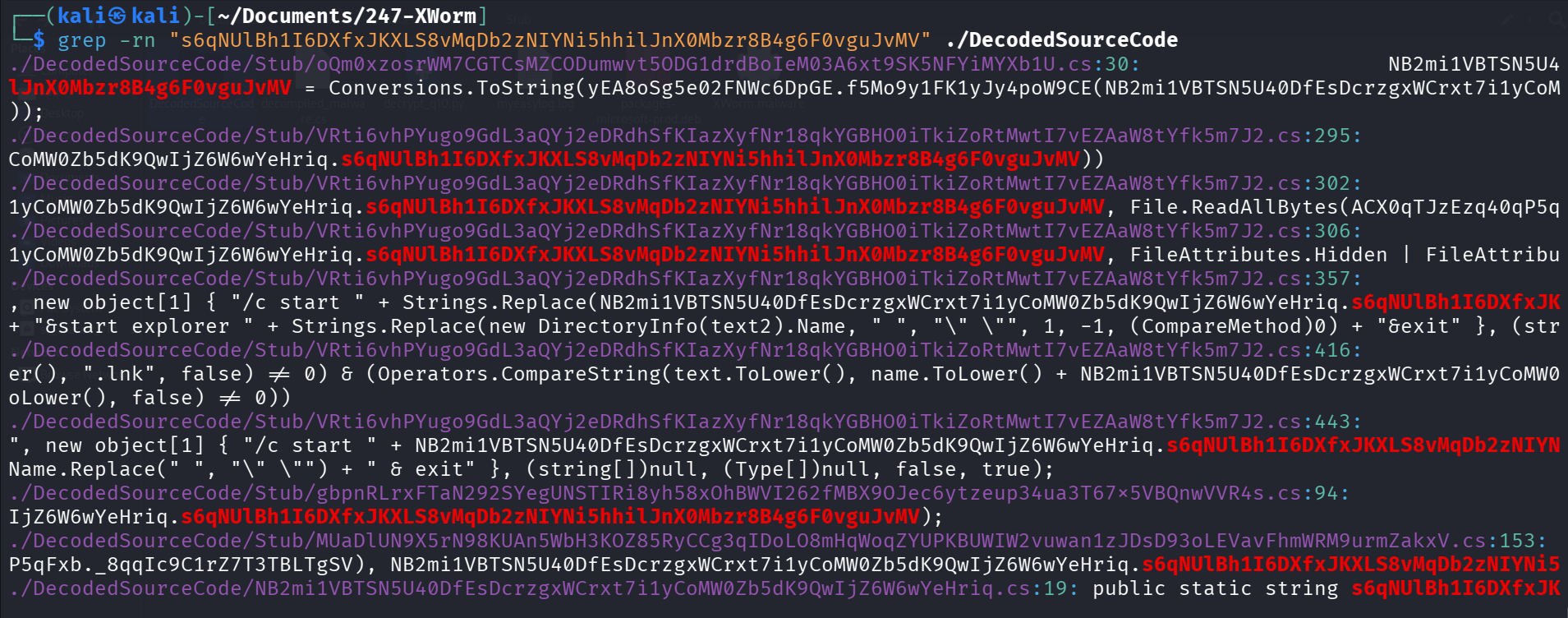
The CyberChef Pitfall:
Standard AES decryption in CyberChef fails because the malware’s .NET key derivation has that deliberate 1-byte overlap at index 15 of the 32-byte key array. CyberChef’s AES module uses standard key derivation, so the output is garbage.
The Solution:
We wrote a custom Python script (decrypt_q10.py) that replicates the exact cryptographic quirk — MD5 hashing the seed, copying the 16-byte hash into a 32-byte array with the overlap, then decrypting with AES-ECB:
![Terminal showing the creation and execution of decrypt_q10.py. Output: [+] Decrypted USB Dropper Filename: USB.exe.](/assets/XWorm Lab/python-decrypt-usb-dropper-filename.png)
The decrypted filename is USB.exe — a deliberately generic name designed to trick users into double-clicking it when they browse their USB drive.
Answer:
USB.Exe
Q11: What is the file extension of the files created on infected USB drives?
To maximize the chance of execution, the malware doesn’t just drop USB.exe on the drive. It employs a Shortcut Replacement technique:
- Hide all legitimate folders on the USB drive using
attrib -h -s - Create
.lnkshortcuts with the same names as the original folders - These shortcuts, when clicked, silently execute the malware while also opening the real folder — so the user never notices anything suspicious
Code Discovery:
The decompiled source explicitly checks for the .lnk extension when processing USB drive contents:
1
Path.GetExtension(text).ToLower(), ".lnk"
Analyst Note:
This is a particularly insidious technique. In a corporate environment, imagine a USB drive shared between departments. User A plugs in a clean drive, XWorm infects it. User B — on a completely different network segment — plugs in the same drive, sees their familiar folder names (which are now malicious shortcuts), clicks one, and the infection spreads. This is exactly how Stuxnet initially propagated into air-gapped networks back in 2010, and the technique remains devastatingly effective today.
MITRE ATT&CK Reference:
This maps to T1091 — Replication Through Removable Media. The malware copies itself to USB drives and creates deceptive shortcuts to trick users into executing the payload on new hosts.
Answer:
lnk
7. Phase 6: Defense Evasion & Anti-Analysis (Q12, Q13 & Q14)
Objective: Document the malware’s techniques for evading detection by security tools, hiding from users, and preventing termination.
Q12: What is the name of the DLL used to detect a sandbox environment?
Beyond the six anti-analysis checks detected by ANY.RUN (Phase 2), XWorm also performs explicit checks for specific sandbox software by scanning its loaded modules for known DLLs.
Command Executed:
1
grep -rnioE "[a-zA-Z0-9_]+\.dll" ./DecodedSourceCode | sort -ui
Findings:
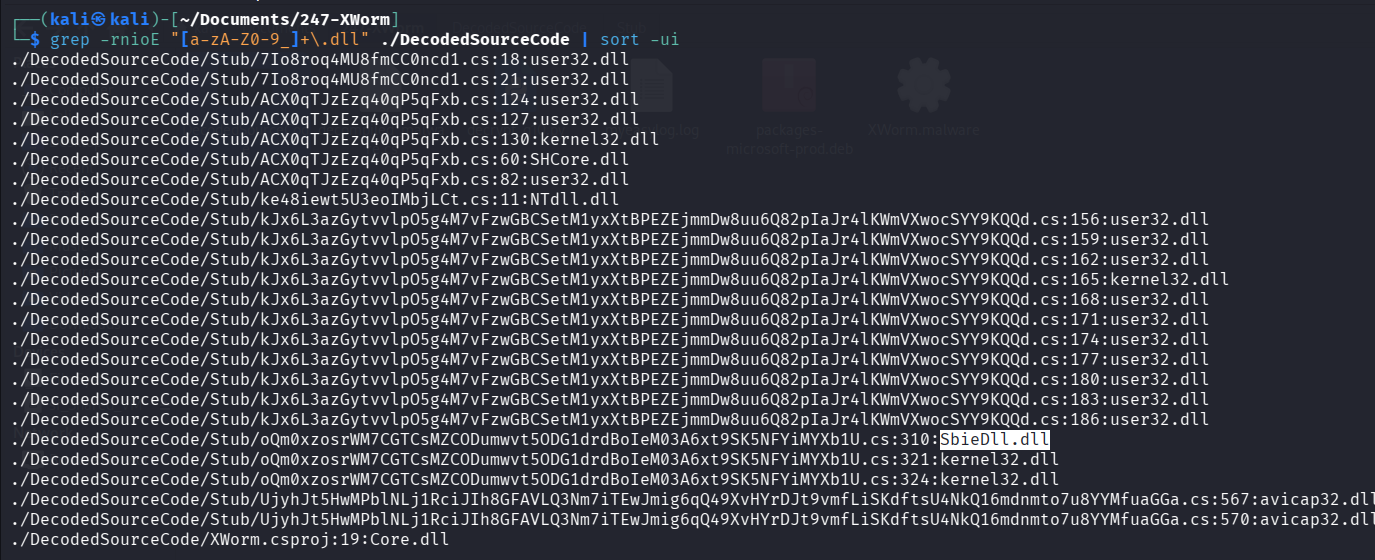
Among the standard Windows DLLs (user32.dll, kernel32.dll, NTdll.dll), one stands out: SbieDll.dll. This is the core isolation module for Sandboxie, a popular application sandboxing tool frequently used by malware analysts to safely detonate samples.
When SbieDll.dll is found in the loaded modules list, XWorm knows it’s running inside a Sandboxie container and can alter its behavior accordingly — potentially exiting cleanly, delaying execution, or skipping its malicious routines entirely.
Answer:
SbieDll.dll
Q13: Which registry key is manipulated to control hidden items visibility?
One of XWorm’s more subtle defense evasion techniques targets the Windows Explorer user interface directly. Rather than just setting attrib +h on its files (which a savvy admin can undo with “Show hidden files”), XWorm modifies the registry to ensure hidden files stay hidden — even if someone tries to change the setting.
Command Executed:
1
grep -rn "ShowSuperHidden" ./DecodedSourceCode
Findings:

The decompiled code reveals two operations:
1
2
3
4
5
// Check current value
registryKey.GetValue("ShowSuperHidden")

// Force it to 0 (disabled)
registryKey.SetValue("ShowSuperHidden", 0);
The ShowSuperHidden registry key lives under HKCU\Software\Microsoft\Windows\CurrentVersion\Explorer\Advanced. When set to 0, it forces Windows Explorer to hide protected operating system files — even if the user has previously enabled “Show hidden files and folders.” This effectively makes the malware’s dropped files invisible in the GUI, and most users won’t know to check this specific registry value.
MITRE ATT&CK Reference:
This maps to T1564.001 — Hide Artifacts: Hidden Files and Directories. By manipulating the registry key controlling Windows Explorer’s visibility settings, XWorm ensures its files remain invisible to casual inspection.
Answer:
ShowSuperHidden
Q14: Which API marks the process as critical to prevent termination?
This is perhaps XWorm’s most aggressive anti-termination technique. Rather than simply relying on the scheduled task to respawn the process, it leverages an undocumented Windows API to make killing the malware process catastrophic for the entire system.
Command Executed:
1
grep -rni "Critical" ./DecodedSourceCode
Findings:

1
[DllImport("NTdll.dll", EntryPoint = "RtlSetProcessIsCritical", SetLastError = true)]
RtlSetProcessIsCritical is an undocumented function exported from ntdll.dll. When called with TRUE, it flags the calling process as system-critical — the same classification given to essential Windows processes like csrss.exe and smss.exe.
The consequence? If a user or antivirus attempts to forcefully kill the XWorm process via Task Manager or taskkill, Windows interprets this as a critical system failure and triggers a Blue Screen of Death (BSOD). The entire system crashes. From the attacker’s perspective, this is a win-win:
- If the process stays alive → the RAT continues operating
- If someone kills it → the system crashes and reboots, at which point the scheduled task immediately re-executes the malware
MITRE ATT&CK Reference:
This maps to T1106 — Native API. The malware directly invokes an undocumented Windows kernel API to manipulate process criticality, preventing termination by tying its lifecycle to system stability.
Answer:
RtlSetProcessIsCritical
8. Phase 7: Espionage & Data Theft (Q15 & Q16)
Objective: Identify the malware’s primary data collection mechanism and its ultimate objective.
All of XWorm’s techniques — the persistence, the evasion, the anti-termination — exist to protect one thing: the payload. Understanding what the malware is ultimately doing with its access tells us the threat actor’s objective and the real impact of the compromise.
Q15 & Q16: Keyboard Hooking API and Primary Objective
Command Executed:
1
grep -rni "Hook" ./DecodedSourceCode
Findings:

The decompiled source imports three functions from user32.dll — together, they form a complete keyboard interception chain:
| API | Purpose |
|---|---|
SetWindowsHookEx | Installs a system-wide keyboard hook that intercepts every keystroke |
CallNextHookEx | Passes intercepted keystrokes to the next hook in the chain (keeps normal keyboard function) |
UnhookWindowsHookEx | Removes the hook when the malware exits cleanly |
The malware passes the WH_KEYBOARD_LL (Windows Hook Keyboard Low-Level) parameter into SetWindowsHookEx, installing a global low-level keyboard hook. This means every single keystroke typed anywhere on the system — in browsers, email clients, chat applications, even password fields — is intercepted by the malware before it reaches the intended application.
The captured keystrokes are logged and exfiltrated to the C2 infrastructure, giving the attacker real-time visibility into:
- Passwords typed into login forms
- Email and chat message content
- Financial information entered into banking portals
- Any sensitive data typed anywhere on the compromised workstation
MITRE ATT&CK Reference:
This maps to T1056.001 — Input Capture: Keylogging. The malware installs a global system keyboard hook to intercept and log all user keystrokes for credential theft and espionage.
Answer (Q15 — Hook API):
SetWindowsHookEx
Answer (Q16 — Primary Functionality):
Keylogger
9. Full ANY.RUN Sandbox Overview
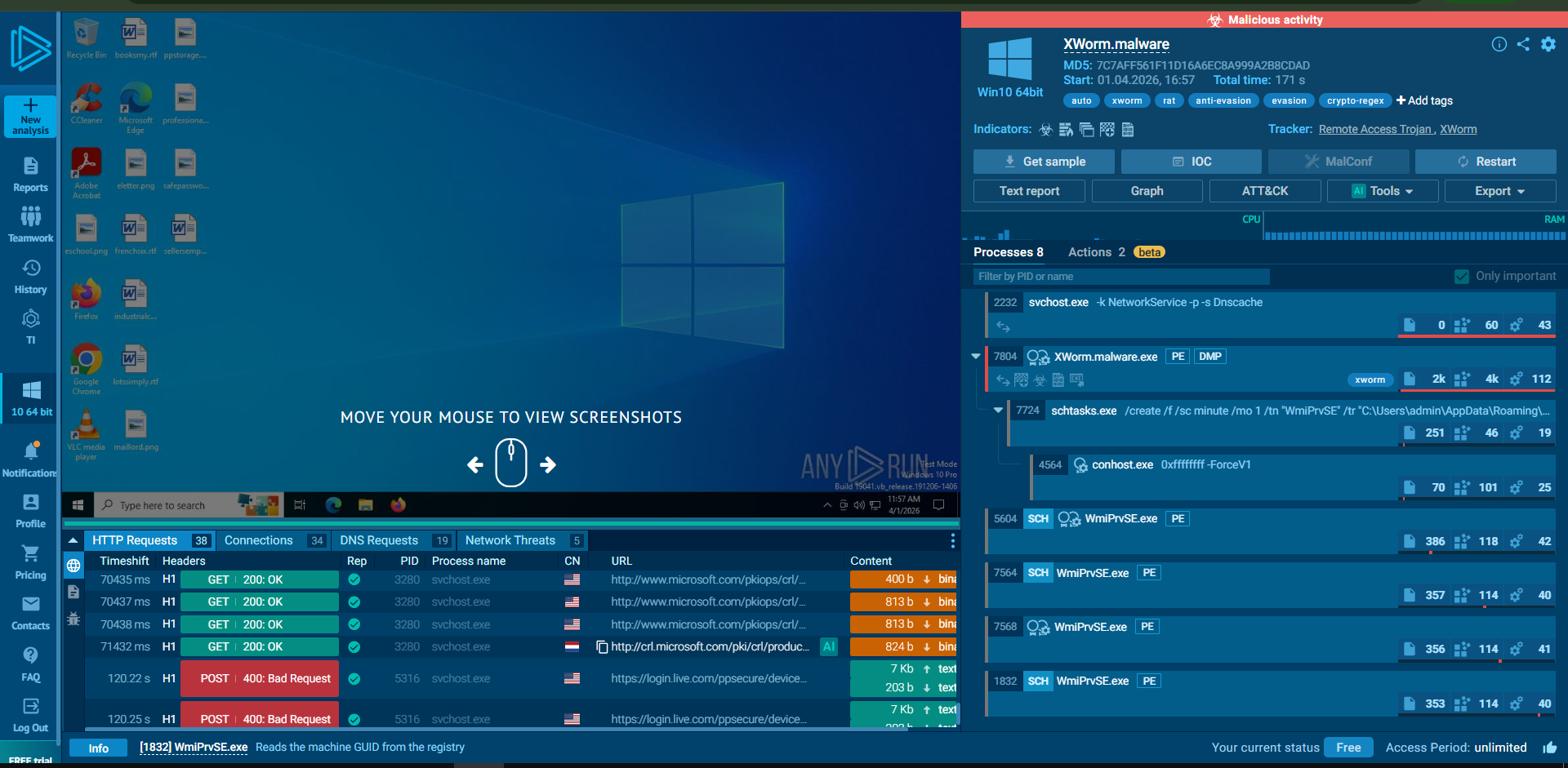
For reference, the complete ANY.RUN sandbox execution session showing all processes, network activity, and behavioral indicators:
10. Full Attack Chain Summary
Based on the combined static analysis and dynamic sandbox findings:
| Phase | Kill Chain Stage | Technique | Evidence |
|---|---|---|---|
| 1 | Delivery | Phishing email with disguised attachment | File metadata spoofs Adobe Inc. |
| 2 | Execution | User executes “Adobe Installer” | .NET binary with obfuscated code |
| 3 | Defense Evasion | Defender exclusions added | PowerShell Add-MpPreference -ExclusionPath |
| 4 | Defense Evasion | 6 anti-analysis checks | Debugger, sandbox, VM detection |
| 5 | Defense Evasion | Registry manipulation | ShowSuperHidden set to 0 |
| 6 | Defense Evasion | Critical process protection | RtlSetProcessIsCritical API call |
| 7 | Persistence | Scheduled task (1-minute interval) | schtasks /RL HIGHEST /sc minute /mo 1 |
| 8 | C2 Communication | Multi-IP failover on port 7000 | 3 IPs across Germany and US |
| 9 | Collection | Global keyboard hook | SetWindowsHookEx with WH_KEYBOARD_LL |
| 10 | Lateral Movement | USB propagation | USB.exe dropper + .lnk shortcuts |
11. Remediation & Mitigation Recommendations
Immediate Containment
- Isolate the infected workstation from the network immediately — XWorm’s USB propagation means connected drives may already be compromised
- Block all three C2 IPs at the perimeter firewall:
185.117.250.169,66.175.239.149,185.117.249.43 - Block outbound TCP port
7000at the edge firewall - Kill the XWorm process carefully — due to
RtlSetProcessIsCritical, useprocdumpto capture memory first, then reboot into Safe Mode for safe removal - Delete the persistence artifacts:
C:\Users\*\AppData\Roaming\WmiPrvSE.exe- Scheduled Task
WmiPrvSE - Windows Defender exclusions (verify via
Get-MpPreference)
- Restore the
ShowSuperHiddenregistry key to1 - Scan all connected USB drives for
USB.exeand suspicious.lnkfiles
Detection Rules
- Scheduled Task Anomalies: Alert on
schtasks.execreating tasks with/RL HIGHESTand/sc minute— legitimate software rarely needs minute-level execution with maximum privileges - Defender Exclusion Abuse: Monitor for
Add-MpPreference -ExclusionPathand-ExclusionProcesscommands, especially from non-admin contexts - Process Name Masquerading: Flag any
WmiPrvSE.exeexecuting from user directories (AppData) — the legitimate binary only runs fromC:\Windows\System32\wbem\ - Non-Standard Port C2: Monitor outbound connections to port 7000 from workstations
- Critical Process API: Alert on
RtlSetProcessIsCriticalimports in any non-system binary
Long-Term Hardening
- Application Whitelisting: Implement AppLocker or WDAC policies to block execution from
AppData\Local\TempandAppData\Roaming - USB Device Control: Deploy endpoint USB policies restricting autorun and executable execution from removable media
- PowerShell Logging: Enable Script Block Logging and Module Logging to capture
Add-MpPreferenceabuse - Network Segmentation: Restrict workstation-to-workstation communication to prevent lateral movement
12. Conclusion
The XWorm RAT investigation reveals a mature, multi-layered threat that combines aggressive persistence with sophisticated evasion — all designed to protect a keylogging payload. Key findings include:
Defense in Depth (from the attacker’s side): XWorm doesn’t rely on a single technique — it layers six anti-analysis checks, Defender exclusions, registry manipulation, critical process protection, and minute-interval scheduled tasks to create multiple barriers against detection and removal.
The Cryptographic Trap: The deliberate 1-byte overlap in the AES key derivation is a subtle but effective anti-analysis technique. It breaks automated decryption tools and forces analysts to manually reverse-engineer the key generation — a time investment many automated pipelines won’t make.
USB as a Lateral Movement Vector: In an era focused on network-based attacks, XWorm’s USB propagation capability is a reminder that physical media remains a viable attack vector, particularly in environments with shared removable drives or air-gapped networks.
The BSOD Kill Switch: By marking itself as a critical process, XWorm transforms process termination from a defensive action into a denial-of-service attack against the defender. This forces analysts to boot into Safe Mode or use specialized tools, buying the attacker additional dwell time.
Key Takeaways for the SOC:
- Never trust metadata alone. An “Adobe Installer” executing from
AppData\Tempis not legitimate — always cross-reference the execution path with the claimed identity. - Monitor Defender exclusions. Legitimate software uses proper signing and Defender compatibility — any binary that needs to carve out its own AV exclusions is suspicious by definition.
- USB policies matter. A single infected USB drive can bridge network segments, defeat air gaps, and turn a contained infection into an enterprise-wide incident.
Analysis Date: April 1, 2026
Analyst: El OMARI Zakaria