Incident Investigation Report: AWSRaid — Compromised IAM Credentials & S3 Data Exfiltration
Platform: CyberDefenders Challenge: AWSRaid Category: Cloud Forensics Difficulty: Easy Tools: Splunk Achievement: Proof of Completion
1. Executive Summary
Incident Type: IAM Credential Compromise / S3 Data Exfiltration / Privilege Escalation
Malware Family: N/A
An incident was reported involving unauthorized access to critical AWS-hosted data and potential exfiltration. Investigation of AWS CloudTrail logs ingested into Splunk confirmed that the IAM account helpdesk.luke had been compromised via credential theft. The attacker leveraged the compromised credentials to access multiple S3 buckets containing sensitive files — including CAD designs and client contracts — deliberately weakened S3 bucket security by removing public access blocks, and established long-term persistence by creating a backdoor IAM user with full administrative privileges.
Indicators of Compromise (IOCs)
| Type | Indicator | Description |
|---|---|---|
| Compromised IAM User | helpdesk.luke | Account used for initial unauthorized access |
| Attacker IP (1) | 185.192.70.84 | Primary source IP for malicious ConsoleLogin events |
| Attacker IP (2) | 2.57.168.220 | Secondary source IP for helpdesk.luke logins |
| Accessed S3 Bucket | product-designs-repository31183937 | Contained exfiltrated CAD file (Product2_CAD_Designs.dwg) |
| Exposed S3 Bucket | backup-and-restore98825501 | Public access blocks intentionally removed |
| Persistence Account | marketing.mark | Backdoor IAM user created by attacker |
| Privilege Escalation Group | Admins | IAM group the backdoor account was added to |
| Targeted Files | Product2_CAD_Designs.dwg, secrets_vault_dump.bak, Contract_Termination_Letter_Client.pdf | Sensitive data accessed by the attacker |
MITRE ATT&CK Mapping Overview
| Tactic | Technique | ID |
|---|---|---|
| Initial Access | Valid Accounts — Cloud Accounts | T1078.004 |
| Collection | Data from Cloud Storage — S3 GetObject | T1530 |
| Defense Evasion | Modify Cloud Compute Infrastructure — PutBucketPublicAccessBlock | T1578 |
| Persistence | Create Account — Cloud Account (CreateUser) | T1136.003 |
| Privilege Escalation | Account Manipulation — AddUserToGroup to Admins | T1098 |
2. Background: AWS CloudTrail & IAM Forensics
AWS CloudTrail is the backbone of cloud forensic investigations. Every API call made within an AWS account — whether from the Console, CLI, or SDK — is logged as an event in CloudTrail. Understanding which events to filter for is critical to reconstructing an attacker’s actions.
| CloudTrail Event | AWS API Action | Forensic Significance |
|---|---|---|
ConsoleLogin | IAM Authentication | Identifies who logged in and from where (source IP) |
GetObject | S3 File Download | Reveals exactly which files were accessed or exfiltrated |
PutBucketPublicAccessBlock | S3 Bucket Policy Change | Detects intentional weakening of security controls |
CreateUser | IAM User Creation | Reveals persistence via backdoor accounts |
AddUserToGroup | IAM Group Membership Change | Detects privilege escalation to admin-level access |
Why This Matters: Without understanding which CloudTrail events correspond to which attacker actions, an analyst would waste hours sifting through thousands of log entries. Knowing that
GetObject= file access andCreateUser= persistence immediately focuses the investigation on the most critical evidence.
3. Phase 1: Identifying the Compromised Account (Question 1)
Objective: Determine which IAM user was compromised by analyzing login anomalies across the organization.
To establish the initial entry point, we need to identify anomalous authentication patterns. In a healthy AWS environment, users typically authenticate from a consistent set of corporate IP addresses. An account logging in from unfamiliar external IPs is a strong indicator of credential compromise.
We queried CloudTrail for all ConsoleLogin events and aggregated by username and source IP:
Splunk Query:
1
index=* sourcetype=aws:cloudtrail eventName="ConsoleLogin" | stats count by userIdentity.userName, sourceIPAddress
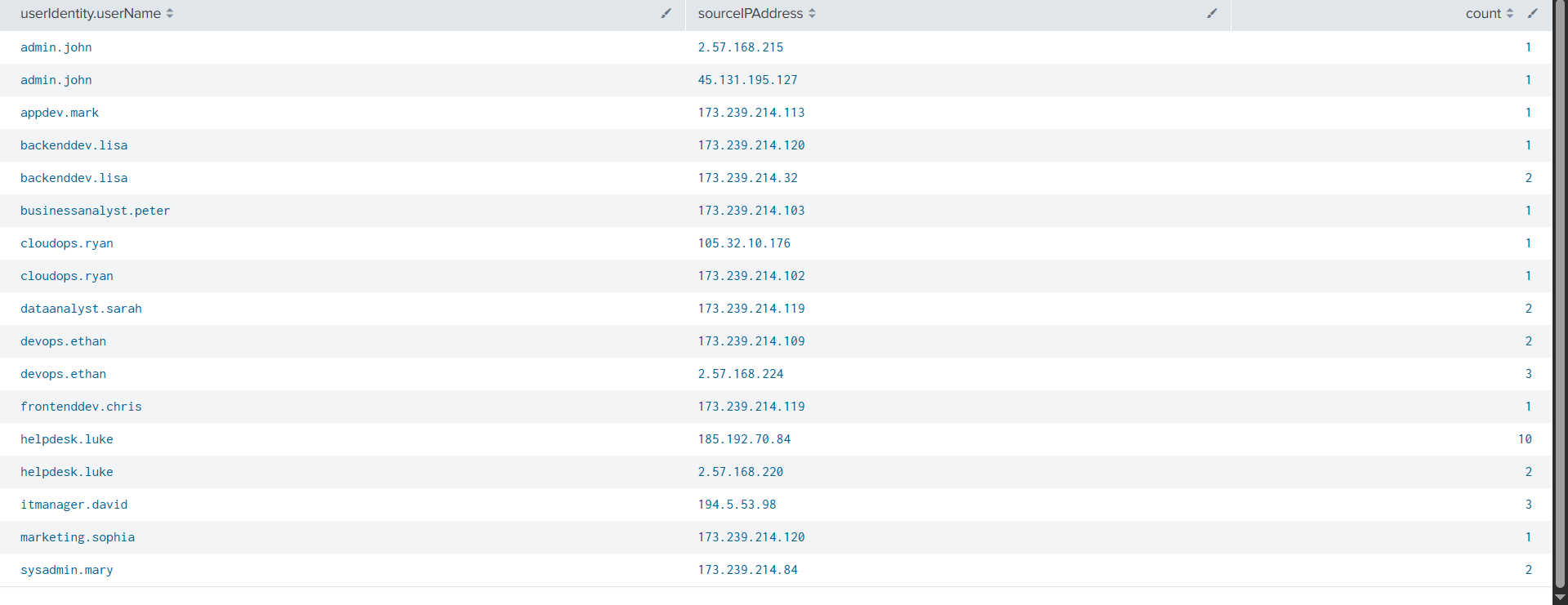
The results immediately reveal the anomaly: while the majority of users authenticate exclusively from the corporate subnet (173.239.214.x), the account helpdesk.luke exhibits 12 logins from two entirely unknown external IP addresses (185.192.70.84 and 2.57.168.220). This volume and IP diversity strongly indicates the credentials were stolen and used by an external threat actor.
Analyst Note: In real-world investigations, always cross-reference unusual source IPs with threat intelligence feeds. The IPs
185.192.70.84and2.57.168.220should be checked against AbuseIPDB, VirusTotal, and Shodan to determine if they are known VPN exit nodes, Tor relays, or previously reported attacker infrastructure.
Answer Q1
What is the username of the compromised IAM user?
helpdesk.luke
4. Phase 2: Tracking S3 Data Access (Questions 2 & 3)
Objective: Determine when the attacker first accessed S3 data and identify the specific buckets and files targeted.
Knowing the compromised account, we pivot to tracking data access. In AWS, downloading or viewing a file in S3 generates a GetObject event in CloudTrail. We filtered for all GetObject calls made by helpdesk.luke and sorted chronologically to establish the timeline of data exfiltration.
Splunk Query:
1
index=* sourcetype=aws:cloudtrail userIdentity.userName="helpdesk.luke" eventName="GetObject" | table _time, userIdentity.userName, sourceIPAddress, requestParameters.key, requestParameters.bucketName
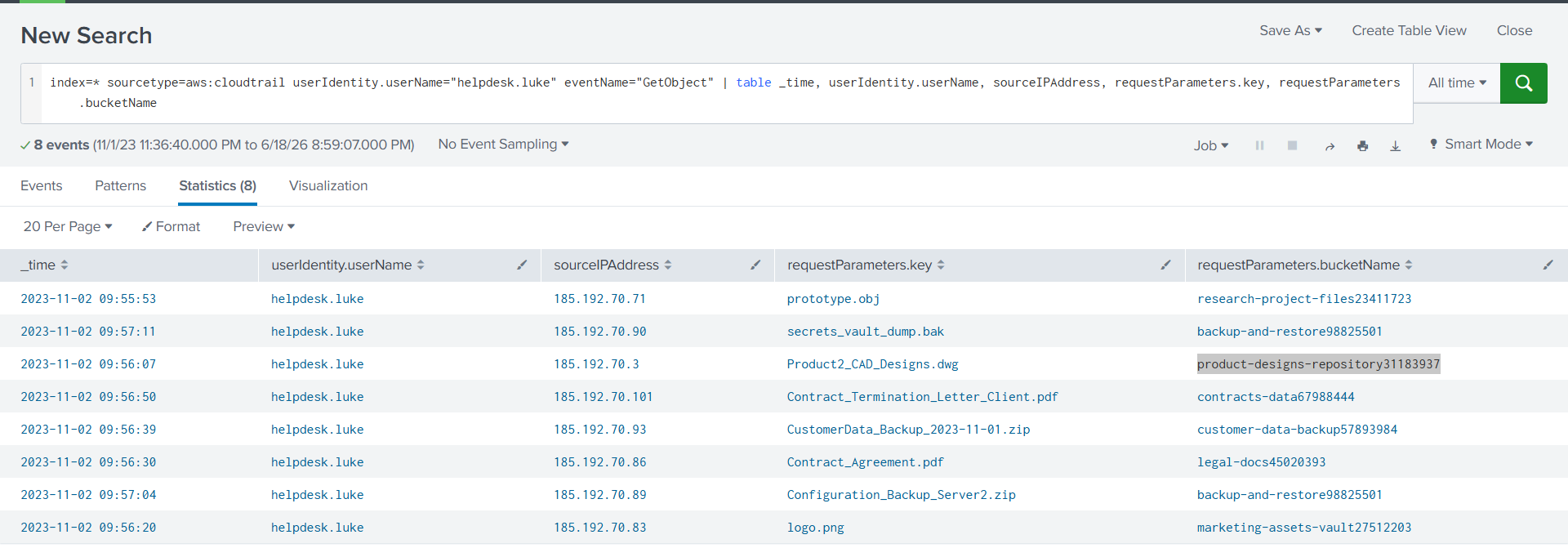
The results paint a devastating picture: the attacker systematically raided 8 files across 7 different S3 buckets within a 2-minute window. The targeted files include intellectual property (Product2_CAD_Designs.dwg), credential backups (secrets_vault_dump.bak), legal documents (Contract_Termination_Letter_Client.pdf), and customer data archives. The earliest access occurred at 2023-11-02 09:55:53.
The DWG file was specifically housed in the bucket product-designs-repository31183937 — identifying this bucket is critical for scoping the impact of the breach to the product engineering team.
Why this matters: The attacker accessed files from multiple source IPs within the
185.192.70.xrange, suggesting they may be using a VPN service or rotating proxies to distribute their activity. EachGetObjectcall from a different IP complicates simple IP-based blocking.
Answer Q2
What was the timestamp for the first S3 access by the attacker?
2023-11-02 09:55:53
Answer Q3
What is the name of the S3 bucket containing the DWG file?
product-designs-repository31183937
5. Phase 3: Defense Evasion — Public Access Misconfiguration (Question 4)
Objective: Identify which S3 bucket the attacker deliberately exposed to the internet by removing public access protections.
Beyond data theft, sophisticated attackers often weaken security controls to facilitate easier future access or to prepare for large-scale data exfiltration. In AWS S3, removing the Block Public Access settings is logged as a PutBucketPublicAccessBlock event — one of the most dangerous configuration changes an attacker can make.
Splunk Query:
1
index=* sourcetype=aws:cloudtrail userIdentity.userName="helpdesk.luke" eventName="PutBucketPublicAccessBlock" | table requestParameters.bucketName
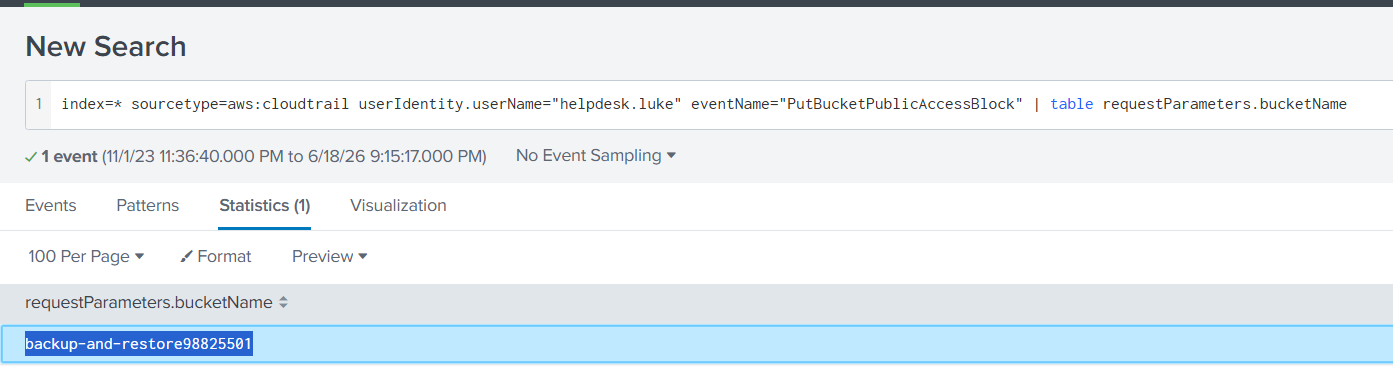
The attacker deliberately removed public access blocks on the backup-and-restore98825501 bucket. This is significant because this same bucket contained secrets_vault_dump.bak and Configuration_Backup_Server2.zip — making these sensitive backup files potentially accessible to anyone on the internet.
Analyst Note: AWS S3
Block Public Accessis a safety net that prevents accidental public exposure. An attacker deliberately disabling it is a clear indicator of intent — they are preparing for bulk exfiltration or setting up a persistent data access channel that doesn’t require stolen IAM credentials. Immediately check if any bucket policies or ACLs were also modified to grant anonymous read access.
Answer Q4
What is the name of the S3 bucket whose configuration was changed to allow public access?
backup-and-restore98825501
6. Phase 4: Persistence — Backdoor Account Creation (Question 5)
Objective: Identify the IAM user the attacker created to maintain access after the compromised credentials are revoked.
Experienced attackers know that compromised credentials will eventually be discovered and rotated. To maintain access beyond the initial compromise, they create backdoor accounts that fly under the radar. The CreateUser API call in CloudTrail captures exactly when a new IAM user is provisioned.
Splunk Query:
1
index=* sourcetype=aws:cloudtrail eventName="CreateUser" | table requestParameters.userName
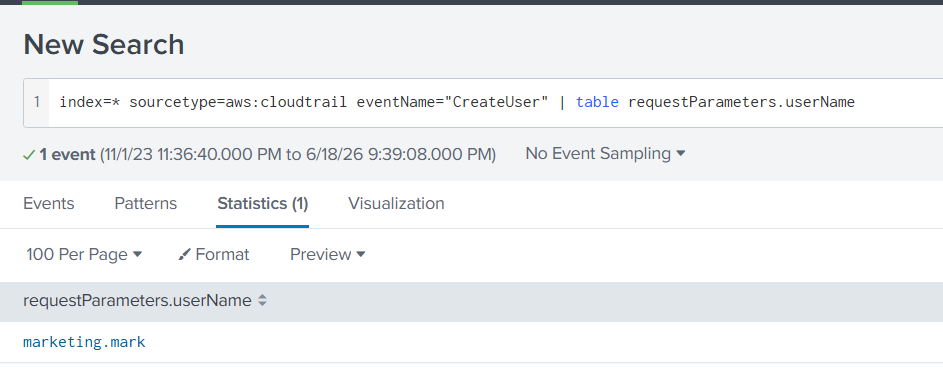
The attacker created a user named marketing.mark — deliberately choosing a name that blends in with the existing organizational naming convention (e.g., helpdesk.luke, cloudops.ryan, frontenddev.chris). Without proactive IAM auditing, this account could persist for months undetected.
Answer Q5
What is the username of the new IAM account created by the attacker?
marketing.mark
7. Phase 5: Privilege Escalation — Admin Group Assignment (Question 6)
Objective: Determine what level of access the attacker granted their backdoor account.
A newly created IAM user has zero permissions by default. To weaponize it, the attacker needs to attach policies — most efficiently by adding the user to an existing administrative group. The AddUserToGroup event captures this privilege escalation.
Splunk Query:
1
index=* sourcetype=aws:cloudtrail eventName="AddUserToGroup" | table requestParameters.groupName
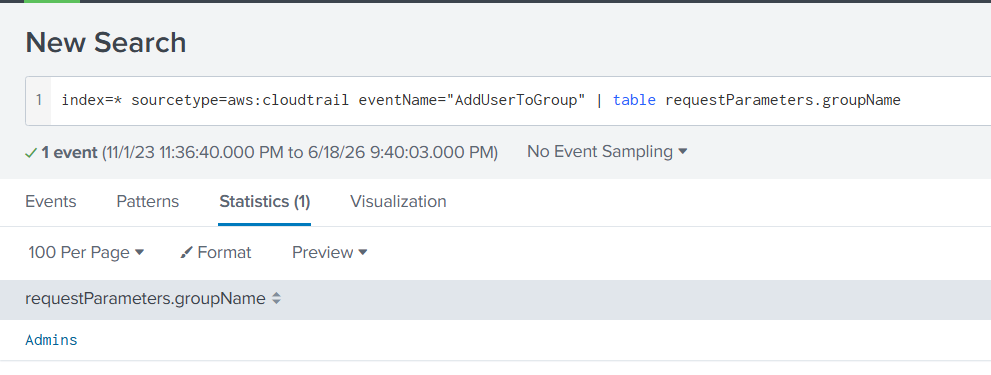
The attacker achieved full administrative privilege escalation by adding marketing.mark to the Admins group. This gives the backdoor account unrestricted access to every AWS service and resource in the account — effectively granting the attacker persistent root-level control over the entire cloud infrastructure.
Analyst Note: IAM group membership changes should trigger immediate alerts in any cloud SIEM. The
AddUserToGroupevent targeting admin-level groups is a critical detection signal — it is one of the most impactful privilege escalation actions an attacker can perform in AWS. Configure AWS GuardDuty and CloudWatch alarms to flag any IAM changes outside of change windows.
Answer Q6
What IAM group was the newly created user added to?
Admins
8. Reconstructed Incident Timeline
Based on the CloudTrail log analysis in Splunk, we can reconstruct the complete attack chain:
| Date | Time | Kill Chain Phase | Action | Evidence Source |
|---|---|---|---|---|
| 2023-11-02 | — | Initial Access | Attacker obtains helpdesk.luke credentials (phishing, credential stuffing, or leak) | External — pre-dates CloudTrail evidence |
| 2023-11-02 | 09:55:53 | Collection | First S3 GetObject — accesses prototype.obj from research-project-files | CloudTrail: GetObject |
| 2023-11-02 | 09:55–09:57 | Collection | Systematic raid of 8 files across 7 S3 buckets (CAD, contracts, backups, credentials) | CloudTrail: GetObject × 8 |
| 2023-11-02 | ~09:57 | Defense Evasion | Removes Block Public Access from backup-and-restore98825501 | CloudTrail: PutBucketPublicAccessBlock |
| 2023-11-02 | ~09:58 | Persistence | Creates backdoor IAM user marketing.mark | CloudTrail: CreateUser |
| 2023-11-02 | ~09:58 | Privilege Escalation | Adds marketing.mark to Admins group — full admin access | CloudTrail: AddUserToGroup |
Key Observation: The entire attack — from initial S3 data exfiltration to establishing a fully privileged backdoor account — was completed in under 3 minutes. This speed strongly suggests automation or a pre-planned playbook, not manual exploration. The attacker knew exactly which buckets to target and what persistence actions to take, indicating prior reconnaissance or insider knowledge of the AWS environment.
9. Conclusion
The AWSRaid investigation confirms a complete cloud attack lifecycle executed through the compromised helpdesk.luke IAM credentials. Key findings:
- Compromised Account:
helpdesk.lukewas accessed from 2 external IPs (185.192.70.84,2.57.168.220) outside the corporate baseline. - Data Exfiltration: 8 sensitive files were accessed across 7 S3 buckets in under 2 minutes, including intellectual property and credential backups.
- Security Weakening: The
backup-and-restore98825501bucket was intentionally exposed to the public internet. - Persistence: A backdoor IAM account (
marketing.mark) was created and added to theAdminsgroup for unrestricted access. - Attack Speed: The entire kill chain was executed in under 3 minutes, indicating automation.
Key Takeaways for the SOC:
- Immediately revoke
helpdesk.luke’s active sessions and rotate all associated credentials. Delete themarketing.markbackdoor account and audit theAdminsgroup for any other unauthorized members. - Restore
Block Public Accesssettings onbackup-and-restore98825501and audit all S3 bucket policies organization-wide for unauthorized changes. - Implement CloudTrail real-time alerting for
CreateUser,AddUserToGroup, andPutBucketPublicAccessBlockevents — these are high-confidence indicators of compromise in any AWS environment. - Enforce MFA on all IAM ConsoleLogin events — credential theft alone should not be sufficient for account access. AWS IAM Identity Center with mandatory MFA would have prevented this entire attack chain.
Analysis Date: June 21, 2026 Analyst: El OMARI Zakaria