Threat Intelligence Analysis: Yellow RAT — Hunting the Jupyter / Yellow Cockatoo Infostealer
Platform: CyberDefenders
Challenge: Yellow RAT
Category: Threat Intelligence
Difficulty: Easy
Tools: VirusTotal, Red Canary Threat Intelligence
Achievement: Proof of Completion
1. Executive Summary
Incident Type: Infostealer / Backdoor / Browser Hijacking
Malware Family: Jupyter (Yellow Cockatoo / SolarMarker)
During a routine security check at GlobalTech Industries, abnormal network behavior was detected across multiple workstations — employee search queries were being silently hijacked and redirected to unfamiliar URLs. A SHA-256 hash was extracted from the affected systems and provided as the starting pivot point for this threat intelligence investigation. The hash was traced to a .NET DLL identified as the Jupyter infostealer, also tracked by Red Canary as Yellow Cockatoo. This malware family communicates with a hardcoded C2 domain, stores a unique host identifier on disk, and executes attacker commands in an infinite polling loop.
Indicators of Compromise (IOCs)
| Type | Indicator | Description |
|---|---|---|
| SHA-256 | 30e527e45f50d2ba82865c5679a6fa998ee0a1755361ab01673950810d071c85 | Jupyter DLL sample |
| MD5 | 4eb6170524b5e18d95bb56b937e89b36 | Alternative hash for hunting |
| File Type | Win32 DLL (.NET Assembly) | Compiled with .NET v2.0.50727 |
| Compile Timestamp | 2020-09-24 18:26:47 UTC | PE compilation date |
| First Submission | 2020-10-15 02:47:37 UTC | First seen on VirusTotal |
| Malware Family | Jupyter / Yellow Cockatoo / SolarMarker | Multiple threat intel aliases |
| DLL Filename | 111bc461-1ca8-43c6-97ed-911e0e69fdf8.dll | GUID-format filename used for concealment |
| C2 Domain | gogohid[.]com | Command and control endpoint |
| Persistence File | %USERPROFILE%\AppData\Roaming\solarmarker.dat | Unique host identifier stored on disk |
MITRE ATT&CK Mapping Overview
| Tactic | Technique | ID |
|---|---|---|
| Defense Evasion | Masquerading — GUID-format DLL filename | T1036 |
| Persistence | Unique Host Identifier File | T1053 |
| Discovery | System Information Discovery | T1082 |
| Command & Control | Encrypted C2 Channel (HTTPS) | T1071.001 |
| Collection | Browser Session Hijacking | T1185 |
2. Background: The Threat Intelligence Pivot Model
Before diving into the analysis, it is important to understand the methodology used in this investigation. Unlike memory forensics or network forensics, where we analyze raw artifacts (memory dumps, PCAPs), threat intelligence investigations start with a single indicator — in this case, a SHA-256 hash — and expand outward through a series of pivots.
| Pivot Step | Source | What It Reveals |
|---|---|---|
| Hash → Detection Engines | VirusTotal Detection Tab | Is the file malicious? How many vendors flag it? |
| Hash → Community Intel | VirusTotal Community Tab | Malware family attribution, researcher notes, related IOCs |
| Hash → PE Metadata | VirusTotal Details Tab | Compile timestamp, original filename, .NET version, file type |
| Hash → Submission History | VirusTotal History Tab | First seen date, dwell time (gap between compilation and detection) |
| Hash → External Reports | Vendor threat blogs (Red Canary, Talos, etc.) | Full TTP breakdown, C2 infrastructure, persistence mechanisms |
This “pivot chain” is the core tradecraft of threat intelligence analysis. Each step reveals a new layer of context, and the skill lies in knowing which sources to query and how to interpret their output.
Why This Matters: Many junior analysts stop at the VirusTotal detection ratio (e.g., “52/72 vendors flagged it”). This tells you almost nothing useful for incident response. The real intelligence — malware family, C2 domains, persistence files, behavioral patterns — lives in the community notes, PE metadata, and external vendor reports.
3. Phase 1: Sample Identification — VirusTotal Community Analysis (Questions 1 & 2)
Objective: Query the provided SHA-256 hash on VirusTotal and leverage community intelligence to identify the malware family.
The investigation begins with a single artifact: a hash.txt file containing the SHA-256 hash of the suspicious DLL. This hash is our only starting point — we have no binary sample, no PCAP, no memory dump. Everything we learn must be pivoted from this 64-character string.

Querying this hash on VirusTotal reveals community notes from researchers who have previously analyzed this sample. Multiple community members explicitly tagged the submission with #Jupyter and #YellowCockatoo, providing immediate attribution without needing to dig into detection engine names.
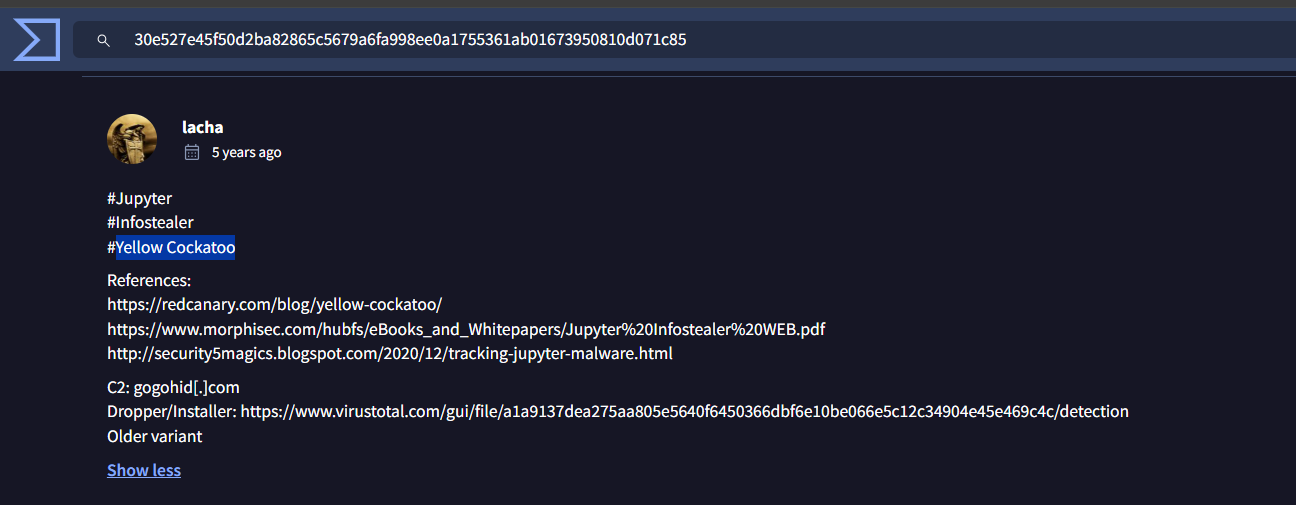
Why this matters: The detection engine tab might say “Trojan.Generic” or “Malware.Agent” — labels so vague they are operationally useless. The community tab, however, gave us the exact malware family name and linked us directly to the Red Canary threat report that we will use in Phase 4. This single pivot — hash to community notes — saved hours of reverse engineering.
Analyst Note: The VirusTotal community comments section is one of the most underutilized intelligence resources available to analysts. Researchers frequently post configuration extracts, C2 infrastructure details, and malware family attributions that don’t appear anywhere in the automated detection engine results. Always check community notes before concluding a hash pivot.
Answer Q1
What malware family does this DLL belong to?
Jupyter(also known as Yellow Cockatoo)
4. Phase 2: File Properties & Compile Timestamp (Questions 2 & 3)
Objective: Extract the DLL’s first observed filename and compilation date from the VirusTotal Details tab.
The Details tab on VirusTotal surfaces the PE (Portable Executable) metadata embedded in the binary at compile time. Every Windows executable and DLL contains a structured header with fields like the compilation timestamp, target architecture, .NET version, and original filename. Attackers cannot easily strip this metadata without recompiling the binary, which makes it a reliable forensic artifact.
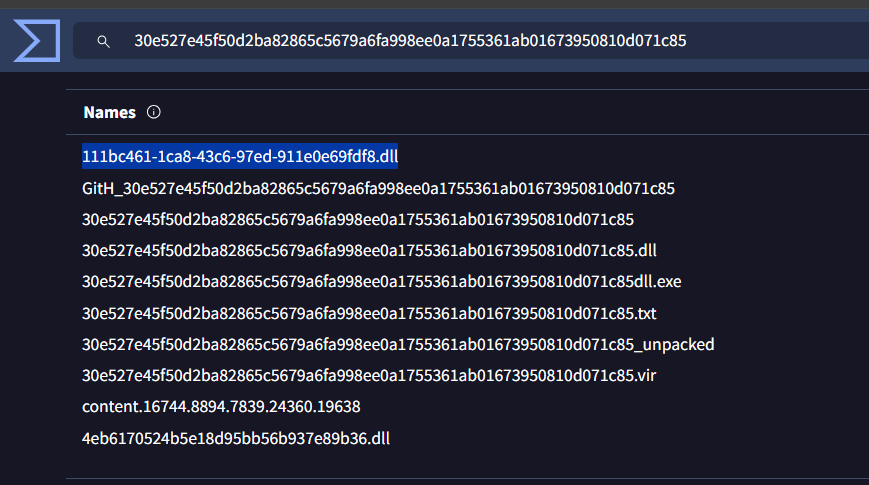
Filename Analysis: The GUID Concealment Technique
The filename follows a GUID (Globally Unique Identifier) format — 111bc461-1ca8-43c6-97ed-911e0e69fdf8.dll.
Why this is suspicious: Legitimate applications use descriptive, consistent filenames (e.g., mscoree.dll, chrome_elf.dll). A GUID-formatted filename is a deliberate concealment technique — it makes the file blend in with the hundreds of legitimate GUID-named folders that exist in AppData directories (e.g., browser extension caches, update staging folders). An analyst casually browsing the file system would likely skip right over it.
Detection rule: Any .dll file with a GUID-format filename ([0-9a-f]{8}-[0-9a-f]{4}-...-[0-9a-f]{12}.dll) in %APPDATA% or %LOCALAPPDATA% that is NOT inside a recognized application’s directory should trigger an investigation.
Compile Timestamp Analysis
The PE header records the compilation date as 2020-09-24 18:26:47 UTC. While this timestamp can be forged by the attacker (a technique called “timestomping”), in practice most commodity malware authors do not bother. This gives us a baseline for the malware’s age and helps correlate it with known campaign timelines.
Answer Q2
What is the DLL’s first observed filename?
111bc461-1ca8-43c6-97ed-911e0e69fdf8.dll
Answer Q3
What is the malware’s compilation date?
2020-09-24
5. Phase 3: Submission Timeline & Dwell Time Analysis (Question 4)
Objective: Determine when this sample first appeared on VirusTotal to understand the threat’s age and intelligence maturity.
The VirusTotal History section records the precise timestamps for first submission, last submission, and first seen in the wild. These timestamps are critical for understanding the dwell time — the period between when the malware was deployed and when it was first detected by the security community.
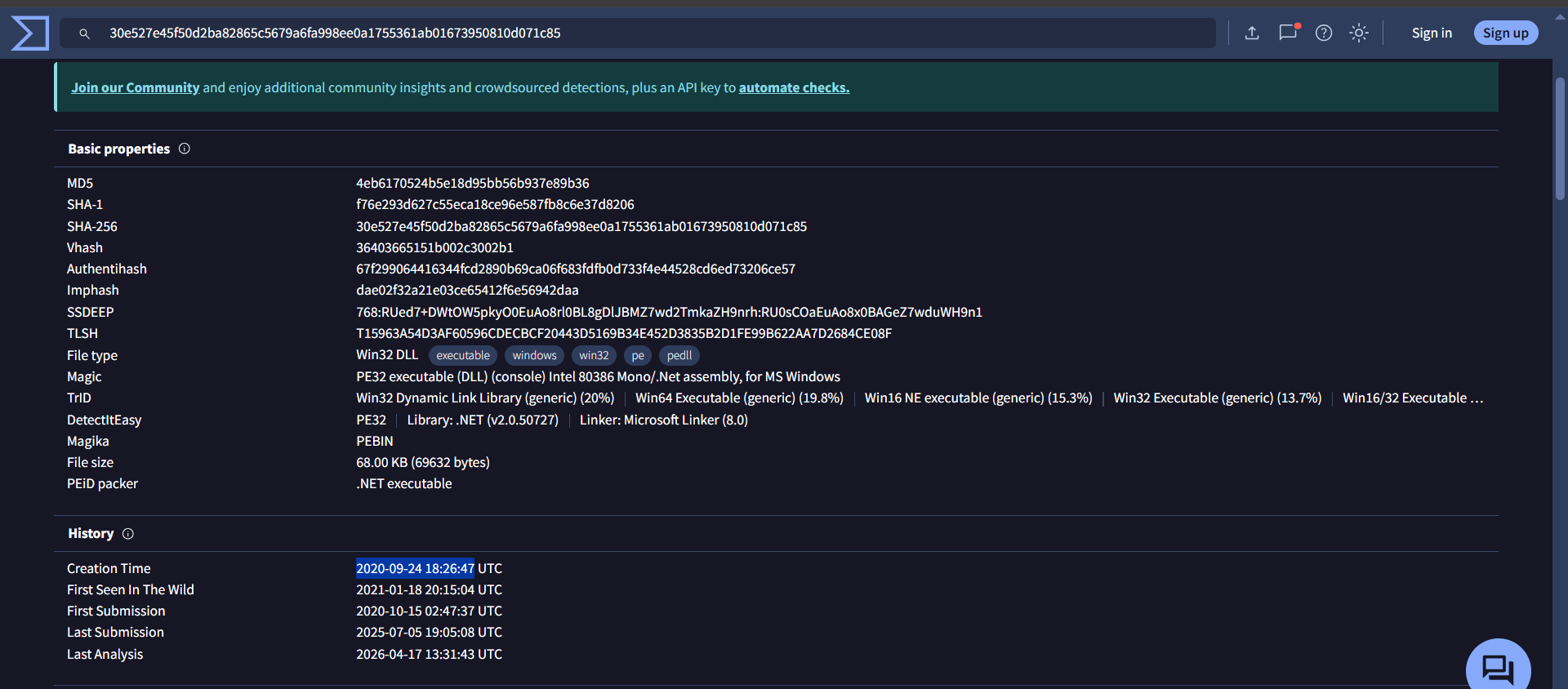
Understanding Dwell Time
The 21-day gap between compilation (September 24) and first submission (October 15) is highly significant intelligence:
| Event | Date | Significance |
|---|---|---|
| Compiled | 2020-09-24 | Attacker builds the DLL |
| First Submitted to VT | 2020-10-15 | A defender or automated sandbox first uploads it for analysis |
| First Seen in Wild | 2021-01-18 | Community-wide awareness — nearly 4 months after compilation |
Why this matters: During those 21 days (and arguably the full 4 months until “first seen in wild”), this malware was actively operating on victim endpoints with zero public intelligence available. No VirusTotal lookup would have flagged it. No YARA rule existed for it. No threat feed contained its hash. This is the window attackers exploit — and it is exactly why behavioral detection (monitoring what a process does) is more reliable than signature-based detection (checking if a file hash is known-bad).
Analyst Note: When you discover a sample with a significant compile-to-submission gap, immediately check your organization’s historical logs (EDR telemetry, proxy logs, DNS queries) for the C2 domain and file hash going back to the compile date. The malware may have been active in your environment during the entire dwell period without triggering any alert.
Answer Q4
What is the malware’s first submission date to VirusTotal?
2020-10-15
6. Phase 4: Threat Intelligence — C2 Behavior & Persistence (Questions 5 & 6)
Objective: Use external threat intelligence to identify the malware’s C2 domain and on-disk persistence artifact.
The VirusTotal community comments linked to Red Canary’s published Yellow Cockatoo threat report. This document provides the deepest technical analysis of Jupyter’s behavior in a real environment. This is the most important pivot in the entire investigation — moving from static file properties to understanding the malware’s live operational behavior.
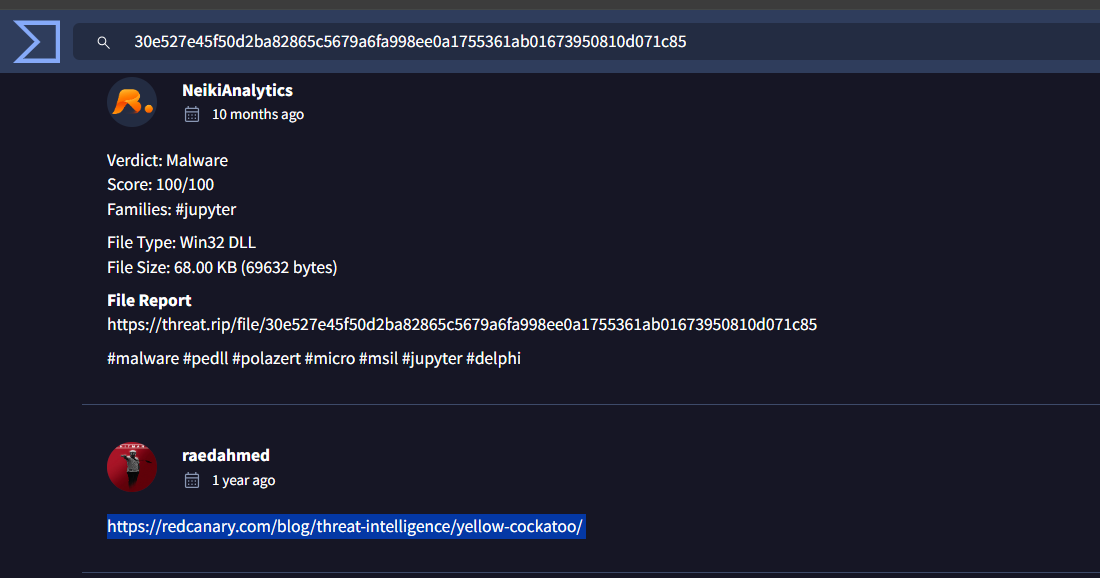
The Jupyter Infection Lifecycle
According to Red Canary’s analysis, the Jupyter DLL operates in a three-stage lifecycle:
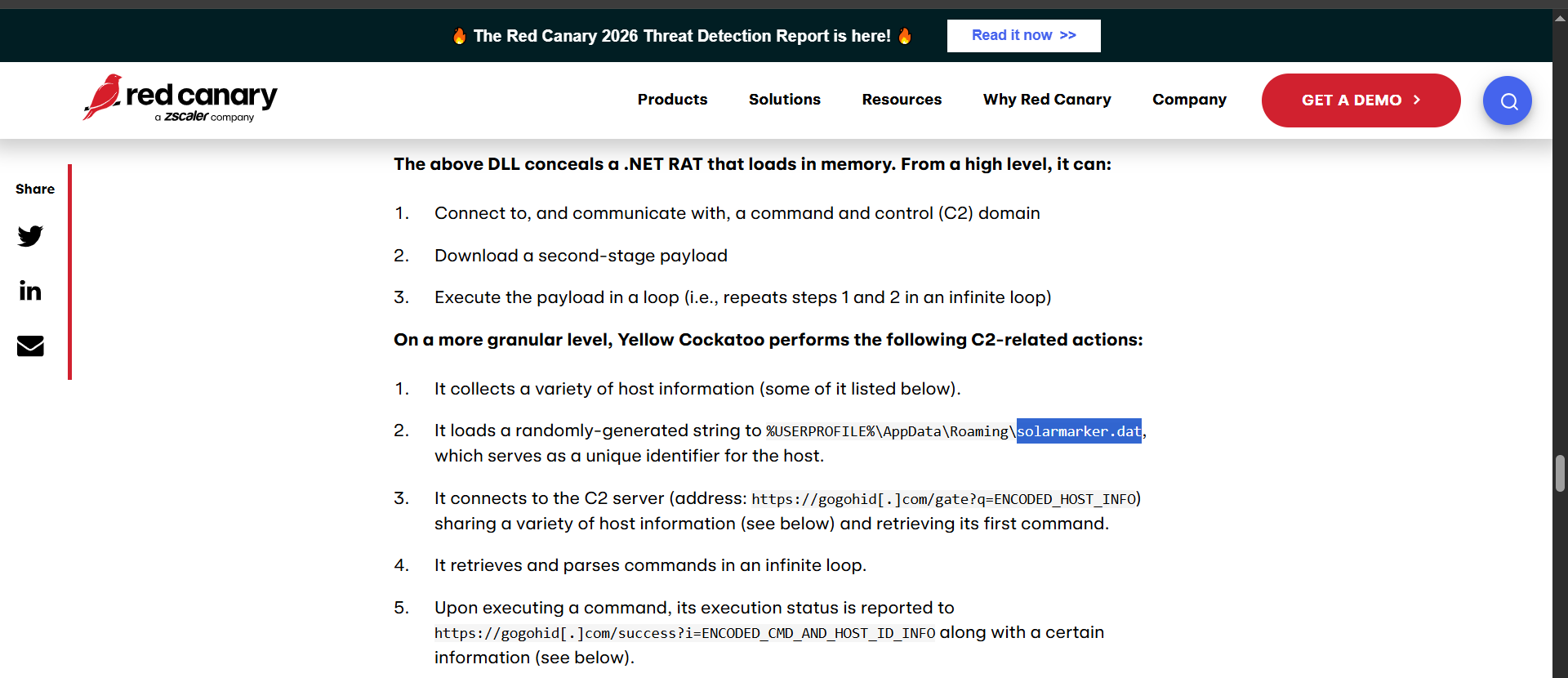
Host Identification: On first execution, the DLL checks for the existence of
solarmarker.datin%USERPROFILE%\AppData\Roaming\. If absent, it generates a random unique identifier and writes it to this file. This UUID serves as the attacker’s tracking label for the infected machine — similar to how a botnet assigns each zombie a unique ID.C2 Registration: The DLL connects to
https://gogohid[.]com/gate?q=ENCODED_HOST_INFO, transmitting the host identifier. The use of HTTPS means the C2 traffic is encrypted and blends seamlessly with normal web browsing — a firewall seeing outbound HTTPS togogohid.comwould have no reason to block it without threat intelligence context.Command Polling Loop: Once registered, the DLL enters an infinite polling loop — periodically checking in with the C2 server and executing any commands it receives. This makes Jupyter a fully functional backdoor, not just a one-time stealer. The attacker can send new instructions at any time: steal browser cookies today, deploy ransomware tomorrow.
Why the polling loop matters: Unlike a “smash-and-grab” stealer that exfiltrates data once and exits, Jupyter maintains persistent access to the infected machine indefinitely. The attacker can return weeks or months later to execute new commands. This transforms a single infected endpoint into a long-term foothold in the corporate network.
Analyst Note: The
solarmarker.datfile is the definitive on-host indicator of active Jupyter infection. It is small, hidden in a standard-looking directory, and survives reboots. If you find this file on an endpoint, the machine should be treated as fully compromised. Hunt for it proactively across your endpoint fleet before waiting for a detection alert.
Answer Q5
What is the name of the file the malware creates for persistence/identification?
solarmarker.dat
Answer Q6
What is the malware’s C2 domain?
gogohid.com
7. Reconstructed Threat Intelligence Timeline
Based on the evidence gathered across all four pivot phases, we can reconstruct the complete lifecycle of this threat from development to detection:
| Date | Event | Intelligence Source | Significance |
|---|---|---|---|
| 2020-09-24 | Jupyter DLL compiled (.NET v2.0.50727) | VirusTotal PE metadata | Malware build date — campaign preparation begins |
| 2020-09-24 → 10-15 | 21-day dwell period — malware active, zero public intel | (Gap analysis) | Victims compromised with no available signatures or IOCs |
| 2020-10-15 | First submission to VirusTotal | VirusTotal History | A defender or sandbox encounters the sample for the first time |
| 2021-01-18 | “First Seen in Wild” flag set | VirusTotal History | Community-wide awareness — nearly 4 months after compilation |
| Ongoing | DLL polls gogohid[.]com/gate in infinite loop | Red Canary report | C2 channel active; attacker maintains persistent backdoor access |
| Ongoing | Browser sessions hijacked; search queries redirected | Incident report (GlobalTech) | End-user impact detected — the symptom that triggered this investigation |
8. Conclusion
The Yellow RAT investigation demonstrates how a single SHA-256 hash pivot — combined with community intelligence and external threat reports — can build a complete threat profile without any dynamic analysis or malware execution. Key findings:
- Family: Jupyter / Yellow Cockatoo — a .NET-based infostealer and backdoor active since at least late 2020.
- Persistence:
solarmarker.datin%USERPROFILE%\AppData\Roaming\stores the victim’s unique identifier. - C2: HTTPS communication to
gogohid[.]comwith encoded host parameters in a continuous polling loop. - Concealment: GUID-format DLL filenames disguise the malware among legitimate AppData content.
- Impact: Browser session hijacking caused employee search queries to be silently redirected.
Key Takeaways for the SOC:
- A single SHA-256 hash can unlock a full intelligence picture: Pivot from the hash → VirusTotal community comments → vendor threat intelligence blogs for complete TTP depth. Don’t stop at the detection ratio.
solarmarker.dat= smoking gun: If you find this file, you’ve found active Jupyter. Hunt for it proactively using EDR or file integrity monitoring.- GUID-named DLLs in AppData are suspicious: Legitimate software uses consistent, readable filenames. Flag any GUID-format DLL files in roaming profile directories for immediate investigation.
- Red Canary’s threat intelligence library is an excellent free resource for detailed Yellow Cockatoo/Jupyter TTPs and detection guidance.
Analysis Date: April 18, 2026 Analyst: El OMARI Zakaria