Incident Response Report: PoisonedCredentials — LLMNR/NBT-NS Poisoning & SMB Relay
Platform: CyberDefenders Challenge: PoisonedCredentials Category: Network Forensics Difficulty: Easy Tools: Wireshark Achievement: Proof of Completion
1. Executive Summary
Incident Type: LLMNR/NBT-NS Poisoning / Credential Theft / SMB Relay
Affected Systems: Multiple workstations on the 192.168.232.0/24 subnet
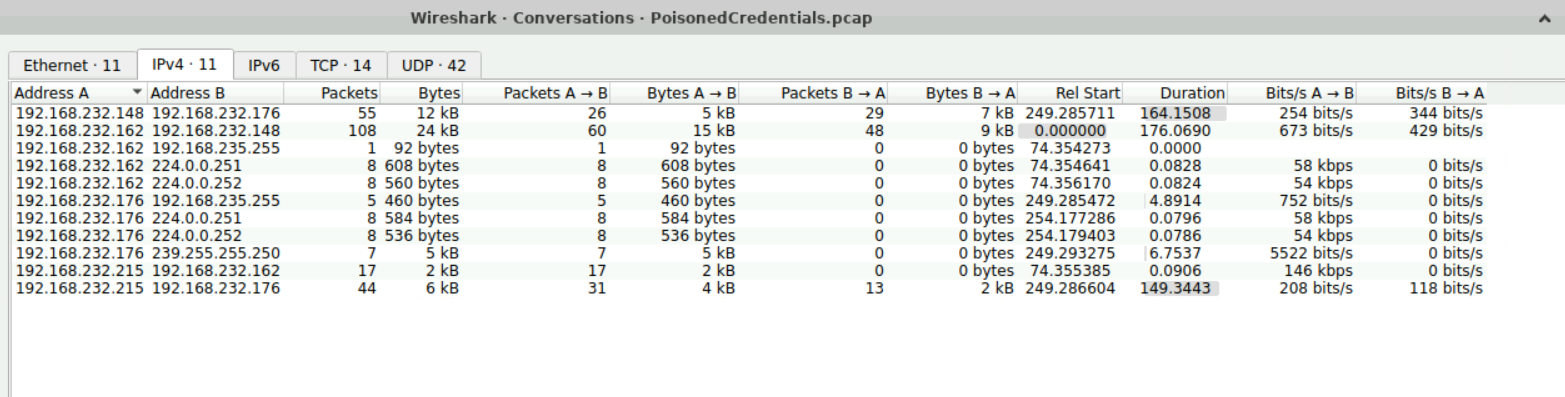
The organization’s security team detected a surge in suspicious network activity. Analysis of the captured PCAP confirmed an active LLMNR/NBT-NS poisoning attack in progress. A rogue machine was silently answering name resolution broadcasts from other workstations, intercepting their authentication attempts, and performing a live SMB Relay attack to access adjacent systems — all without ever cracking a single password hash offline.
Indicators of Compromise (IOCs)
| Type | Indicator | Description |
|---|---|---|
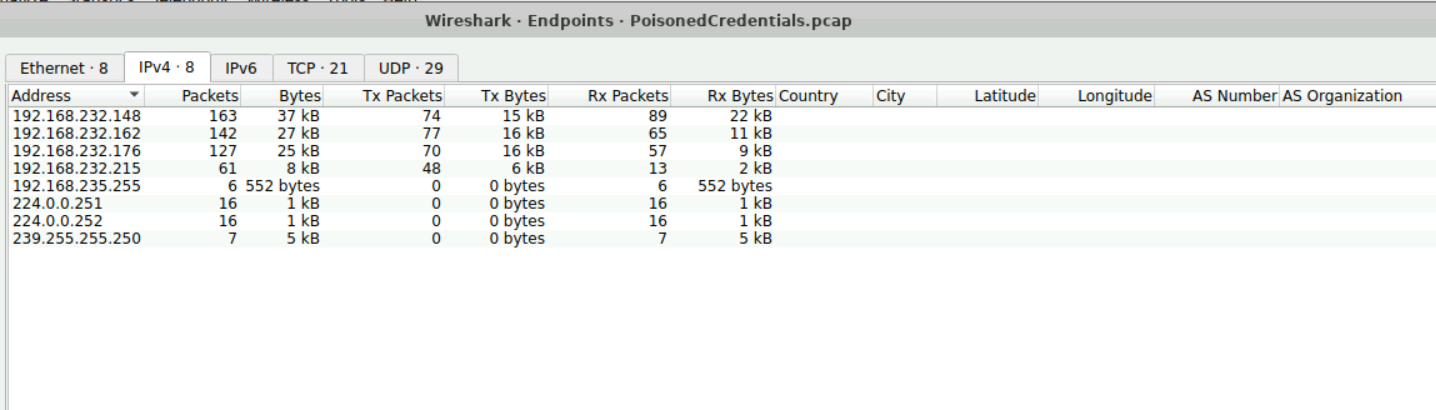
| Rogue Machine IP | 192.168.232.215 | Attacker running Responder/Inveigh |
| Rogue Hostname | KALI | Confirmed Kali Linux attack platform |
| First Victim IP | 192.168.232.162 | Initiated broadcast for fileshaare |
| Second Victim IP | 192.168.232.176 | Targeted by SMB relay attack |
| Mistyped Query (V1) | fileshaare | Typo that triggered the poisoning |
| Compromised Username | janesmith | NetNTLMv2 hash captured via SMB |
| Relay Target Hostname | ACCOUNTINGPC | Machine accessed via credential relay |
| Protocol Exploited | LLMNR (UDP 5355) / NBT-NS (UDP 137) | Unauthenticated broadcast protocols |
MITRE ATT&CK Mapping Overview
| Tactic | Technique | ID |
|---|---|---|
| Credential Access | LLMNR/NBT-NS Poisoning | T1557.001 |
| Credential Access | NTLM Hash Capture | T1557 |
| Lateral Movement | SMB Relay Attack | T1550.002 |
| Collection | Man-in-the-Middle | T1557 |
2. Phase 1: Understanding the Attack Vector
Objective: Establish the technical foundation for why LLMNR/NBT-NS poisoning is possible.
Before analyzing specific packets, it is critical to understand the underlying Windows name resolution fallback mechanism that makes this attack possible.
When a Windows machine attempts to connect to a hostname (e.g., \\fileshaare), the operating system follows this resolution order:
- DNS → Server returns NXDOMAIN (hostname not found — because it’s a typo)
- LLMNR (UDP 5355) → Multicast broadcast: “Does anyone on the local network know where
fileshaareis?” - NBT-NS (UDP 137) → Broadcast: “Does anyone know
fileshaare?”
Because these broadcast protocols have no built-in authentication, any machine on the subnet can respond. An attacker running Responder or Inveigh listens quietly for these queries and immediately sends a spoofed reply: “I am fileshaare. Connect to me.” The victim machine trusts this reply, connects to the attacker, and automatically attempts to authenticate — sending the user’s NetNTLMv2 hash.
3. Phase 2: Identifying the Mistyped Query (Question 1)
Objective: Determine the exact hostname that the victim machine broadcast — the typo that triggered the attack.
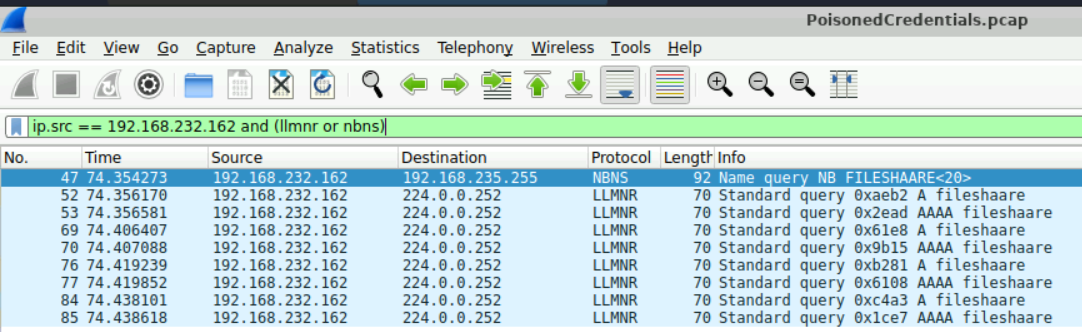
Wireshark Filter Used: ip.src == 192.168.232.162 and (llmnr or nbns)
Filtering for broadcast traffic originating from the first victim machine (192.168.232.162) isolates the specific LLMNR query. Inspecting the Info column reveals the hostname being requested.
Analyst Note: The attacker does not need to target anyone specifically. Tools like Responder are purely reactive — they simply listen and respond to every failed name resolution query they observe on the subnet. A single typo from any user is all it takes to expose their credentials.
Answer Q1
What was the mistyped query made by the machine at 192.168.232.162?
fileshaare
4. Phase 3: Identifying the Rogue Machine (Questions 2 & 3)
Objective: Identify the attacker’s IP address and the hostname of their rogue machine.
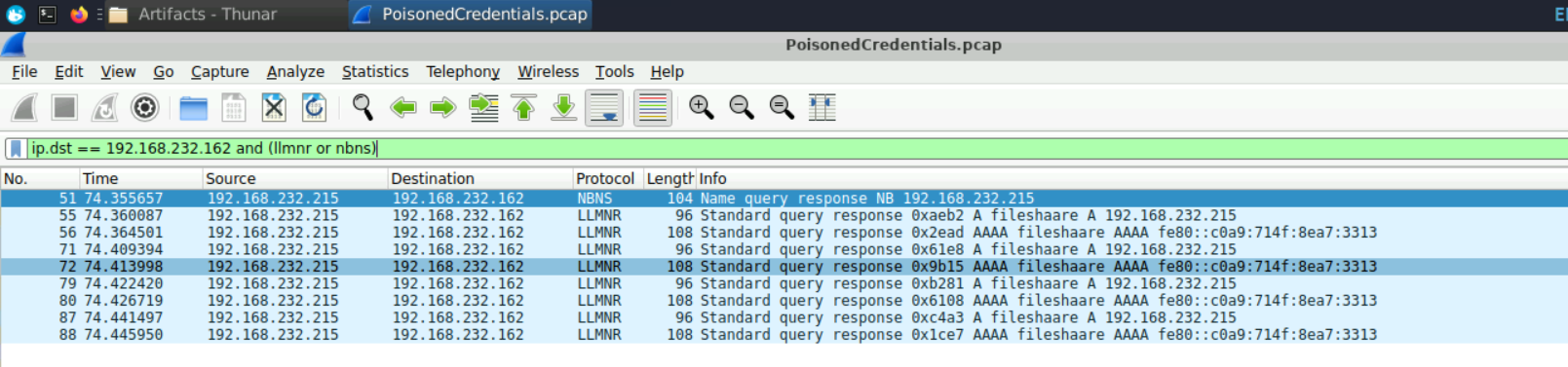
Wireshark Filter Used: ip.dst == 192.168.232.162 and (llmnr or nbns)
By flipping the filter to show traffic destined for the victim, the attacker’s spoofed response is immediately visible — falsely claiming that fileshaare resolves to their own IP.
To identify the attacker’s NetBIOS hostname, we examine the NBT-NS packets from the rogue machine. The registered hostname is present in the packet data:
The hostname KALI confirms the attacker is operating from a default Kali Linux distribution — a notable operational security failure that makes attribution straightforward.
Answer Q2
What is the IP address of the rogue machine?
192.168.232.215
Answer Q3
What is the hostname of the rogue machine?
KALI
5. Phase 4: Credential Theft — Captured Usernames (Questions 4 & 5)
Objective: Identify the usernames of the accounts whose credentials were captured.
Wireshark Filter Used: ntlmssp
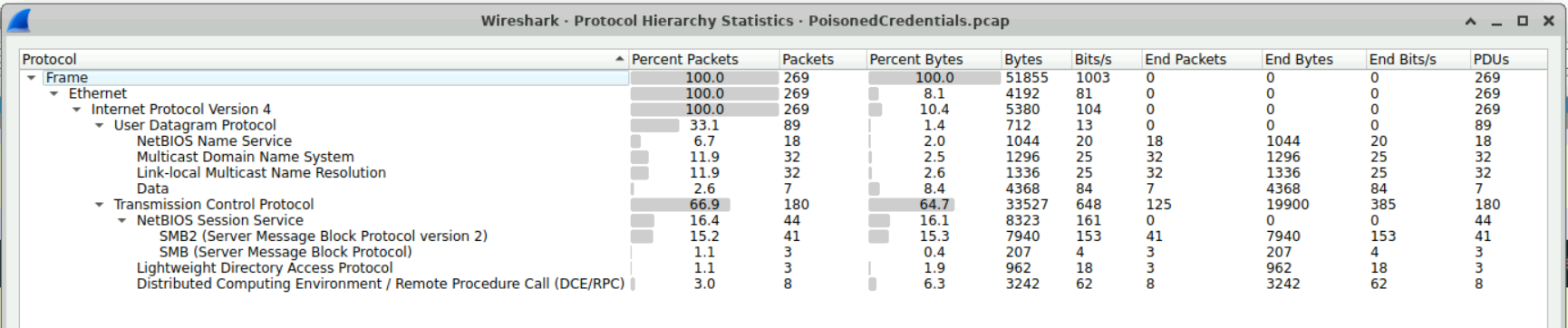
After the victim machine accepts the spoofed response, it automatically initiates an SMB authentication attempt to the attacker’s IP. Wireshark’s built-in NTLMSSP protocol dissector automatically parses the NTLM handshake, extracting the username directly from the NTLMSSP_AUTH packet.
Answer Q4
What is the username of the first compromised account?
janesmith
Answer Q5
What is the username of the second compromised account?
janed
6. Phase 5: Scoping the Impact — Second Victim (Question 6)
Objective: Identify all machines that received poisoned responses to determine the full scope of the incident.
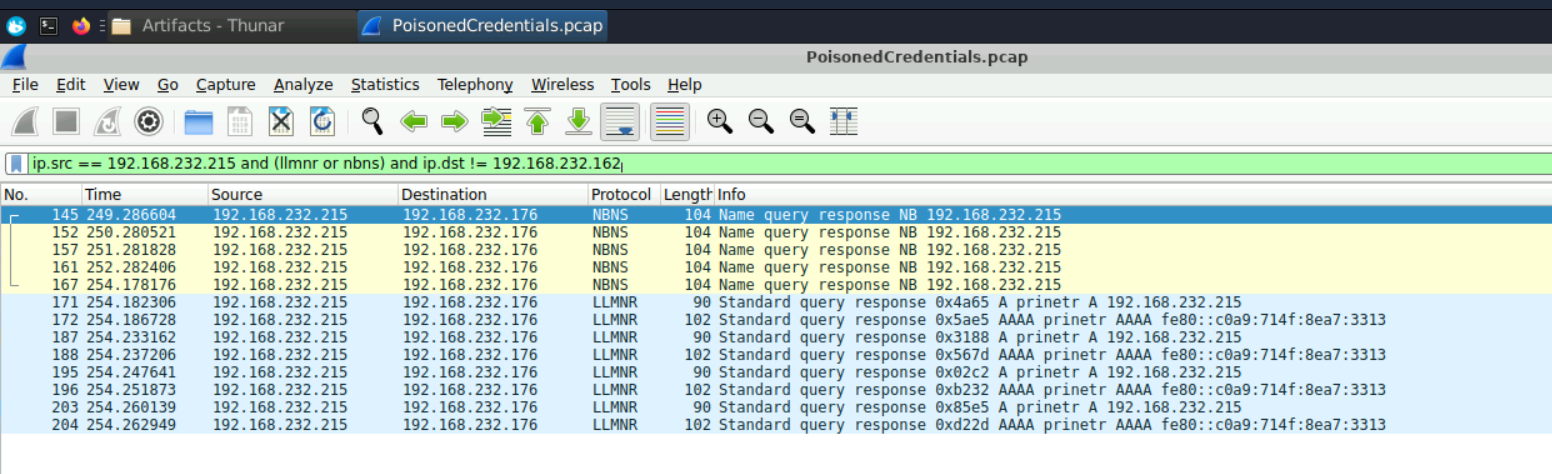
Wireshark Filter Used: ip.src == 192.168.232.215 and (llmnr or nbns) and ip.dst != 192.168.232.162
By filtering for all poisoning responses from the rogue machine that were NOT sent to the already-identified first victim, a second target IP is revealed:
Answer Q6
What is the IP of the second machine that received poisoned responses?
192.168.232.176
7. Phase 6: SMB Relay — Lateral Movement Without Cracking (Questions 7 & 8)
Objective: Confirm the SMB relay attack and identify the target machine accessed via relayed credentials.
This is the most dangerous aspect of this attack. The attacker is not just capturing hashes to crack offline — they are relaying the credentials in real-time to a third machine. The flow is:
- Victim A (Jane) authenticates to the Attacker
- Attacker simultaneously initiates an SMB session with Victim B (
192.168.232.176) - Victim B sends a cryptographic challenge back to the Attacker
- Attacker forwards that exact challenge to Victim A
- Victim A signs the challenge with their password hash and sends it back
- Attacker forwards Jane’s valid response to Victim B → Access granted
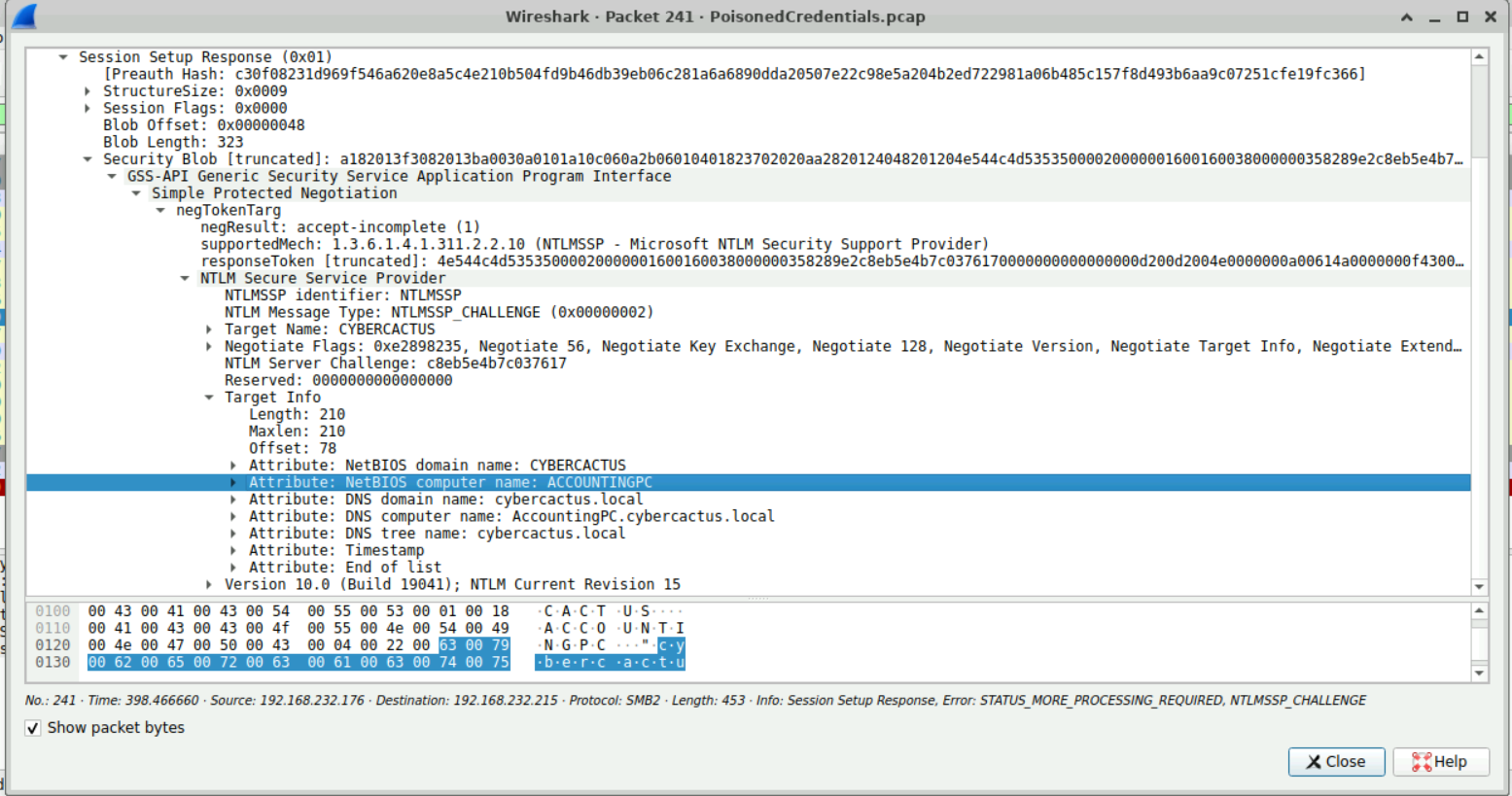
To identify the relay target’s hostname, we examine the NTLMSSP_CHALLENGE packet from the second victim — it contains the target machine’s NetBIOS name in the Target Info block.

Analyst Note: SMB Relay is more dangerous than offline hash cracking because it grants immediate access — no time spent on dictionary attacks or GPU cracking rigs. The only effective technical control against SMB Relay is enabling SMB Signing on all domain systems. This cryptographically binds the SMB session to the original authenticating client, making relayed credentials cryptographically invalid.
Answer Q7
What is the hostname of the machine accessed via SMB relay?
ACCOUNTINGPC
Answer Q8
What shared folder did the attacker access on the relay target?
accounts
8. Remediation & Mitigation Recommendations
To prevent future incidents of this nature, the following actions must be taken:
Disable LLMNR and NBT-NS
These legacy protocols have no place in a modern network environment. Disable them via Group Policy:
- LLMNR:
Computer Configuration > Administrative Templates > Network > DNS Client > Turn off Multicast Name Resolution = Enabled - NBT-NS: Modify NIC properties → WINS tab →
Disable NetBIOS over TCP/IP
Enable SMB Signing Domain-Wide
This is the single most effective control against SMB Relay attacks. Enforce via GPO:
Computer Configuration > Windows Settings > Security Settings > Local Policies > Security Options > Microsoft network server: Digitally sign communications (always) = Enabled
Network Monitoring
- Alert on any single IP responding to LLMNR/NBT-NS queries for multiple different hostnames — this is the behavioral fingerprint of Responder.
- Monitor for
NTLMSSP_AUTHpackets where the source IP differs from the IP that sent the challenge (relay indicator).
9. Reconstructed Incident Timeline
Based on the packet capture analysis, we can reconstruct the precise sequence of events from the initial typo to full credential relay:
| Step | Kill Chain Phase | Actor | Action | Evidence (Wireshark Filter) |
|---|---|---|---|---|
| 1 | Trigger | Victim (192.168.232.162) | User mistypes fileshaare in the Run dialog or Explorer address bar | LLMNR query: ip.src == 192.168.232.162 and llmnr |
| 2 | Reconnaissance | DNS Server | DNS returns NXDOMAIN — hostname does not exist | DNS negative response |
| 3 | Delivery | Victim (192.168.232.162) | Windows falls back to LLMNR/NBT-NS — broadcasts “Who is fileshaare?” to subnet | LLMNR multicast (UDP 5355) / NBT-NS broadcast (UDP 137) |
| 4 | Exploitation | Attacker (KALI / 192.168.232.215) | Responder sends spoofed reply: “I am fileshaare, connect to me” | ip.dst == 192.168.232.162 and llmnr |
| 5 | Credential Access | Victim (192.168.232.162) | Victim machine automatically authenticates to attacker — sends janesmith NetNTLMv2 hash | ntlmssp — NTLMSSP_AUTH packet with username field |
| 6 | Lateral Movement | Attacker (192.168.232.215) | Attacker simultaneously initiates SMB session with ACCOUNTINGPC (192.168.232.176) | SMB2 Session Setup → 192.168.232.176 |
| 7 | Lateral Movement | ACCOUNTINGPC (192.168.232.176) | Sends NTLM challenge back to attacker | NTLMSSP_CHALLENGE with Target Name: ACCOUNTINGPC |
| 8 | Lateral Movement | Attacker relays challenge → Victim | Forwards the challenge to victim, victim signs it with janesmith credentials | SMB relay chain visible in overlapping NTLMSSP exchanges |
| 9 | Actions on Objectives | Attacker → ACCOUNTINGPC | Attacker accesses \\ACCOUNTINGPC\accounts shared folder with relayed credentials | SMB2 Tree Connect Request: \\ACCOUNTINGPC\accounts |
| 10 | Credential Access | Attacker (192.168.232.215) | Second victim’s hash (janed) captured via same poisoning technique | Additional NTLMSSP_AUTH from second victim IP |
Key Observation: Steps 1–9 happen in milliseconds — far faster than any human could detect or respond. The entire chain from a single typo to accessing the
accountsshare onACCOUNTINGPCis fully automated by Responder. This is why technical controls (disable LLMNR, enable SMB Signing) are the only reliable defense — no amount of user training can prevent a typo-triggered attack that completes before the user even notices an error.
10. Conclusion
The PoisonedCredentials investigation reveals how a single user typo can cascade into a domain-wide credential compromise. Key findings:
- Attack Vector: LLMNR/NBT-NS broadcast exploitation using Responder on Kali Linux (
192.168.232.215). - Initial Trigger:
fileshaaretypo from192.168.232.162triggered the poisoning. - Credential Theft:
janesmithandjanedhad their NetNTLMv2 hashes captured. - SMB Relay:
ACCOUNTINGPCwas accessed in real-time without cracking any hashes. - Scope: Two victim machines confirmed; the
accountsshared folder was accessed.
Key Takeaways for the SOC:
- LLMNR/NBT-NS poisoning is entirely silent — no malware deployed, no exploits used. Detection requires active network traffic monitoring, not endpoint-only security.
- SMB Relay = instant lateral movement without needing to know any passwords. Disable legacy protocols and enable SMB Signing before assuming your network is safe.
- Wireshark’s NTLMSSP dissector is invaluable — it automatically parses NTLM handshakes and reveals usernames, domains, and workstations, turning raw packet data into actionable intelligence.
- One typo = one compromised session. User education is not a sufficient control for this attack — technical controls (disable LLMNR, enable SMB Signing) are the only reliable defense.
Analysis Date: April 17, 2026 Analyst: El OMARI Zakaria