Malware Analysis Report: Ramnit — Tracking a Malicious ChromeSetup Downloader
Platform: CyberDefenders
Challenge: Ramnit
Category: Malware Analysis
Difficulty: Easy
Tools: Static Analysis Tools, OSINT, Threat Intelligence Platforms
Achievement: Proof of Completion
1. Executive Summary
Incident Type: Malware Delivery / Trojan Downloader
Malware Family: Ramnit
During routine endpoint monitoring, suspicious network activity and unusual process execution were detected on a user’s workstation. Investigation revealed that the user had downloaded a disguised executable named ChromeSetup.exe. Instead of a legitimate Google Chrome installer, this file proved to be a delivery mechanism for the Ramnit malware. The malware established command and control (C2) communication with a server located in Hong Kong, utilizing specific domains for continued instruction polling and potential data exfiltration.
Indicators of Compromise (IOCs)
| Type | Indicator | Description |
|---|---|---|
| Malicious Process | ChromeSetup.exe | Masqueraded process name for Ramnit. |
| File Path | C:\Users\alex\Downloads\ChromeSetup.exe | Initial execution path on the victim machine. |
| Attacker IP | 58.64.204.181 | C2 server IP address (Hong Kong). |
| C2 Domain | dnsnb8[.]net | Domain used by Ramnit for command polling. |
| Malware Hash (SHA-1) | 280c9d36039f9432433893dee6126d72b9112ad2 | Hash of the malicious ChromeSetup.exe. |
MITRE ATT&CK Mapping Overview
| Tactic | Technique | ID |
|---|---|---|
| Initial Access | User Execution: Malicious File | T1204.002 |
| Defense Evasion | Masquerading | T1036 |
| Command & Control | Application Layer Protocol | T1071 |
| Command & Control | Dynamic Resolution | T1568 |
2. Phase 1: Endpoint Triage & Execution Tracking (Questions 1 & 2)
Objective: Identify the malicious process and determine its origin on the local filesystem.
The initial alert stemmed from anomalous activity originating from what appeared to be a standard browser installer. Attackers frequently name malicious payloads after popular, trusted software (like Chrome, Zoom, or Adobe Reader) to trick users into executing them voluntarily.
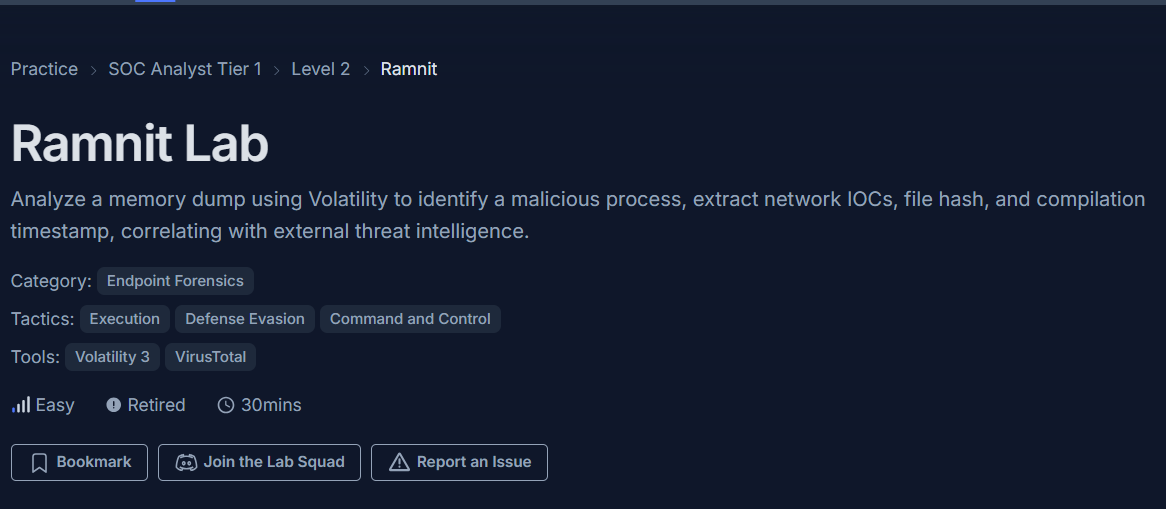
Further inspection of the process details revealed its execution path. The executable was launched from the user’s Downloads directory, strongly indicating a drive-by download or phishing vector where the user was socially engineered into downloading the file.

Why this matters: Malicious files executing from the
DownloadsorTempfolders under a user’s profile (%USERPROFILE%) are classic indicators of initial access. Legitimate system-level software like browsers typically run fromProgram Filesafter the initial installation phase.
Answer Q1
What is the name of the process responsible for the suspicious activity?
ChromeSetup.exe
Answer Q2
What is the exact path of the executable for the malicious process?
C:\Users\alex\Downloads\ChromeSetup.exe
3. Phase 2: Static Analysis & Malware Fingerprinting (Questions 5 & 6)
Objective: Extract the file hash and compilation timestamp to build a threat profile and search for existing intelligence.
To properly identify the malware and check if it is a known threat, we must extract its cryptographic hash. Generating the SHA-1 hash of the executable allows analysts to query Threat Intelligence platforms like VirusTotal or internal MISP instances.
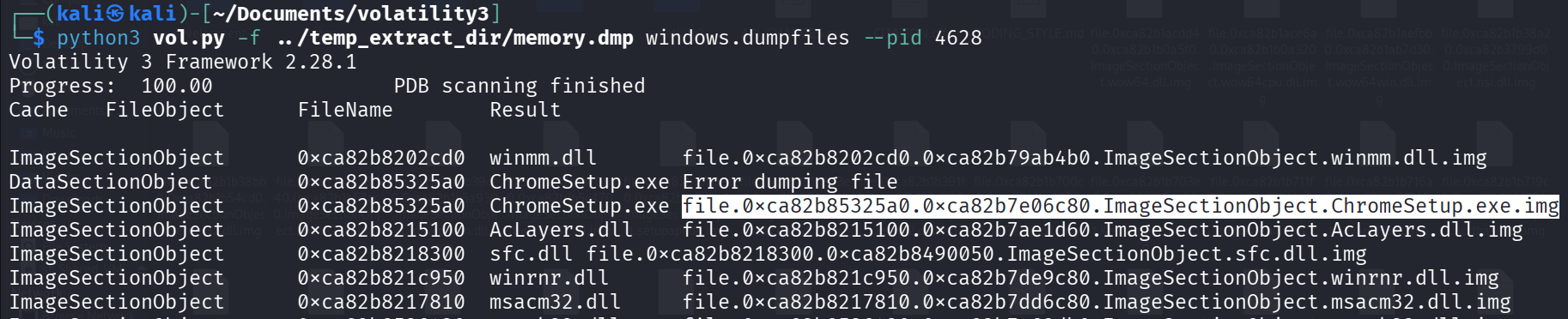
Additionally, static analysis of the Portable Executable (PE) headers reveals the compilation timestamp. This timestamp indicates when the malware author compiled the code. While attackers can forge this (timestomping), when legitimate, it helps correlate the malware with specific campaigns or threat actor activity periods.
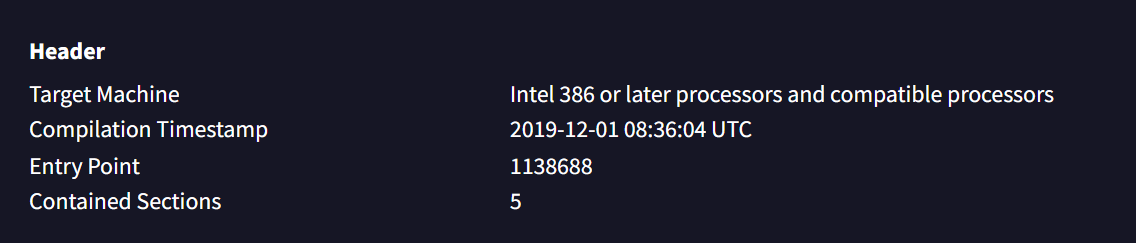
Why this matters: The compilation timestamp
2019-12-01 08:36tells us this is an older malware sample or variant. Correlating this timestamp with the infection date can indicate whether the attacker is using fresh, custom-compiled malware or repurposing older, well-known commodity malware like Ramnit.
Answer Q5
Hashes serve as unique identifiers for files, assisting in the detection of similar threats across different machines. What is the SHA1 hash of the malware executable?
280c9d36039f9432433893dee6126d72b9112ad2
Answer Q6
Examining the malware’s development timeline can provide insights into its deployment. What is the compilation timestamp for the malware?
2019-12-01 08:36
4. Phase 3: Network Behavior & C2 Infrastructure (Questions 3, 4, & 7)
Objective: Analyze the malware’s network communications to identify its Command and Control (C2) servers.
Malware rarely operates in isolation; it needs to “phone home” to receive instructions or exfiltrate data. Dynamic analysis and network monitoring revealed the ChromeSetup.exe process initiating an outbound connection to an external IP address.

Using OSINT IP geolocation tools, this IP address was traced to Hong Kong. Geolocation, while not definitively attributing the attack to a specific nation-state (as attackers use proxies and compromised infrastructure globally), is useful for identifying anomalous traffic patterns—especially if the victim organization has no business operations in that region.

Further network analysis revealed the specific domain the malware was resolving to communicate with its C2 server: dnsnb8.net. Extracting the C2 domain is critical for incident response, as IP addresses can change rapidly (Fast Flux), but domains provide a more durable indicator to block at the DNS level (e.g., Pi-hole, corporate DNS sinkholes).
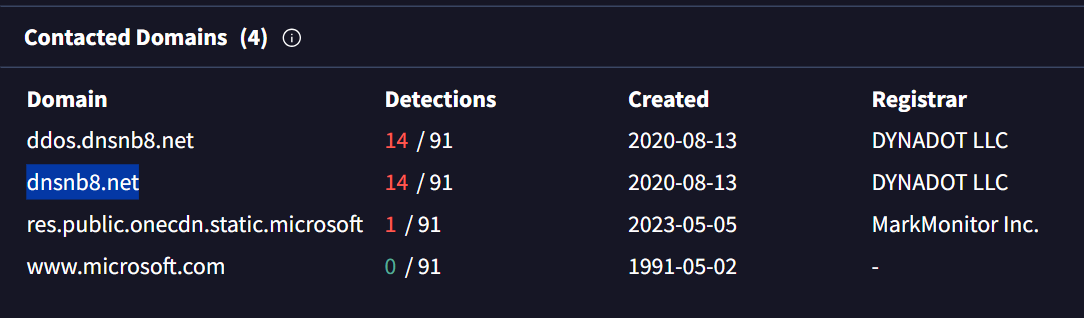
Analyst Note: Finding the C2 domain
dnsnb8.netallows the SOC to perform a retroactive hunt across the entire network. Searching DNS logs for any other internal hosts querying this domain will quickly identify if the infection has spread or if other users fell for the same phishing lure.
Answer Q3
Identifying network connections is crucial for understanding the malware’s communication strategy. What IP address did the malware attempt to connect to?
58.64.204.181
Answer Q4
To determine the specific geographical origin of the attack, Which city is associated with the IP address the malware communicated with?
Hong Kong
Answer Q7
Identifying the domains associated with this malware is crucial for blocking future malicious communications and detecting any ongoing interactions with those domains within our network. Can you provide the domain connected to the malware?
dnsnb8.net
5. Reconstructed Incident Timeline
Based on the file properties, static analysis, and network behavior, we can reconstruct the infection flow:
| Step | Kill Chain Phase | Action | Evidence Source |
|---|---|---|---|
| 1 | Weaponization | Ramnit payload compiled by attacker | PE Header Timestamp: 2019-12-01 08:36 |
| 2 | Delivery | User alex downloads malicious file disguised as browser installer | Path: C:\Users\alex\Downloads\ChromeSetup.exe |
| 3 | Execution | User manually executes ChromeSetup.exe, triggering the Ramnit infection | Process execution logs |
| 4 | C2 | Malware queries dnsnb8.net to resolve attacker infrastructure | DNS traffic |
| 5 | C2 | Malware establishes connection with C2 server at 58.64.204.181 (Hong Kong) | Network connection logs |
Key Observation: The attack relies heavily on user interaction and masquerading (
ChromeSetup.exe). The gap between the compilation time (2019) and active deployment suggests the attacker is using an off-the-shelf or older builder of the Ramnit malware, relying on social engineering rather than zero-day exploits to gain initial access.
6. Conclusion
The Ramnit investigation highlights a classic malware delivery mechanism utilizing social engineering and masquerading. Key findings:
- Initial Access: A user (
alex) was tricked into downloading and executing a malicious file disguised as a Google Chrome installer (ChromeSetup.exe). - Identification: The SHA-1 hash
280c9d36039f9432433893dee6126d72b9112ad2and a compilation timestamp of Dec 2019 confirm this as a Ramnit variant. - C2 Infrastructure: The malware communicated with
dnsnb8[.]netresolving to a Hong Kong-based IP (58.64.204.181).
Key Takeaways for the SOC:
- DNS Sinkholing: Immediately add
dnsnb8[.]netto the corporate DNS blocklist/sinkhole. - Network Blocking: Block all outbound traffic to
58.64.204.181at the perimeter firewall. - Retroactive Hunting: Query EDR and DNS logs for any other hosts executing
ChromeSetup.exefrom aDownloadsdirectory, or querying the identified C2 domain. - User Awareness: Remind users that legitimate software updates should only be downloaded from official vendor websites, or deployed via central IT management systems, never from random pop-ups.
Analysis Date: June 15, 2026 Analyst: El OMARI Zakaria