Incident Response Report: PsExec Hunt — Lateral Movement via SMB & PsExec in a Corporate Network
Platform: CyberDefenders
Challenge: PsExec Hunt
Category: Network Forensics
Difficulty: Easy
Tools: Wireshark
Achievement: Proof of Completion
1. Executive Summary
Incident Type: Lateral Movement / Credential Abuse / Remote Service Execution
Attack Tool: PsExec (Sysinternals)
An alert from the Intrusion Detection System (IDS) flagged suspicious lateral movement activity indicative of PsExec usage. PsExec is a legitimate Sysinternals administration tool heavily abused by threat actors and red teams alike to execute processes on remote systems using compromised credentials — requiring no malware deployment, no exploitation, and no C2 infrastructure.
The objective of this investigation is to analyze the provided network packet capture (PCAP) to reconstruct the attacker’s full attack chain: identifying the compromised machine and account, mapping each lateral movement pivot, documenting the network shares abused, and cataloguing the service executable deployed on target systems.
Indicators of Compromise (IOCs)
| Type | Indicator | Description |
|---|---|---|
| Attacker Machine IP | 10.0.0.130 | Initial foothold — highest packet count in the capture |
| Attacker Hostname | HR-PC | NetBIOS name of the compromised workstation |
| Compromised Account | ssales | Username used for SMB authentication |
| First Pivot Target IP | 10.0.0.133 | First machine the attacker moved to laterally |
| First Pivot Hostname | SALES-PC | NTLMSSP Target Name from Session Setup Response |
| Second Pivot Target IP | 10.0.0.131 | Second machine targeted for lateral movement |
| Second Pivot Hostname | MARKETING-PC | NTLMSSP Target Name from Session Setup Response |
| Service Executable | PSEXESVC.exe | Default PsExec payload dropped via SMB |
| Upload Share | ADMIN$ | Hidden administrative share (C:\Windows) used for payload delivery |
| C2 Channel Share | IPC$ | Inter-Process Communication share used for named pipe control |
MITRE ATT&CK Mapping Overview
| Tactic | Technique | ID |
|---|---|---|
| Lateral Movement | Remote Services — SMB/Windows Admin Shares | T1021.002 |
| Execution | System Services — Service Execution (PsExec) | T1569.002 |
| Credential Access | Valid Accounts — Domain Accounts | T1078.002 |
| Lateral Movement | Use Alternate Authentication Material — Pass the Hash | T1550.002 |
| Discovery | Remote System Discovery | T1018 |
2. Phase 1: Network Triage — Identifying the Attacker’s Foothold (Question 1)
Objective: Identify the IP address of the machine from which the attacker initially gained access.
To identify the source of the attack, the first step is to get a high-level overview of the network communications. In Wireshark, navigating to Statistics → Endpoints → IPv4 reveals the top talkers in the network — machines generating the most traffic.
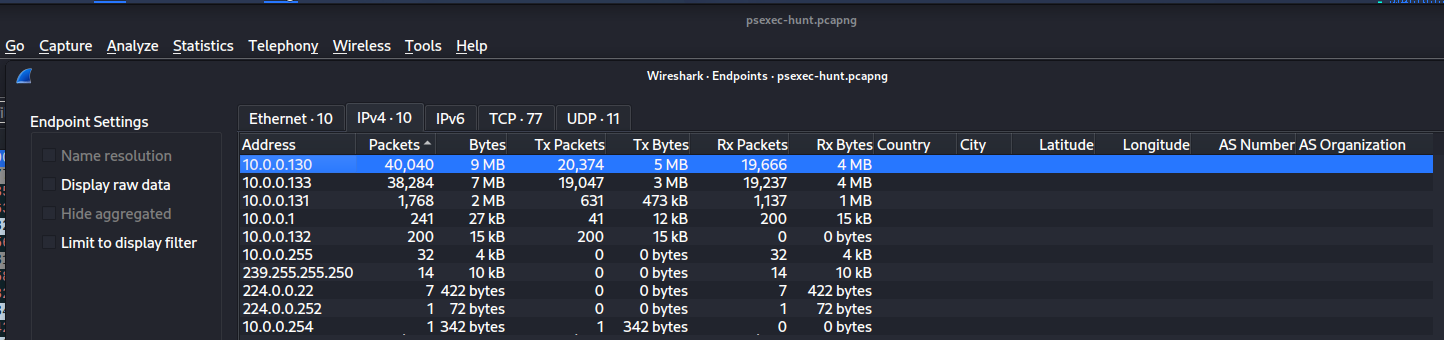
The IP address 10.0.0.130 dominates the capture with 20,374 transmitted packets. Furthermore, when reviewing the raw smb2 traffic, 10.0.0.130 is consistently the source IP initiating Session Setup Requests and Tree Connect Requests to multiple other machines — the behavioral fingerprint of an attacker performing systematic lateral movement.
Answer Q1
What is the IP address of the machine used for initial access?
10.0.0.130
3. Phase 2: First Pivot — Mapping the Lateral Movement (Question 2)
Objective: Determine the hostname of the first machine the attacker pivoted to.
To map the lateral movement chain, we must analyze SMB authentication traffic. When a machine attempts to authenticate to another via SMB, it uses the NTLM Security Support Provider (NTLMSSP) protocol embedded within the SMB2 Session Setup exchange.
By filtering for SMB2 Session Setup traffic (smb2.cmd == 1), we can inspect the Session Setup Response sent back from the target machine (10.0.0.133) to the attacker. Expanding the SMB2 → Security Blob → NTLM Secure Service Provider section reveals the Target Name field — the hostname of the machine being authenticated against.
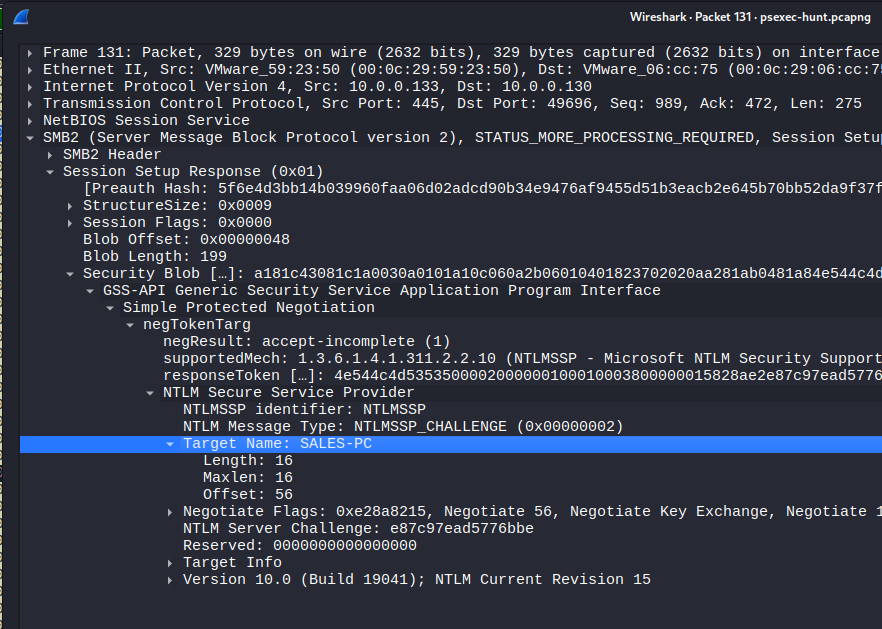
The PCAP confirms the first pivot target’s hostname is SALES-PC (10.0.0.133).
Answer Q2
What is the hostname of the first machine the attacker pivoted to?
SALES-PC
4. Phase 3: Compromised Credentials (Question 3)
Objective: Identify the username the attacker used for authentication.
PsExec requires valid administrative credentials to function — it cannot exploit vulnerabilities or bypass authentication. To determine whose identity the attacker compromised, we inspect the initial SMB2 Session Setup Request originating from the attacker’s machine (10.0.0.130).
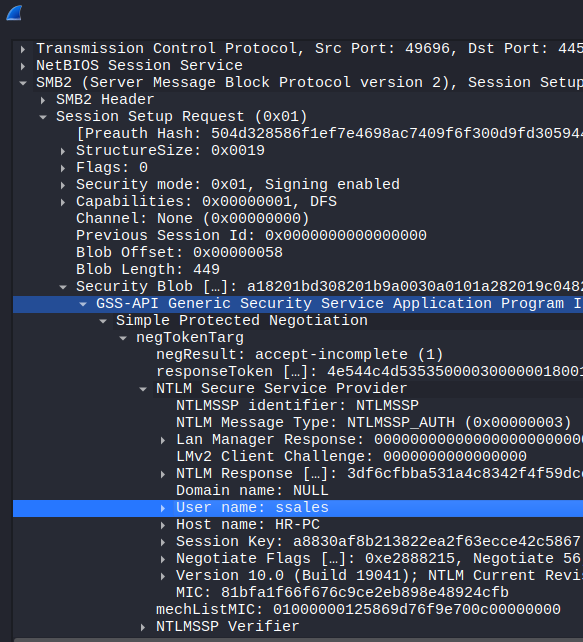
Within the NTLMSSP authentication blob of the request, the User name field is transmitted in plain text: ssales. The packet also reveals the attacker’s origin workstation hostname — HR-PC — providing the complete picture: the attacker compromised the ssales account from the HR department workstation.
Analyst Note: The username
ssaleslikely belongs to an employee in the Sales department, while the attack originates fromHR-PC. This cross-departmental credential usage is a strong indicator of compromise — a Sales account should not normally authenticate from an HR workstation. Correlating user-to-workstation mappings is a highly effective lateral movement detection strategy.
Answer Q3
What username did the attacker use for authentication?
ssales
5. Phase 4: PsExec Service Deployment (Questions 4, 5 & 6)
Objective: Identify the service executable deployed, the network share used for upload, and the share used for command-and-control communication.
Service Executable (Q4)
When PsExec is executed against a remote target, it performs three actions in sequence:
- Connects to the target via SMB using valid credentials
- Uploads a service executable to the target’s file system
- Installs and starts the service via the Service Control Manager (SCM) over named pipes
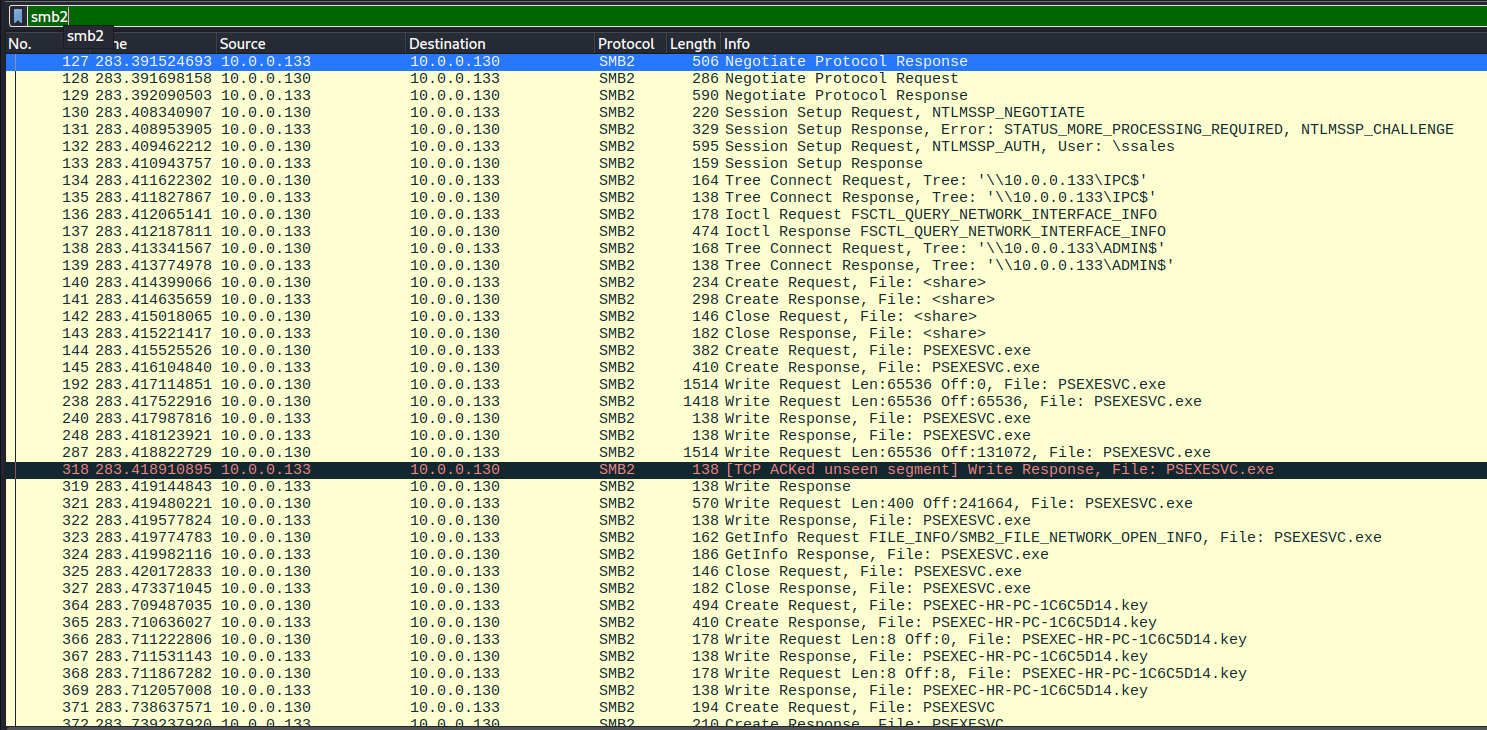
By examining the SMB2 traffic flow, we observe the attacker (10.0.0.130) sending an SMB2 Create Request File followed by Write Requests to the target (10.0.0.133). The File field clearly shows the payload name: PSEXESVC.exe — the default, un-obfuscated service executable used by the standard PsExec tool.
Upload Share — ADMIN$ (Q5)
Before the PSEXESVC.exe file can be written to the target, the attacker must connect to a network share with write permissions. PsExec targets the hidden administrative share ADMIN$ by default, which maps directly to the C:\Windows directory on the remote system.
Referencing the same packet capture segment, packet No. 138 shows an SMB2 Tree Connect Request with the Tree field set to \\10.0.0.133\ADMIN$. This is the exact conduit used to upload the service executable into the target’s Windows directory.
Communication Share — IPC$ (Q6)
Dropping the executable is only half the operation. The attacker must then start the remote service and establish a command-line interface. This is accomplished via Distributed Computing Environment / Remote Procedure Calls (DCE/RPC) over Named Pipes.
To utilize named pipes, the attacker must connect to the Inter-Process Communication share. Packet No. 134 in the same capture segment shows an SMB2 Tree Connect Request to \\10.0.0.133\IPC$. This share acts as the command-and-control channel between the attacker and the deployed PSEXESVC.exe service — carrying stdin, stdout, and stderr streams for the remote shell.
Analyst Note: The use of un-renamed
PSEXESVC.exeand default shares (ADMIN$,IPC$) indicates the attacker made no effort to obfuscate their PsExec usage. Sophisticated adversaries often rename the service binary (using-rflag) and may even modify the PsExec source to evade signature-based detection. The default behavior seen here suggests either a low-sophistication actor or an intentional speed-over-stealth approach.
Answer Q4
What is the name of the service executable deployed on the target?
PSEXESVC.exe
Answer Q5
Which network share was used to upload the service?
ADMIN$
Answer Q6
Which network share did PsExec use for communication?
IPC$
6. Phase 5: Continued Lateral Movement — Second Pivot (Question 7)
Objective: Identify the hostname of the second machine the attacker targeted.
After successfully compromising SALES-PC, the attacker continued their systematic lateral movement through the corporate network. By filtering the PCAP for new SMB authentication attempts directed at IP addresses other than 10.0.0.133, we identify additional Session Setup traffic flowing toward 10.0.0.131.
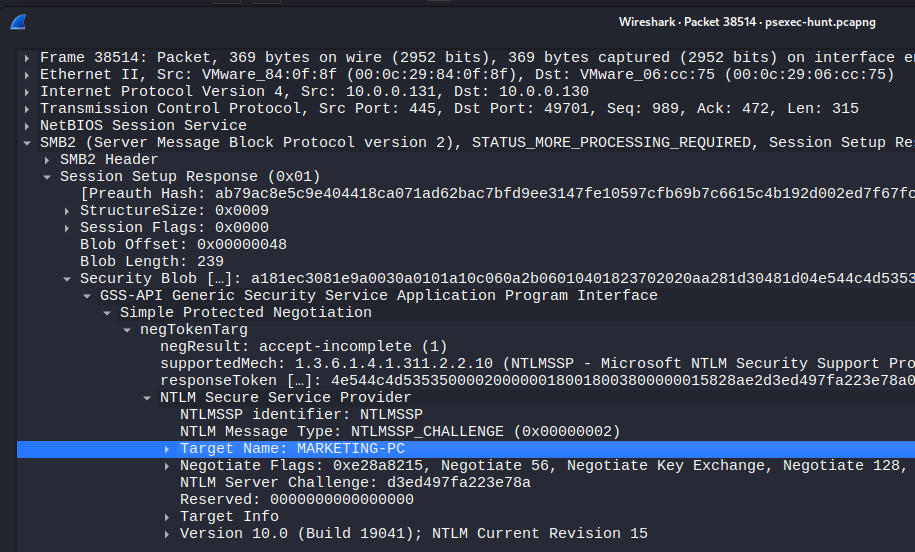
Inspecting the SMB2 Session Setup Response from this new target IP reveals the NTLMSSP Target Name: MARKETING-PC. The attacker performed the identical PsExec deployment sequence — ADMIN$ tree connect, PSEXESVC.exe upload, IPC$ pipe communication — indicating a systematic crawl through the corporate network.
Answer Q7
What is the hostname of the second machine targeted for lateral movement?
MARKETING-PC
7. Attack Chain Reconstruction
The complete lateral movement chain can be visualized as:
1
2
3
4
5
HR-PC (10.0.0.130) ──[ssales creds]──► SALES-PC (10.0.0.133) ──[ssales creds]──► MARKETING-PC (10.0.0.131)
     │                                        │                                          │
     │  Compromised Account: ssales            │  ADMIN$ → PSEXESVC.exe                   │  ADMIN$ → PSEXESVC.exe
     │  Origin Workstation                     │  IPC$ → Named Pipe C2                    │  IPC$ → Named Pipe C2
     └─────────────────────────────────────────┴──────────────────────────────────────────┘
Reconstructed Incident Timeline
Based on the packet capture sequence, we can reconstruct the precise order of operations the attacker followed:
| Step | Kill Chain Phase | Source → Target | Action | Evidence (Wireshark) |
|---|---|---|---|---|
| 1 | Credential Theft | (Pre-capture) | Attacker compromises the ssales account credentials | Credentials already in-hand when capture begins |
| 2 | Reconnaissance | HR-PC → Network | Attacker identifies live hosts on 10.0.0.0/24 subnet | 10.0.0.130 is the top talker with 20,374 packets |
| 3 | Lateral Movement | HR-PC → SALES-PC | SMB2 Session Setup Request with ssales credentials via NTLMSSP | Session Setup Request → 10.0.0.133 |
| 4 | Execution | HR-PC → SALES-PC | Tree Connect to \\SALES-PC\ADMIN$ — maps to C:\Windows | Tree Connect Request (pkt ~138) |
| 5 | Execution | HR-PC → SALES-PC | PSEXESVC.exe uploaded via SMB Write Request | Create Request File + Write Request |
| 6 | C2 Channel | HR-PC → SALES-PC | Tree Connect to \\SALES-PC\IPC$ — named pipe communication | Tree Connect Request (pkt ~134) |
| 7 | Execution | SALES-PC | PsExec service installed and started via SCM over named pipe | DCE/RPC over IPC$ |
| 8 | Lateral Movement | HR-PC → MARKETING-PC | Identical SMB2 Session Setup with ssales credentials | Session Setup Request → 10.0.0.131 |
| 9 | Execution | HR-PC → MARKETING-PC | PSEXESVC.exe deployed via ADMIN$, C2 via IPC$ | Identical deployment pattern |
Key Observation: The attacker used the same credential (
ssales) and the same deployment pattern (ADMIN$ + IPC$ + PSEXESVC.exe) for both pivots. This cookie-cutter approach is the behavioral fingerprint of PsExec — the tool automates this exact sequence every time it is executed. Detecting one instance means you have the detection signature for all instances.
8. Conclusion
The PsExec Hunt investigation confirms a classic, textbook lateral movement attack using legitimate system administration tools. The network forensics reconstructed the complete attack chain with no ambiguity. Key findings:
- Initial Foothold:
HR-PC(10.0.0.130) — the top talker in the capture with 20,374 packets, initiating all SMB authentication attempts. - Compromised Account:
ssales— credentials used cross-departmentally from an HR workstation, a clear anomaly. - First Pivot:
SALES-PC(10.0.0.133) —PSEXESVC.exedeployed viaADMIN$, command channel viaIPC$. - Second Pivot:
MARKETING-PC(10.0.0.131) — identical deployment pattern, systematic network crawl. - No Obfuscation: Default PsExec binary name, default shares, default NTLMSSP authentication — no attempt to evade detection.
Key Takeaways for the SOC:
- PsExec is Living-off-the-Land. It is a legitimate, signed Microsoft tool — EDR solutions must detect its behavior (SMB + service installation + named pipe communication), not just its binary hash. Monitor for
PSEXESVC.execreation events inC:\Windows\on any endpoint. - SMB Session Setup + Tree Connect to
ADMIN$= immediate investigation trigger. In most corporate environments, workstation-to-workstation SMB authentication via administrative shares is not normal user behavior. Alert on it. - NTLMSSP exposes everything in cleartext — usernames, workstation names, domain names. Even encrypted SMB3 traffic exposes the NTLMSSP handshake, making Wireshark an effective detection tool for lateral movement regardless of encryption.
- Cross-departmental credential usage is a high-fidelity detection signal. The
ssalesaccount authenticating fromHR-PCis an anomaly that should trigger User and Entity Behavior Analytics (UEBA) alerts in any mature security program.
Analysis Date: June 13, 2026 Analyst: El OMARI Zakaria